.svg)
.svg)
.svg)




The Ultimate Notebook Screen Repair Checklist: 2026 Expert Guide
You are right in the middle of a critical project when a sudden flicker or a jagged hairline crack appears across your display. That sinking feeling is rarely just about the hardware. It is the immediate worry about losing your personal data and the confusion over whether you need a professional notebook screen repair or a total replacement. We know how disruptive a broken screen can be to your daily life, and we are here to help you move from frustration to a state of total resolution.
It is perfectly normal to feel overwhelmed by technical terms like LCD versus digitizer or to worry about the rising costs of OLED and foldable tech. This 2026 guide provides a clear path through the diagnostic process so you can stop guessing and start fixing. You will learn how to identify your specific screen issues, evaluate the latest repair trends under new Right to Repair laws, and prepare your device for a professional restoration. We will also explain the benefits of specialized in-house depot service and how it ensures your data stays safe while your laptop returns to peak performance.
Key Takeaways
- Learn how to perform a quick external monitor test to pinpoint whether your screen or your graphics card is the true source of the problem.
- Demystify technical terms like LCD, LED, and digitizers so you can communicate clearly with technicians and understand exactly what needs fixing.
- Apply the “Rule of 50” to determine if a professional notebook screen repair is a smart investment based on your device’s age and value.
- Follow our essential preparation checklist to secure your personal data and protect your privacy before you hand your laptop over for restoration.
- Discover why in-house depot repairs provide superior quality control and faster turnaround times compared to standard on-site or DIY attempts.
Identifying Notebook Screen Damage: A Diagnostic Checklist
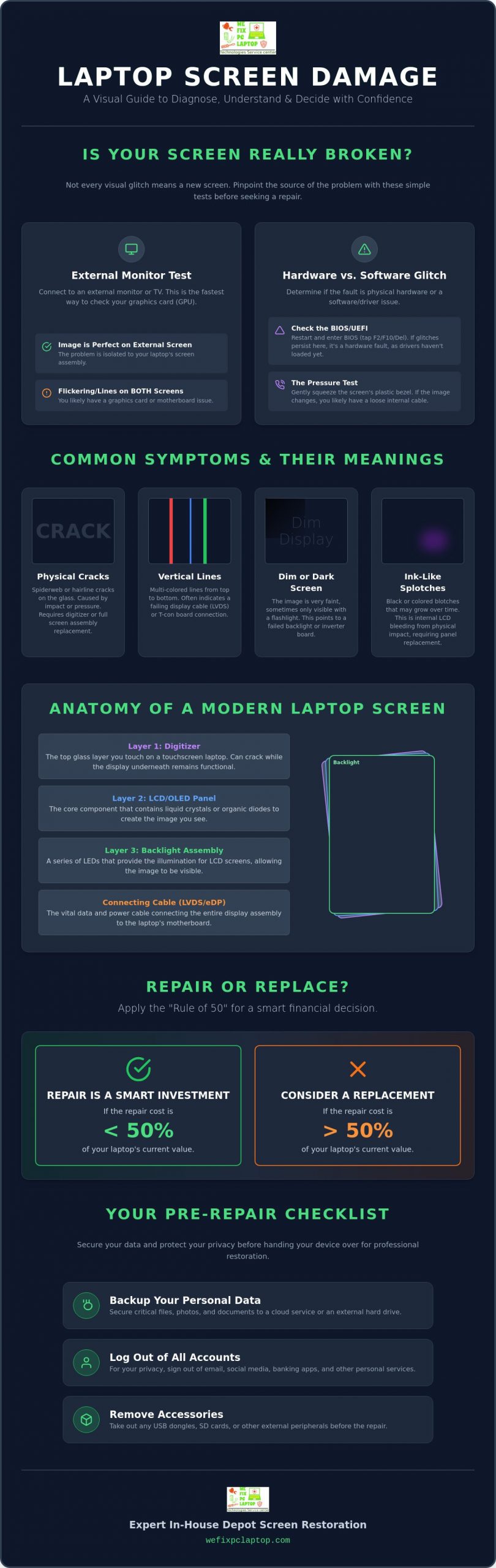
A laptop screen failure can feel like a total digital blackout. Before you panic, take a deep breath. Not every visual glitch requires a full replacement, but identifying the root cause is the first step toward a successful notebook screen repair. Start with a methodical external inspection. Use a bright light to scan the surface for impact points or those tell-tale spiderweb cracks. Even if the glass feels smooth to the touch, internal fractures can disrupt the display technology beneath the surface, leading to distorted images or total blackouts.
Next, perform the external monitor test. Connect your laptop to a TV or another monitor using an HDMI or USB-C cable. If the image on the external screen looks perfect, your graphics card is healthy, and the problem is isolated to the laptop display. However, if the flickering or lines appear on both screens, you are likely facing a GPU or motherboard issue rather than a physical screen break. This simple test helps you avoid paying for a screen you don’t actually need.
Check for dim screen syndrome by shining a flashlight directly against the glass at an angle. If you can see a faint image of your desktop, your backlight or inverter board has failed, even if the LCD panel itself is intact. Finally, look for artifacts. Vertical multi-colored lines usually point to a failure in the LVDS cable or the T-con board, while static or stuck pixels suggest the panel itself is reaching the end of its life. Identifying these details helps us provide a faster, more accurate solution when you bring your device in for restoration.
Hardware Failure vs. Software Glitch
Identifying the difference between a broken part and a buggy driver saves you time and stress. Restart your laptop and enter the BIOS or UEFI screen by tapping F2, F10, or Delete during startup. If the screen still flickers in the BIOS, the damage is hardware-related because Windows drivers haven’t even loaded yet. You can also try the Pressure Test. Gently squeeze the plastic bezel around the edges of the screen. If the image clears up or changes drastically, you likely have a loose internal cable that needs professional reseating rather than a full panel replacement.
Common Visual Symptoms and Their Meanings
Ink-like splotches that grow over time are a sign of internal LCD bleeding. This happens when the liquid crystals leak between layers after a physical impact. This is a permanent physical failure that requires a professional notebook screen repair to resolve. If you notice dim or dark corners, your LED backlight is likely failing. Unlike older models, modern LED backlights are often integrated into the panel itself. A dark corner usually signals that the light-emitting diodes are burnt out, which means it is time for a high-quality display restoration.
Understanding Display Technology: LCD, LED, and Touchscreen Digitizers
Understanding what sits behind that thin bezel is the key to managing your expectations during a notebook screen repair. Most people think of a laptop screen as a single component, but it’s actually a complex sandwich of layers. At the very back is the backlight layer, which provides the illumination. In front of that is the LCD (Liquid Crystal Display) panel, which creates the image. While manufacturers often market “LED” screens, these are almost always LCD panels that use Light Emitting Diodes for backlighting instead of the older, bulkier fluorescent tubes. The difference is in the light source, not the way the image is created.
If your laptop has a touchscreen, there’s an additional layer called the digitizer. This is the glass you actually touch. It’s quite common for a user to crack the top glass while the underlying LCD remains perfectly functional. However, in many modern, ultra-thin designs, these layers are fused together. This means even a small crack in the glass requires a full assembly replacement. Connecting this entire assembly to your motherboard is the LVDS or EDP cable. Think of this as the umbilical cord of your display. If this cable becomes frayed or pinched in the laptop hinge, you might see flickering or lines that look like a broken screen, even when the panel is healthy.
High-Performance Screens: Gaming and Professional Displays
Repairing high-end machines requires a specialized touch. Gaming laptops often feature refresh rates of 144Hz or higher to ensure smooth motion. Using a standard 60Hz replacement panel would significantly degrade your gaming experience. Similarly, creative professionals rely on specific color gamuts like sRGB or Adobe RGB for accurate photo and video editing. We see this level of precision most often in mac air repairs and other Retina displays, where the pixel density and color calibration are vital to the machine’s identity. Replacing these requires parts that meet exact factory specifications.
Matte vs. Glossy: Does the Finish Matter During Replacement?
When you choose a replacement screen, you often have a choice between a matte or glossy finish. Glossy screens offer vibrant colors and deep blacks, but they act like a mirror in bright rooms. Matte screens use an anti-glare coating to diffuse light, making them much easier to use outdoors or under office lights. You can often switch between the two during a notebook screen repair, provided the technical specifications match. If you’re tired of seeing your own reflection, switching to a matte finish is a great way to customize your device. If you aren’t sure which panel fits your workflow, our team at wefixpclaptop.com can help you weigh the trade-offs.
The Notebook Screen Repair Cost-Benefit Analysis
Deciding whether to invest in a notebook screen repair often comes down to a simple financial formula. We call this the “Rule of 50.” If the quote for your repair exceeds 50% of the current market value of your laptop, it might be time to consider a new purchase. However, for most premium machines, a professional fix is almost always the smarter choice. Consider the age of your device. In 2026, a high-end laptop from 2023 or 2024 still has years of productive life left. If you are holding onto a 2020 model, you must weigh the repair cost against the likelihood of other components like the battery or SSD failing soon. For inexpensive Chromebooks, the repair cost can sometimes exceed the device’s value, but for gaming rigs and MacBooks, restoration is usually the most cost-effective path. If you own a Dell machine specifically, our detailed breakdown of Dell laptop screen replacement cost can help you apply this rule with precise 2026 pricing figures.
The temptation to buy a cheap replacement panel from a third-party auction site is strong. But these budget parts often lack proper shielding or have incorrect pin configurations. A single mismatched connector can cause an immediate motherboard short, turning a simple screen swap into a total hardware catastrophe. Professional services provide a safety net through warranties on both parts and labor. This ensures your investment is protected long after you leave the shop. When you choose an expert repair, you aren’t just paying for a part; you’re paying for the peace of mind that your motherboard remains safe and your warranty stays intact.
DIY vs. Professional Repair: The Risk Checklist
Taking a screwdriver to your laptop carries hidden dangers that many YouTube tutorials gloss over. Static electricity is the silent killer of notebook motherboards; even a tiny discharge from your fingertips can fry sensitive circuits during a DIY fix. Modern laptops also require specialized tools like ultra-thin spudgers, heat guns for adhesive removal, and precision drivers. If your device has a glued-in battery or complex internal display routing, the risk of accidental damage increases exponentially. One wrong tug on a ribbon cable can result in a repair bill that is double the original estimate. For a thorough comparison of your options across all major brands, our comprehensive laptop screen repair guide for 2026 walks you through professional solutions and cost considerations in detail.
Impact on Resale and Longevity
Professional repair preserves the resale value of high-end MacBooks and gaming rigs. Buyers in the secondary market look for OEM (Original Equipment Manufacturer) parts rather than generic third-party panels that may have poor color accuracy or dim backlighting. Choosing a professional in-house depot computer repair is the gold standard for hardware restoration. This model ensures that your laptop is fixed in a controlled environment with access to genuine components and advanced diagnostic tools. It’s the most reliable way to extend your device’s lifespan and ensure it continues to serve you well into the future.
Professional Preparation Checklist: Before You Send Your Laptop for Repair
Handing over your laptop for a notebook screen repair can feel like handing over a piece of your private life. While our technicians are focused strictly on the hardware restoration, your digital well-being is our top priority. Start your preparation with a full data backup. Whether you prefer a cloud-based solution or a physical external hard drive, ensure your photos, work documents, and personal files are stored safely elsewhere. While we take every precaution to protect your device, hardware repairs involve opening the chassis. Having a fresh backup provides the ultimate peace of mind during the process.
Privacy protection is the next critical step on your checklist. Log out of your primary web browsers and sensitive applications like banking portals or work-from-home software. You should also remove all physical accessories before drop-off. Keep your power adapter, USB dongles, and SD cards at home unless our team specifically requests them for specialized testing. Finally, take a few clear photos of your laptop from different angles. Documenting the physical condition of your device before it enters the shop ensures that both you and the technician are on the same page regarding its state.
Securing Your Personal Information
You don’t always need to share your login password for a display fix. If your laptop still boots and you can see the image, create a “Guest” account with no password. This allows our technicians to verify the new display’s brightness levels, color accuracy, and touch functionality without ever accessing your private folders. Regarding encryption like BitLocker or FileVault, you generally don’t need to disable it for a screen replacement. However, keeping your recovery key handy is a smart move. For added security, wipe your browser cache and saved passwords to ensure your credentials stay private.
Providing the Right Information to Your Technician
Clear communication speeds up the restoration process and helps us source the exact parts you need. Locate your Model Number and Serial Number (S/N), which are usually found on a small sticker on the bottom of the case or within the BIOS settings. Be ready to provide a brief “Incident Report.” Tell us if the failure occurred after a drop, a liquid spill, or if it was a spontaneous hardware failure. Mentioning secondary issues, such as a loose hinge or a battery that won’t hold a charge, allows us to address all your needs at once. If you’re ready to restore your device to peak condition, you can book your notebook screen repair through our secure portal today.
Expert In-House Depot Screen Restoration: The We Fix PC Laptop Advantage
Once you have completed your pre-repair checklist, the next step is choosing a partner who values your device as much as you do. Our in-house depot model is designed to offer a level of quality control that simply isn’t possible with on-site fixes or “quick-fix” kiosks. By performing every notebook screen repair in a controlled, professional environment, we ensure your laptop is protected from dust, static, and environmental hazards. This specialized setting allows our technicians to use advanced diagnostic equipment to calibrate your new display for perfect color and brightness. It is the difference between a simple part swap and a total hardware restoration.
We understand that in 2026, being without your computer for even a few hours is a major disruption. That is why we offer a same-day service promise for many common screen models. Our goal is to minimize your digital downtime and get you back to work or play as quickly as possible. Whether you are dealing with a shattered MacBook Retina display or a high-refresh-rate gaming panel, our team has the specific expertise required to handle these sensitive components. We treat every restoration with a deep commitment to data integrity, ensuring your personal files remain exactly where you left them throughout the entire process.
Nationwide Reliability for Every Brand
Our expertise extends across the entire spectrum of modern hardware. We provide expert support for Dell, HP, Lenovo, and ASUS, as well as specialized high-performance gaming brands. Sometimes a screen issue is just the tip of the iceberg. If our diagnostics reveal complex logic board faults or damaged hinges, we can address those issues simultaneously. This comprehensive approach is why professional clients in law, healthcare, and retail rely on our 24/7 emergency support. We don’t just swap parts; we provide a foundation of trust for your digital well-being.
Your Next Steps to a Clear View
Getting your device back to peak performance is a seamless process. You can start by visiting our website to get a fast, reliable estimate for your notebook screen repair. Once you have your quote, simply follow our secure instructions to get your device to our expert technicians. We will take it from there, providing regular updates until your laptop is ready for return. Don’t let a broken display hold you back any longer. Trust the experts at We Fix PC Laptop to restore your screen today!
Restore Your Digital Vision with Confidence
A cracked display doesn’t have to mean the end of your laptop’s story. By following our diagnostic checklist and performing an external monitor test, you’ve already taken the first step toward a successful resolution. You now understand the “Rule of 50” for evaluating costs and know how to secure your private data before handing over your machine. These essential preparations ensure that your notebook screen repair is a smooth, stress-free experience that preserves both your hardware and your peace of mind.
When you’re ready for professional restoration, our team is standing by to help. We provide specialized MacBook and Gaming PC expertise within our professional in-house depot repair facility. We prioritize your schedule with fast and reliable same-day services to get you back online without delay. Get Your Notebook Screen Repaired by Experts: Contact We Fix PC Laptop Now! We are here to guide you from a state of technical failure back to total resolution with the personal touch you deserve. Your clear view is just one click away.
Frequently Asked Questions
How much does a typical notebook screen repair cost in 2026?
A typical notebook screen repair in 2026 generally costs between $150 and $300 for standard models. Budget-friendly repairs for minor issues often range from $100 to $200, while high-end OLED or premium displays can exceed $500. These figures usually include both parts and labor. Specialized gaming rigs or MacBook repairs often sit at the higher end of the spectrum due to the advanced display technology and calibration required for those machines. Dell owners looking for a more granular breakdown can consult our guide on Dell laptop screen replacement cost in 2026 for model-specific pricing details.
Can I still use my laptop if the screen is cracked but still works?
You can technically use a laptop with a cracked screen if the display is still visible, but it’s a risky choice. Small cracks can quickly spread due to the pressure of opening and closing the lid, eventually leading to a total blackout. Additionally, glass shards can damage the delicate internal layers or even cause injury to your fingers if your device has a touchscreen digitizer. It’s best to address the issue early to avoid more expensive internal damage.
How long does a professional notebook screen replacement usually take?
A professional notebook screen replacement usually takes between 24 and 48 hours, though our depot offers same-day service for many common models. The exact timeline depends on whether the specific panel is currently in stock. If a specialized high-resolution or gaming display needs to be ordered, the process might take a few extra days. We always prioritize minimizing your digital downtime and will give you a clear window once we identify your specific model.
Will replacing my laptop screen delete any of my data?
Replacing a laptop screen won’t delete your data because the repair is strictly hardware-focused and doesn’t involve the storage drive. Our technicians focus on the display assembly and internal cables, ensuring your photos, documents, and personal settings remain exactly as you left them. However, we always advise creating a full backup before any service as a standard safety precaution. Your digital well-being is our top priority throughout the entire restoration process.
Is it possible to upgrade my screen to a higher resolution during repair?
Upgrading to a higher resolution is sometimes possible, but it depends heavily on your laptop’s motherboard and video cable compatibility. Most laptops are designed to support a specific resolution and pin configuration. If the internal video cable doesn’t support the increased bandwidth of a 4K or high-refresh-rate panel, the upgrade won’t work. We can verify your specific model’s compatibility during the initial diagnostic phase to see if an upgrade is a viable option for you.
What is the difference between a digitizer and an LCD panel?
The digitizer is the top layer of glass that senses your touch, while the LCD panel is the underlying component that displays the image. In many modern notebooks, these two parts are fused into a single assembly. If your screen is cracked but the image looks perfect, you’ve likely broken only the digitizer. If you see ink-like splotches or vertical lines, the LCD panel has suffered internal damage. Both issues typically require a professional notebook screen repair to resolve.
Does a cracked screen fall under a standard manufacturer warranty?
A cracked screen is almost never covered by a standard manufacturer warranty because it’s usually classified as accidental damage. Most basic warranties only cover factory defects, such as a failing backlight or spontaneous pixel death. However, if you purchased a premium accidental damage protection plan, the cost might be covered. You should check your specific policy details or look into the “Right to Repair” laws that took effect in states like Colorado and Connecticut in 2026.
Why should I choose depot repair over a local mobile technician?
Choosing an in-house depot repair ensures a much higher level of quality control than a mobile technician can provide in a home or office. Our facility is a static-free, controlled environment equipped with specialized tools and a wide inventory of genuine parts. This setup allows us to handle complex logic board issues and delicate display calibrations that require a professional workspace. It’s the most reliable way to ensure a successful, long-term restoration of your high-end display.
- Laptop Repair Near Me: How to Know When Your Laptop Needs Professional Repair
- How to Fix an Overheating Laptop: A Complete Repair Guide
- How to Fix a Water Damaged Laptop: Expert Tips
- Can a Broken Laptop Screen Be Repaired? Everything You Need to Know Before Replacing Your Device
- How to Find the Best Notebook Repair Shop: The 2026 Expert Guide
- Cloud Disaster Recovery: 2026 Small Business Guide
- Laptop Screen Repair vs. Buying a New Laptop: Which Saves You More Money in 2026?