.svg)
.svg)
.svg)




The 2026 Dental IT Support Checklist: Is Your Practice Secure and Compliant?
A single-dentist practice loses approximately $600 for every hour the network stays down, but the real cost of outdated technology is the nagging stress of wondering if your patient data is truly safe. You’ve likely felt that spike of adrenaline when Eaglesoft freezes during a busy afternoon or worried if your current backups would actually hold up against a modern ransomware attack. Finding reliable it support for dental offices shouldn’t feel like a constant game of damage control while you’re trying to focus on clinical excellence.
We understand that your priority is the patient in the chair, not troubleshooting a server or worrying about the 2026 HIPAA Security Rule overhaul. This article provides a comprehensive checklist to help you audit your IT infrastructure, verify your encryption, and eliminate the hardware failures that disrupt your production. You’ll learn exactly how to transition from a state of technical frustration to a state of total resolution. We’ll walk through the essential steps to ensure your operatory laptops are fast, your backups are verified, and your practice remains fully compliant in this new regulatory landscape.
Key Takeaways
- Learn why specialized support is vital for managing dental-specific databases like Dentrix and Eaglesoft without risking clinical downtime.
- Discover how to audit your practice against 2026 HIPAA requirements using enterprise-grade tools like SentinelOne and multi-factor encryption.
- Identify how to protect and repair critical operatory hardware, including fast screen replacements and MacBook logic board restoration.
- Establish a redundant network and backup strategy to ensure your office stays productive even during a technical crisis.
- Determine the specific qualities to look for in it support for dental offices to guarantee immediate, expert resolution for any technical failure.
Why Generic IT Support Fails the Modern Dental Office
Many practitioners treat IT like a utility, similar to electricity or water. It’s just there until it isn’t. However, specialized it support for dental offices is a distinct branch of managed services designed to protect clinical uptime and the absolute integrity of your patient data. It’s not just about fixing a broken mouse; it’s about ensuring your practice remains a functional, compliant healthcare facility.
Your local residential “computer guy” might be great at removing a virus from a home laptop, but he likely doesn’t understand the delicate architecture of a Dentrix database or the specific driver requirements for a CBCT imaging system. When these systems fail, a generic tech often spends hours “learning on your dime,” while your production sits at a standstill. This is the “Generic IT” trap. It’s a reactive approach that leaves you vulnerable to specialized software crashes that a generalist simply isn’t trained to handle.
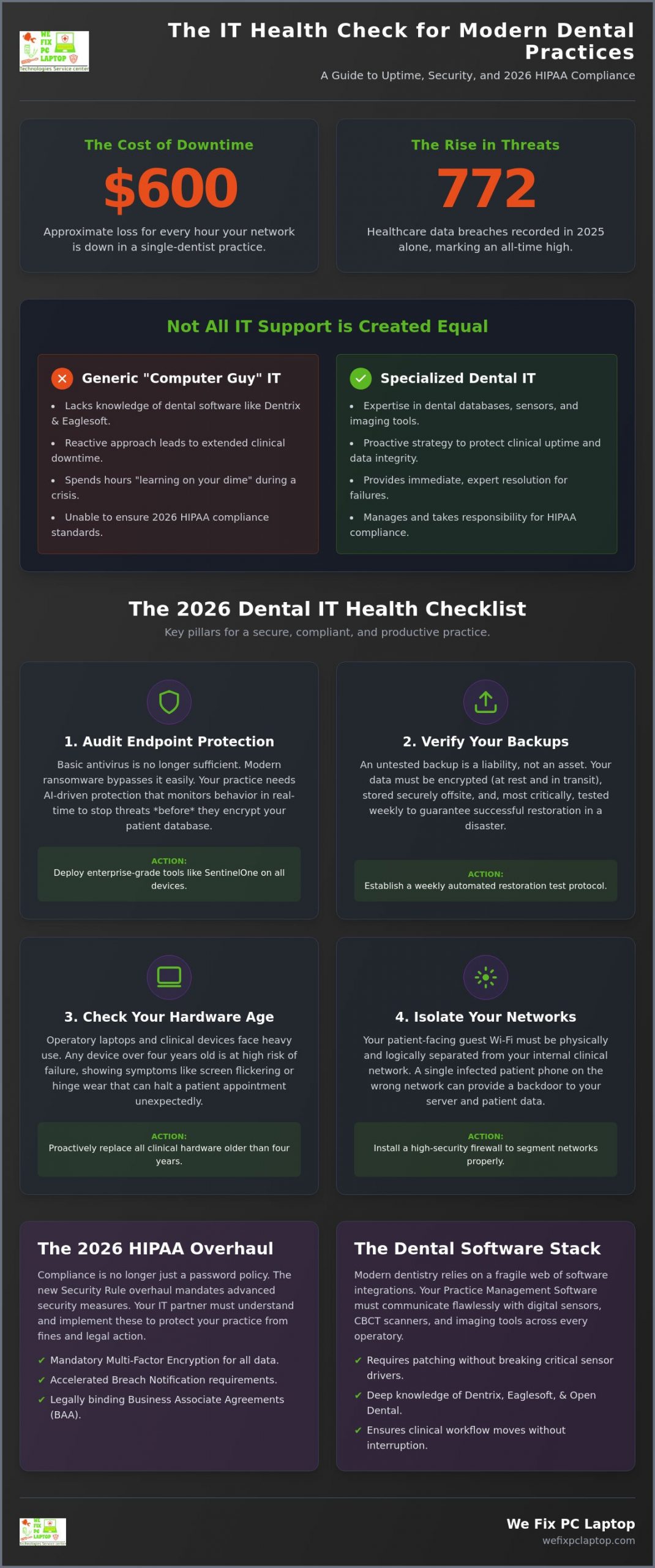
The stakes in 2026 have never been higher. In 2025, the HHS Office for Civil Rights recorded 772 healthcare data breaches, the highest number ever for a single year. Ransomware groups now specifically target small-to-medium clinics because they often lack enterprise-grade protection. A single-dentist practice is estimated to lose approximately $600 per hour during IT downtime. A 15-minute network glitch can quickly cascade into a full day of lost production and a permanent loss of patient trust. The same operational downtime crisis affects other industries as well; the principles behind IT support for manufacturing companies — where every minute of network silence translates to thousands in lost revenue — mirror the urgent uptime demands facing modern dental practices.
The Dental Software Stack Challenge
Modern dentistry relies on a complex web of integrations. Whether you use Dentrix, Eaglesoft, or Open Dental, your software must communicate perfectly with digital sensors and high-resolution imaging tools across multiple operatories. These connections are fragile. Ensuring these systems remain stable requires managed it support services that understand how to patch software without breaking the sensor drivers that your hygienists rely on every hour. We focus on the tiny details that keep your clinical flow moving without interruption.
HIPAA and 2026 Compliance Standards
HIPAA compliance is no longer about just having a password. With the 2026 Security Rule overhaul, requirements now include mandatory multi-factor encryption and accelerated breach notifications. Understanding Electronic Health Record (EHR) basics is just the starting point; you need an IT partner who signs a Business Associate Agreement (BAA) and takes legal responsibility for your data safety. Looking into specialized it support for healthcare providers is the only way to ensure your practice meets these rigorous new standards. We act as your knowledgeable guide, protecting your digital well-being so you can focus on your patients.
The 2026 Dental IT Health Checklist
Moving from technical frustration to total resolution starts with a clear picture of where your practice stands today. Specialized it support for dental offices isn’t a luxury; it’s the framework that keeps your operatories running during peak clinical hours. Use this checklist to identify the gaps in your infrastructure before they turn into emergency calls or compliance fines.
- Audit your endpoints: Basic antivirus is no longer enough to stop modern threats. You should be using AI-driven protection like SentinelOne that monitors behavior in real time to stop ransomware before it encrypts your Dentrix or Eaglesoft database.
- Verify your backups: Ensure your data is encrypted both at rest and in transit. Your backups must be stored offsite and, most importantly, tested for restoration every single week to guarantee the data is actually there when you need it.
- Check your hardware: Operatory laptops lead a hard life. If your devices are over four years old or showing signs of screen flickering and hinge wear, they are a liability. Proactive replacement is always cheaper than an emergency repair during a patient appointment.
- Network Security: Your guest Wi-Fi must be physically and logically separated from your clinical network. A high-security firewall is essential to prevent a patient’s infected phone from reaching your server.
If you aren’t sure where your network stands, our onsite support services can provide a professional audit to clear the fog and give you peace of mind.
Cybersecurity Essentials for Patient Data
Protecting patient privacy requires more than just a login screen. We recommend implementing Atakama for file-level encryption, which ensures that even if a bad actor gains access to your network, your files remain unreadable without multi-factor authorization. Modern cybersecurity solutions focus on preventing data exfiltration rather than just blocking viruses. In a dental setting, “Zero Trust” architecture means the network never assumes a user or device is safe, requiring strict verification for every single access request to patient records.
Backup and Disaster Recovery Audit
We follow the “3-2-1” backup rule for dental imaging: keep three copies of your data, on two different media types, with one copy stored securely offsite. You need a mix of cloud and local storage to ensure a robust ransomware recovery plan is always ready. The most critical metric is your “Time to Restore.” If your server died right now, how many hours would your practice stay dark before you could see patients again? Reliable it support for dental offices aims to keep that number as close to zero as possible.
Hardware Maintenance: Operatory Laptops and Clinical Devices
The dental operatory is a hostile environment for sensitive electronics. Unlike a standard accounting office, a clinical room is filled with fine aerosols, gypsum dust, and constant moisture from sterilization protocols. These microscopic particles settle into cooling fans and ports, leading to thermal throttling and eventual component failure. When you invest in it support for dental offices, you aren’t just paying for software patches. You’re securing the physical lifeline of your practice. Constant movement of articulating arms and laptop lids puts immense strain on hinges and internal ribbon cables, which is why screen flickers often precede a total blackout during a patient procedure.
Whether your practice runs on high-performance PCs or uses MacBooks for aesthetic consultations and diagnostic imaging, logic board failures can bring your production to a halt. While many IT providers suggest buying a new machine at the first sign of a hardware glitch, we believe in restoration. Specialized logic board repair for high-end machines can save your practice thousands in replacement costs. To ensure you never have to turn a patient away, we recommend a “Hot Swap” strategy. By keeping computer rental for business units on standby, you can slide a pre-configured machine into place the moment a failure occurs. This keeps your clinical flow moving while your primary device is being restored.
We’ve found that professional in-house depot computer repair is the gold standard for these complex fixes. Unlike onsite “quick fixes” that are limited by the tools a tech can carry in a bag, our depot repair center allows for deep diagnostics and precision soldering that simply isn’t possible in a busy dental office. It’s the difference between a temporary patch and a total resolution that extends the life of your expensive clinical hardware.
Common Hardware Failure Points in Dentistry
Laptop screen replacements are the most frequent request we handle for check-in kiosks and operatory stations. Constant physical adjustments eventually wear down the delicate connections. We also specialize in logic board and CPU repair for imaging workstations that handle massive 3D rendering files. These machines generate significant heat, and without proper it support for dental offices, their internal components can literally cook themselves over time. Our team focuses on restoring these critical assets quickly so your diagnostic capabilities remain sharp.
Preventative Maintenance Cycles
Don’t wait for a “blue screen of death” to think about your hardware. We suggest scheduling quarterly hardware cleanings to blow out the accumulated dust that causes overheating. Check your battery health on mobile charting tablets every six months to avoid unexpected shutdowns mid-exam. Finally, ensure all your peripherals, such as intraoral scanners and digital sensors, have updated and stable drivers. A proactive approach to maintenance prevents the technical crises that stress your staff and frustrate your patients.
Clinical Continuity: Avoiding the “Dark Office” Scenario
Imagine your front desk team trying to check in a full morning of patients while your cloud-based practice management system refuses to load. The frustration spreads quickly from the reception area to the clinical bays, creating a “dark office” scenario where production stops but overhead continues to climb. Achieving true clinical continuity requires a shift from reactive repairs to a proactive, multi-layered strategy for it support for dental offices. It’s about building a resilient environment where technical glitches are resolved before they can disrupt a single appointment.
- Step 1: Implement redundant internet connections. If you rely on cloud software, a single internet outage can paralyze your practice. A secondary “failover” connection ensures that if your primary line drops, your system automatically switches to a backup, keeping your schedules and charts accessible.
- Step 2: Deploy 24/7 emergency onsite support. Some problems cannot be fixed through a remote screen-share. When a network switch dies or a server fails physically, you need a technician who can be at your door immediately to restore order.
- Step 3: Establish a clear “Emergency Tech Protocol.” Your staff should never have to guess who to call or what to do when a system lags. A simple, documented workflow empowers your team to take the right steps, reducing panic and shortening the path to a resolution.
- Step 4: Use managed technology services. Real-time monitoring allows us to see the health of your server and workstations 24/7. We often identify and fix a failing hard drive or a memory leak over the weekend, so you never even knew there was a problem on Monday morning.
If your current setup leaves you feeling vulnerable, our onsite support services are designed to act as your tech-savvy lifesaver, ensuring your doors stay open and your systems stay fast.
The Cost of Tech Frustration
Technical issues do more than just slow down your clinical work; they erode the morale of your team. When computers are slow or software crashes repeatedly, it leads to staff burnout and increases the likelihood of scheduling errors. Patients notice when a team is stressed by their tools, which can impact their overall trust in your clinical care. Investing in a zero-downtime strategy provides a massive return on investment by protecting your production and maintaining a calm, professional atmosphere for both your staff and your patients.
24/7 Monitoring and Emergency Response
A “business hours only” support model is a significant risk for any modern clinic. Many dental emergencies happen outside of standard 9-to-5 windows, and your IT should be ready to respond whenever you are working. Remote monitoring is your first line of defense, catching small errors before they become catastrophic crashes. However, there is no substitute for a technician who can physically step into your office when hardware fails. We balance remote speed with physical availability to provide a comprehensive safety net for your digital well-being. Broader medical practices face the same challenges, and the strategies outlined in this comprehensive guide to it support for healthcare apply equally to ensuring zero downtime across all clinical environments.
Choosing the Right IT Partner for Your Practice
Selecting a provider for it support for dental offices is one of the most critical business decisions you’ll make. It’s not just about keeping the lights on; it’s about partnering with someone who understands the heartbeat of a clinical environment. A generic provider might be proficient with spreadsheets and email, but a dental IT partner must master the nuances of digital radiography, practice management databases, and the strict physical requirements of an operatory. The difference between a generalist and a specialist often shows up during a crisis, where every minute of downtime directly impacts your production. This same principle holds true across other high-stakes operational environments, as explored in our guide to IT support for manufacturing companies, where unplanned downtime carries equally severe financial consequences.
Look for a partner that prioritizes enterprise-grade security over basic, consumer-level solutions. if your current provider offers generic antivirus, they’re leaving you exposed to 2026’s sophisticated ransomware. You need advanced endpoint protection like SentinelOne to defend your data in real time. Transparency is equally vital. You should receive regular, clear reports that verify your backup success and confirm all security patches are up to date. This level of accountability transforms your it support for dental offices from a mysterious expense into a visible, reliable asset.
Questions to Ask Your Potential IT Consultant
Before signing a contract, dig into the details of their service model to ensure they’re a fit for your specific needs. Ask if they sign a Business Associate Agreement (BAA) and provide a HIPAA compliance guarantee. Inquire about their average response time for an “operatory-down” emergency. Most importantly, ask if they can handle MacBook logic board repairs and screen replacements in-house. If their only solution for a broken laptop is to tell you to buy a new one, they aren’t fully invested in your practice’s restoration or your bottom line.
The We Fix PC Laptop Difference
We provide a unique combination of proactive managed services and a high-end hardware repair depot. This means we don’t just monitor your network; we physically restore your devices when they fail, often providing same-day service for critical hardware. We understand that technical failure feels like a crisis, and our goal is to lead you back to total resolution with speed and expertise. By merging cybersecurity expertise with precision hardware repair, we offer a comprehensive destination for all your technical needs. Our commitment is to restore your clinical peace of mind so you can focus on what matters most: your patients.
Don’t wait for a system failure to audit your security. Schedule a Dental IT Audit with We Fix PC Laptop today and ensure your practice is truly secure and compliant.
Secure Your Clinical Future in 2026
The 2026 landscape demands more than just basic computer maintenance; it requires a specialized approach to both data integrity and physical hardware restoration. By implementing a zero-trust architecture and AI-driven protection, you safeguard your production from the rising tide of healthcare data breaches. Finding the right it support for dental offices means choosing a partner who understands that a flickering operatory screen or a failing server is a clinical emergency. We’re here to act as your tech-savvy lifesaver, ensuring your systems remain fast and your patient data stays encrypted.
As an authorized SentinelOne and Atakama partner with 24/7 Emergency On-Site Support, we bring enterprise-grade security directly to your clinic. Our expert MacBook and Gaming PC repair depot allows us to restore your high-end diagnostic machines in-house, saving you from expensive and unnecessary replacements. Don’t leave your practice’s digital well-being to chance. Get a Professional Dental IT Audit and Secure Your Practice Today. Your technology should be a silent partner in your clinical success, and we’re ready to help you achieve total resolution and peace of mind.
Frequently Asked Questions
Is my dental office required to have specialized IT support for HIPAA?
Yes, while HIPAA doesn’t explicitly name a specific job title, it requires all “covered entities” to ensure the total confidentiality and integrity of electronic health records. Specialized support is essential because general technicians often lack the expertise to configure dental-specific databases or sign the necessary Business Associate Agreements (BAA). We ensure your network meets the 2026 Security Rule standards, protecting your practice from costly non-compliance fines.
What is the most common cybersecurity threat for dental practices in 2026?
Ransomware remains the primary threat, but it has evolved into sophisticated “double extortion” attacks where data is both encrypted and stolen. Small healthcare providers are frequently targeted because they often rely on basic, outdated antivirus software. Using advanced cybersecurity solutions like SentinelOne helps identify these threats before they can exfiltrate patient records, preventing the catastrophic “dark office” scenarios that halt your production and damage patient trust.
Can you repair broken operatory laptop screens without me buying a new device?
Absolutely, we specialize in laptop screen repair services to save your practice from unnecessary replacement costs. Our in-house depot can handle precision hardware restoration for both PCs and MacBooks, including complex logic board repairs. This approach extends the life of your expensive clinical equipment and ensures your operatory stations are back in service quickly without the high price tag of new retail hardware.
How often should a dental office back up its patient data?
You should back up your data continuously throughout the workday, with a full, verified restoration test performed every week. We follow the 3-2-1 rule: keep three copies of your data, stored on two different types of media, with one copy stored offsite in a secure cloud backup solution. This ensures that even in a total hardware failure, your patient history and imaging remain accessible and safe.
What is the difference between generic IT and managed dental IT services?
Generic IT focuses on basic connectivity, whereas managed it support for dental offices focuses on clinical uptime and HIPAA data integrity. We understand the specific driver requirements for digital sensors and the database architecture of programs like Dentrix and Eaglesoft. Our service is proactive, monitoring your system 24/7 to catch server issues or memory leaks before they have a chance to interrupt your busy patient schedule.
Do you provide 24/7 emergency support if our server goes down on a weekend?
Yes, we provide 24/7 emergency on-site support because technical crises don’t wait for business hours. If your server crashes or your network fails over the weekend, our team is available to respond immediately. We aim to move you from technical failure to total resolution before your first patient arrives on Monday morning, ensuring your clinical flow and staff morale remain high.
Can you help us transition our practice management software to the cloud?
We act as your knowledgeable IT consultant to manage the entire transition to cloud-based systems safely. While moving to the cloud reduces local server reliance, it increases the need for high-security firewalls and redundant internet failover connections. We ensure your new environment is fully encrypted and that your local hardware is optimized to handle the high-resolution imaging required by modern dental software without lagging.
Why is SentinelOne better than standard antivirus for a dental office?
Standard antivirus relies on a database of known threats, which means it can’t stop new, “zero-day” attacks. SentinelOne uses AI-driven behavioral analysis to monitor every process on your network in real time. It can even roll back files to their original state if a threat is detected. This provides a much higher level of protection for the sensitive data managed by it support for dental offices than traditional software.
- Best Cloud Backup for Businesses: 2026 Strategy Guide
- Houston Small Business Computer Repair: 2026 Guide
- SentinelOne Managed Security: 2026 Guide for Firms
- Business Computers & Info Services: 2026 Guide
- How to Find the Best Notebook Repair Shop: The 2026 Expert Guide
- Professional Hard Drive Recovery Service: Secure Data Restoration for 2026
- IT Consulting for Manufacturing Industry: Bridging Strategy and Floor-Level Execution in 2026