.svg)
.svg)
.svg)




Best Cloud Backup for Businesses: 2026 Strategy Guide
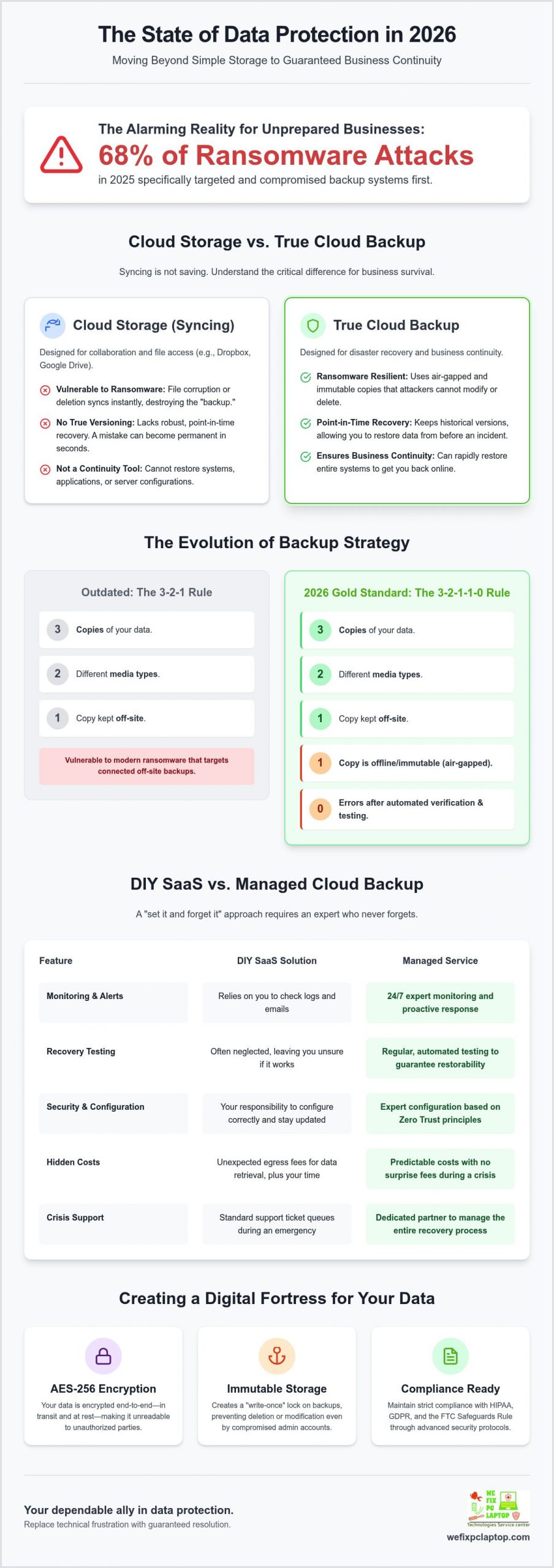
In 2025, 68% of ransomware attacks specifically targeted backup systems. If a crisis hit your office tomorrow, would your current cloud backup solution actually be able to restore your files, or would you find yourself staring at a “data not found” screen? Most business owners live with a quiet fear of permanent data loss, especially as unmanaged storage costs rise and RTO or RPO metrics become more confusing. You want a system that protects your remote team and keeps you compliant with HIPAA or the FTC Safeguards Rule without requiring a computer science degree to manage.
We understand the stress of technical uncertainty, and we are here to act as your dependable ally. You deserve a “set it and forget it” strategy that works every single time. This 2026 guide promises to help you move beyond basic storage into a state of total recovery readiness. We will explore the essential shifts in data protection, from avoiding hidden egress fees to implementing the managed security protocols that guarantee your business stays online no matter what happens. It is time to replace technical frustration with the relief of a guaranteed resolution.
Key Takeaways
- Learn why the traditional 3-2-1 rule is outdated and how the new 3-2-1-1-0 strategy provides the ultimate redundancy for your business data.
- Understand the critical difference between simple file syncing and a professional cloud backup solution that guarantees recovery during a technical crisis.
- Identify the hidden costs and technical risks of DIY backup management compared to a managed service that handles monitoring and testing for you.
- Discover how to maintain strict compliance with HIPAA, GDPR, and the FTC Safeguards Rule using advanced AES-256 encryption and air-gapping.
- See how integrating tools like SentinelOne and Atakama creates a “fortress” environment that protects your backups from even the most advanced ransomware.
What is a Cloud Backup Solution and Why Does Your Business Need One?
A professional cloud backup solution is much more than a digital attic for old files. It is a live, secure, and off-site repository designed to catch your business the moment it falls. While many people think of the cloud as a simple storage space, a high-quality remote, online, or managed backup service is actually a complex system. It automates the encryption and transmission of your critical data to a secondary location, ensuring that your records remain safe even if your office suffers a fire, flood, or total hardware failure. We see businesses every day that believe they are protected because they have a local hard drive plugged in, but those physical devices are just as vulnerable as the computers they support.
In 2026, the conversation has shifted from “saving data” to “business continuity.” It is not enough to simply have a copy of your files somewhere. You need to know exactly how fast you can get back to work. Business continuity is the ability to keep your doors open and your staff productive even during a technical crisis. If your server crashes at 8:00 AM, a managed cloud backup solution ensures you are back online by lunch, rather than spending days or weeks trying to rebuild your digital infrastructure from scratch.
The Difference Between Cloud Storage and Cloud Backup
Many business owners rely on tools like Dropbox, OneDrive, or Google Drive for their daily operations. These are excellent for accessibility and collaboration, but they are not true backup tools. These services use “syncing,” which means if a file is corrupted by a virus or accidentally deleted on your laptop, that change propagates instantly to the cloud. You lose the data in both places at once. A dedicated cloud backup solution uses versioning and air-gapping. This creates a permanent, immutable record of your data at specific points in time. If a file is damaged today, we simply reach back into the archive and pull out the healthy version from yesterday.
The Evolution of Backup: Why 2026 Demands More
The threat landscape has changed dramatically over the last year. We are now seeing the rise of AI-driven ransomware that is specifically designed to hunt for your backup catalogs first. These sophisticated attacks try to delete your safety net before they even touch your primary files. Legacy backup methods, like manual external drives or basic scripts, simply cannot keep up with this level of aggression. Modern protection requires a “Zero Trust” architecture where every access request is verified. This ensures that even if a hacker gets into your main network, they cannot touch the encrypted archives held within your cloud backup solution. We focus on these high-security restorations because we know that in a crisis, your backup is the only thing standing between a minor hiccup and a permanent business closure.
The Architecture of a Secure Backup Strategy
A resilient data strategy requires more than just a subscription to a service; it requires a structural blueprint that can withstand an active attack. While the previous section highlighted the dangers of simple file syncing, true protection comes from how your data is layered. In 2026, the gold standard has evolved into the 3-2-1-1-0 rule. This framework ensures you have three copies of your data on two different media types, with one copy offsite, one copy kept offline or immutable, and zero errors verified through automated recovery testing. This high-level cloud backup and disaster recovery approach ensures that even if one layer fails, your business remains operational.
Security starts the moment your data leaves your computer. We utilize end-to-end encryption using the AES-256 standard, which protects your information both while it travels across the internet and while it sits in the vault. To stop hackers from deleting your safety net, we implement immutable storage. This technology creates a “write-once” lock on your files, meaning that once they are backed up, no one, not even an administrator with stolen credentials, can modify or delete them for a set period. It is a digital fortress that gives you total peace of mind. By layering your defenses, you ensure that even a targeted strike against your main office won’t result in a total loss of your digital history.
Endpoint Protection and Backup Integration
Backing up an already compromised system is a waste of time and storage. This is why we integrate SentinelOne into our workflow to scan every byte of data for hidden threats before it ever reaches your cloud vault. By stopping malware at the source, we prevent the creation of “infected” backups that would just re-infect your network during a restore. To add another layer of safety, Atakama provides sophisticated file-level security that keeps your most sensitive backups fragmented and unreadable to unauthorized users. If you are worried about your current setup, our team can provide a professional cyber security solution to audit your existing defenses.
RTO and RPO: The Metrics That Actually Matter
Every business owner must understand two critical numbers: Recovery Time Objective (RTO) and Recovery Point Objective (RPO). RTO is the clock that starts ticking the moment a server fails; it represents how many minutes or hours you can afford to be offline before the financial damage becomes critical. RPO defines your data loss window, or how much work you are willing to redo if you have to restore from a previous version. A professional cloud backup solution optimizes these metrics by performing frequent, incremental snapshots. This ensures your RPO is measured in minutes, not days, and your RTO is short enough to keep your customers happy and your staff productive.
DIY SaaS vs. Managed Cloud Backup: A Comparison
Comparing the Total Cost of Ownership (TCO) between a DIY app and a managed partnership reveals the true price of data safety. A DIY cloud backup solution might cost less than $100 per year for a single license, but that price tag only covers the software itself. It does not cover the hours of “Hidden Work” required to keep the system functional. When you choose the DIY route, you become the de facto IT manager. This means you are responsible for monitoring job logs every morning, manually updating software agents on every remote laptop, and performing the monthly restore tests that prove the system actually works. If you miss a single failed job notification, your data protection vanishes without warning.
Hardware failure adds another layer of complexity that software-only providers simply cannot handle. If your MacBook or PC suffers a physical crash, a cloud software company cannot help you fix the machine. You need a partner who understands both the physical machine and the digital vault. We take pride in being a tech-savvy lifesaver that can repair your hardware in-house and then bridge the gap to the cloud for a total restoration. For a deeper look at how this level of care fits into your overall business technology, check out our guide on Managed IT Support Services.
When DIY Software Makes Sense
These tools are ideal for home users or single-person freelancers with minimal data needs. Most consumer plans offer “unlimited” storage, but they often come with a significant catch during a crisis. In 2026, many budget providers use “throttling” to slow down your restore speeds. If you are trying to pull down several terabytes of data over a consumer-grade connection, it could take weeks to get your business back on its feet. While the low monthly cost is attractive, the lack of professional support during a recovery event makes it a risky choice for any growing firm.
Why Professional Firms Require Managed Backup
For law offices, healthcare providers, and manufacturing plants, the stakes are too high for a trial-and-error approach. We provide “Human-in-the-loop” monitoring, which means a real expert is watching your backup heartbeat every single day. If a job fails due to a network glitch or a full drive, we resolve it before you even notice a problem. This proactive care is essential when executing a Ransomware Recovery Plan. We also handle customized network configurations to ensure your large data uploads happen after hours, keeping your office internet fast and responsive for your staff during the workday.
Industry-Specific Requirements for Cloud Backup
Every industry carries its own set of digital burdens. A generic cloud backup solution often fails professional audit requirements because it lacks the granular controls needed for modern compliance. In 2026, the FTC Safeguards Rule classifies many professional firms, including CPA practices, as “financial institutions.” This change mandates documented safeguards and mandatory encryption of backups at rest and in transit using standards like AES-256. If your current provider does not offer a Business Associate Agreement (BAA) or multi-factor authentication for backup access, you’re at risk of heavy legal penalties. We tailor retention policies to meet specific document preservation laws, ensuring your digital archives remain accessible for the full duration required by your industry. This prevents the nightmare scenario of a compliance officer finding gaps in your data history during a surprise inspection.
Law Offices and Healthcare Facilities
Protecting client privilege is the bedrock of a legal practice. We implement advanced encryption keys so that even the cloud provider cannot peek at your sensitive files. For healthcare providers, HIPAA compliance is non-negotiable. We specialize in configuring secure vaults for dental and doctor office management software like Dentrix or Eaglesoft. We ensure that your patient records are air-gapped and recoverable within your required timeframe. This proactive approach lowers your stress levels during technical crises because you know the data is safe and the restoration process is already tested. If you need a partner who understands these high-stakes environments, we serve as a dedicated IT consultant for Law office, Dentistry, and healthcare providers.
Manufacturing and Retail Businesses
For manufacturing firms, your intellectual property and CAD designs are your most valuable assets. A hardware crash on a design workstation could set a project back months if your backup isn’t ready for immediate restoration. We understand the complexity of these large file types and how to move them securely without choking your bandwidth. Retail businesses face a different struggle: local hardware failure at the Point of Sale (POS). When a register or local server goes down, our onsite support bridges the gap. We provide immediate hardware repair or computer rental while your data restores from the cloud. This combination of physical support and digital protection is what keeps a retail business running during a crisis. We don’t just fix the software; we fix the machine that runs it.
Implementing Your Solution with We Fix PC Laptop
Moving from a state of vulnerability to total resolution requires a methodical and expert approach. We don’t just sell you a software license and walk away. Instead, we build a customized defense tailored to your office’s specific needs. Our cloud backup solution integrates seamlessly with your daily workflow, ensuring that your data is protected without creating lag for your team. We create what we call a “Fortress” environment by layering SentinelOne for active endpoint threat detection and Atakama for decentralized file security. This proactive strategy ensures that even if a sophisticated breach occurs, your backups remain encrypted, unreadable, and completely untouchable to unauthorized users.
Many businesses discover too late that their biggest hurdle to recovery is not the cloud, but the physical machine that failed. If your server or workstation has suffered a mechanical breakdown, your software-only backup provider won’t be able to help. This is where our In-House Depot Repair service becomes your greatest asset. We possess the technical skill to fix hardware that others can’t, ensuring your restore process isn’t stalled by a broken motherboard or a fried power supply. We act as a tech-savvy lifesaver, providing 24/7 emergency support to ensure that when your systems go dark, you have a direct line to someone who can resolve the issue immediately.
Our 4-Step Deployment Process
- Step 1: Inventory and Data Priority Mapping. We sit down with you to identify your most critical assets and determine which files need the fastest recovery times.
- Step 2: Network Optimization. We configure your systems for seamless background uploads that don’t impact your office internet speed during business hours.
- Step 3: Automated Testing Schedule. Our system runs regular, automated tests to verify the integrity of every single backup file, so we know they will work when you need them.
- Step 4: 24/7 Monitoring and Proactive Response. Our team watches your backup heartbeat every hour of every day, fixing minor glitches before they ever turn into data loss.
Get Started with a Data Security Audit
A professional audit is the first step toward true peace of mind. We analyze your current RTO and RPO metrics to find the hidden gaps in your safety net that could lead to permanent loss. From there, we customize a cloud backup solution that fits your specific budget and industry regulations, whether you are a small law firm or a large manufacturing plant. You don’t have to carry the heavy weight of technical uncertainty by yourself. We are ready to help you transition from a state of technical failure to a state of total resolution. Contact We Fix PC Laptop for a Cloud Backup Consultation today and let us secure your business’s digital well-being.
Build a Resilient Future for Your Business Data
The landscape of data protection has fundamentally changed. As we have explored, relying on simple file syncing is no longer enough to protect a modern firm from sophisticated AI-driven threats. By adopting the 3-2-1-1-0 architecture and focusing on recovery readiness rather than just storage, you ensure that your operations can survive any technical crisis. Investing in a managed cloud backup solution is the most important step you can take toward true business continuity in 2026. It replaces the fear of permanent loss with the confidence of a guaranteed restoration.
We are here to serve as your dependable ally. With advanced protection from SentinelOne and Atakama, we provide the specialized support that law offices, healthcare facilities, and manufacturing plants require to stay compliant. If your systems ever go dark, our 24/7 emergency on-site recovery support ensures you are never left to struggle alone. You deserve the peace of mind that comes with a professional safety net. Secure Your Business Data with a Managed Cloud Solution today. Your digital well-being is our highest priority, and we are ready to help you thrive.
Frequently Asked Questions
Is cloud backup safe for sensitive legal or medical data?
Yes, it’s actually safer than local storage when configured correctly. We use AES-256 encryption and multi-factor authentication to meet the strict standards of HIPAA and the FTC Safeguards Rule. This ensures your patient or client files remain unreadable to anyone without the proper keys. By moving data off-site, you also protect it from physical theft or office disasters that local drives can’t survive.
How long does it take to restore a full server from the cloud?
Recovery time depends on your internet bandwidth and the volume of data being moved. While a few gigabytes might take minutes, a multi-terabyte server could take several hours. We optimize your cloud backup solution to prioritize critical files first. This allows your staff to get back to work quickly while the rest of the data downloads in the background.
What happens to my cloud backup if my office internet goes down?
Your backup software will simply wait for the connection to return. Modern agents use a local cache to track changes made while you are offline. As soon as your internet is restored, the system automatically resumes the upload process from where it left off. This ensures no data is missed and your protection remains continuous without any manual intervention required from your team.
Can cloud backup protect against ransomware?
Yes, a professional system provides a critical line of defense through immutability and versioning. Even if a hacker encrypts your live files, we can reach back to a clean version from before the attack. Because our backups are air-gapped and locked, the ransomware cannot delete or modify your historical archives. This makes it impossible for attackers to destroy your digital safety net.
What is the difference between cloud backup and a disaster recovery plan?
Cloud backup is the act of copying your data to a secure vault, while a disaster recovery plan is the comprehensive strategy for using that data. A backup is just a tool; the plan includes the hardware, personnel, and step-by-step procedures required to rebuild your entire digital environment. We help you develop both to ensure you aren’t just saving files, but actually protecting your uptime.
Do I still need an external hard drive if I have cloud backup?
We still recommend keeping a local copy for the fastest possible recovery. Following the 3-2-1-1-0 rule means having one copy on-site for speed and one in the cloud for safety. If a single file is accidentally deleted, pulling it from a local drive is nearly instant. This saves you time during a busy workday while the cloud copy protects you from larger disasters.
How often should my business be backing up its data?
Most professional firms should use continuous or near-real-time backups. Instead of waiting until the end of the day, a managed cloud backup solution captures changes as they happen. This minimizes your Recovery Point Objective (RPO), ensuring you never lose more than a few minutes of work if a system crashes. Frequent snapshots are essential for maintaining productivity in high-stakes environments like healthcare or law.
Can you help recover data if I didn’t have a backup plan in place?
Yes, our team specializes in restoring data from failed hardware that other shops can’t touch. Through our In-House Depot Repair services, we can often pull records directly from crashed hard drives or damaged motherboards. While it’s always better to have a proactive plan, we act as a tech-savvy lifesaver when you’re facing a total data emergency. We fix what others can’t to get your business back on its feet.
- Houston Small Business Computer Repair: 2026 Guide
- SentinelOne Managed Security: 2026 Guide for Firms
- Business Computers & Info Services: 2026 Guide
- Cloud Disaster Recovery: 2026 Small Business Guide
- IT Consulting for Manufacturing Industry: Bridging Strategy and Floor-Level Execution in 2026
- Comprehensive Laptop Screen Repair Guide: 2026 Professional Solutions
- Professional Computer Technical Support: Comprehensive 2026 Solutions for Business & Home