.svg)
.svg)
.svg)




Professional Mac Air Repairs: Expert Solutions for Screens, Batteries, and Logic Boards
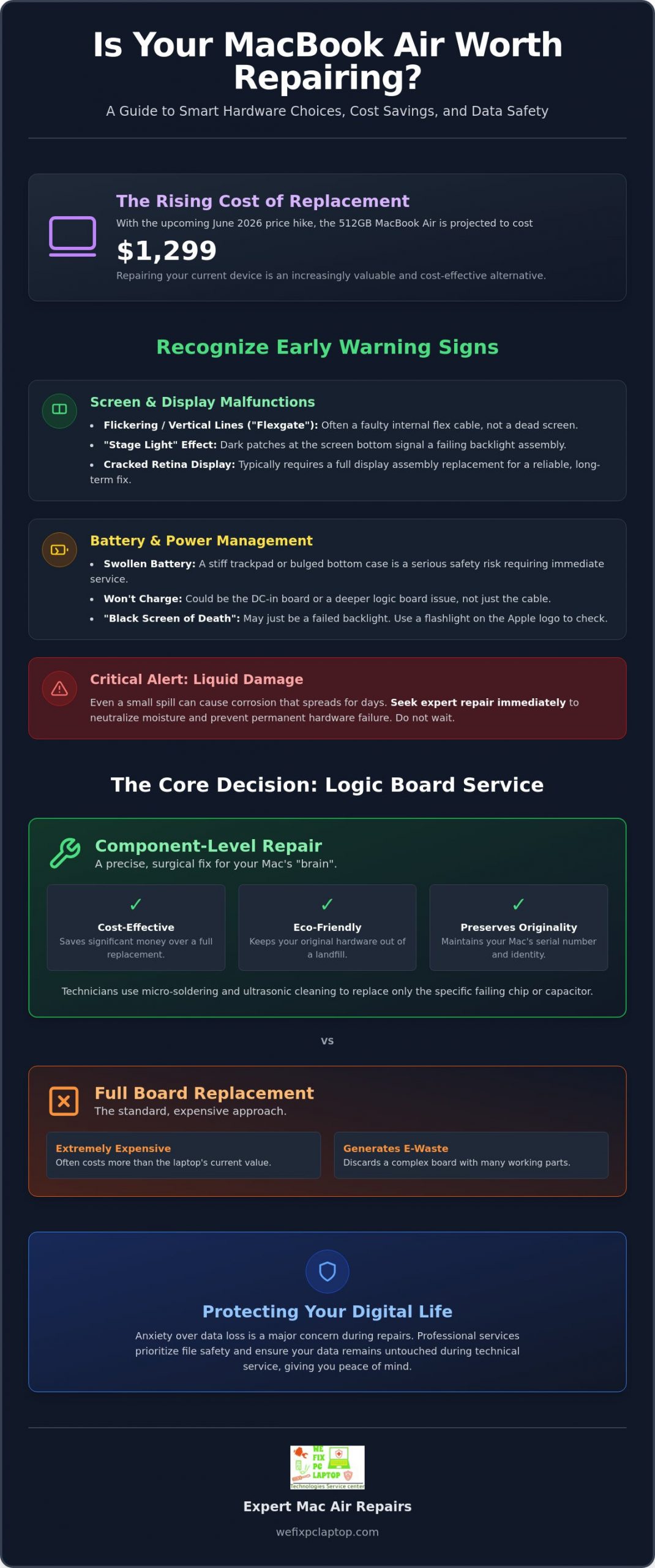
With the June 2026 price hike pushing the 512GB MacBook Air to $1,299, buying a new machine isn’t always the smartest path forward for your wallet. It’s frustrating when a cracked screen or a failing battery disrupts your workflow, and we know the anxiety that comes with fearing your precious data might disappear during service. Finding professional mac air repairs shouldn’t feel like a gamble or a choice between high costs and long wait times at the Genius Bar.
We understand that your MacBook is more than just hardware; it’s your office, your photo album, and your connection to the world. You deserve a solution that restores your device to its peak performance without the corporate price tag or the stress of data loss. This article will help you discover how to breathe new life into your Mac through expert insights that prioritize hardware longevity and file safety. We’ll explore the latest technical solutions for screens, batteries, and logic boards while explaining how recent Right to Repair legislation, like Texas HB 2963, gives you more power to choose the best care for your technology.
Key Takeaways
- Learn how to recognize early warning signs of failing batteries and display assemblies to avoid sudden hardware failures.
- Discover the financial benefits of component-level logic board restoration over expensive total replacements.
- Understand why specialized depot services provide deeper diagnostics for mac air repairs than typical retail environments.
- Explore professional methods for safeguarding your files and ensuring your data remains untouched during technical service.
- Evaluate the long-term value of hardware repair as an affordable alternative to the rising costs of new MacBook models.
Identifying Common MacBook Air Hardware Failures
Hardware failure usually strikes at the worst possible moment. Whether you are working on a tight deadline or relaxing with a movie, a sudden glitch can feel like a major setback. Over the years, various MacBook Air models have exhibited specific hardware quirks that users should recognize. Identifying these symptoms early can save you from a total system collapse and keep your data safe. Understanding what is happening under the hood is the first step toward a successful resolution.
Screen and Display Malfunctions
A flickering screen or strange vertical lines don’t always mean you need a new laptop. Sometimes the issue is a faulty flex cable, which connects the display to the logic board. This is often called “Flexgate” in the repair community. However, if you see the “Stage Light” effect, where dark patches appear at the bottom of the screen like a theater stage, the backlight assembly is likely failing. For Retina displays, a cracked internal LCD usually requires a full assembly replacement to ensure the repair remains reliable. Before committing to any service, reviewing a thorough notebook screen repair checklist can help you understand exactly what the diagnostic process involves and what questions to ask your technician. Professional mac air repairs focus on determining if the fix is a simple cable adjustment or a complete hardware swap. We look for the most durable solution rather than a temporary patch.
Battery and Power Management Issues
Your battery health isn’t just about how long the charge lasts. You can check your cycle count in the System Report, but physical symptoms are just as important. If your trackpad feels stiff or the bottom case looks slightly bulged, you likely have a swollen battery. This is a serious safety risk and requires immediate attention. If your Mac won’t charge despite a working cable, the issue could be the DC-in board or a deeper logic board failure. With the 2026 price increases for new devices, maintaining your current battery health is a cost-effective way to extend your laptop’s life by several years.
The “Black Screen of Death” is perhaps the most frightening symptom, but it doesn’t always signal the end. It could be a simple power cycle issue or a failed backlight. You can test this by shining a flashlight through the Apple logo on the back of the lid; if you see your desktop, the screen is working but the light is out. Liquid damage is the one exception where you shouldn’t wait. Even a small spill can cause corrosion that spreads across the logic board over several days. Seeking expert mac air repairs immediately after a spill is the only way to neutralize the moisture and save your components. Taking fast action prevents a minor accident from turning into a permanent hardware loss.
Logic Board Repair vs. Replacement: A Cost-Effective Choice
When your MacBook Air suddenly goes dark, the logic board is often the culprit. Official repair channels typically suggest a full board replacement. This is an expensive approach that often costs more than the machine’s actual value. Component-level mac air repairs offer a more surgical alternative. Instead of replacing the entire “brain” of your laptop, skilled technicians identify and replace the specific failing chip or capacitor. It’s a precise process that saves you money while keeping your original hardware out of a landfill.
The Anatomy of a MacBook Logic Board
Think of the logic board as a complex map of power highways. If one tiny component on a critical power rail fails, the entire system shuts down to prevent further damage. We use high-resolution schematics and thermal imaging to find these microscopic short circuits. Fixing a single power management chip or a blown capacitor through micro-soldering requires immense precision. This level of work involves BGA rework and micro-soldering under a microscope. It’s the difference between replacing a whole car engine and just fixing a faulty spark plug.
Why Repair is Often Better Than Replacement
Choosing repair over replacement is a win for both your budget and the environment. In 2026, with the 512GB MacBook Air now priced at $1,299, repairing your existing hardware is the most logical financial move. It also preserves your device’s original serial number and system identity. If your board suffered a spill, ultrasonic cleaning can often strip away corrosion that would otherwise lead to permanent failure. This process uses high-frequency sound waves to reach under chips where traditional cleaning can’t go.
On M1 and M2 models, we often see failures in specific power delivery chips or NAND capacitors. Identifying these early can prevent permanent data loss. While you’re researching solutions, Protecting Your Digital Life from common tech scams is just as vital as finding a good technician. If you’re facing a dead board, you might find that expert hardware restoration is the lifeline your Mac needs to get back to work today.
Common failures on modern M-series boards include:
- Shorted capacitors on the primary 12V or 3.3V power rails
- Corroded pins on the display connector from minor moisture
- Failed NAND power management ICs that prevent the system from booting
- Liquid-damaged keyboard and trackpad controllers that disrupt input
Mac Air Repairs: Apple Store vs. Specialized Depot Services
Choosing the right partner for mac air repairs is about more than just convenience; it’s about technical depth. Most users assume the Apple Store is the final authority on hardware, but the retail environment is designed for volume and customer service rather than complex component restoration. While a “Genius” is excellent at software troubleshooting and simple part swaps, they often lack the tools or the mandate to perform the surgical, component-level fixes we discussed in the previous section. This creates a gap between what your Mac needs and what a retail store can actually provide.
The Limitations of Retail Repair
Retail stores operate on a model of efficiency and standardized “flat-rate” tiers. If your MacBook has a minor power issue, you might be quoted a price that covers a full logic board replacement because the store isn’t equipped to find a single faulty capacitor. Many people don’t realize that Apple Stores often ship your device away to a central hub anyway. This adds unnecessary days to your wait time and creates communication barriers. You rarely get to speak with the person actually opening your laptop, which can lead to a “wipe and reload” approach that ignores the nuances of your specific hardware problem.
The Specialized Technician Advantage
In a dedicated lab environment, the focus shifts from processing tickets to restoring hardware. Our in-house depot computer repair services offer more thorough diagnostics because we have the time and specialized equipment to dig deeper. We don’t just look for what is broken; we look for why it failed. This specialized approach allows us to perform “impossible” repairs that corporate stores frequently refuse. Whether it is a vintage model Apple has labeled “obsolete” or a complex liquid damage case, a dedicated technician has the flexibility to find a custom solution.
Turnaround times are another major differentiator. While retail queues can stretch for a week or more just for an initial assessment, a dedicated repair lab operates with a sense of urgency. We understand that your MacBook Air is your primary tool for work or school. By keeping mac air repairs in-house, we eliminate the shipping delays and corporate red tape that slow down the process. You get direct access to the professional working on your machine, ensuring clear communication and a repair plan that prioritizes your specific needs and budget. Our warranties are a reflection of this personal investment, offering you peace of mind that a local ally stands behind every solder joint and screen replacement.
Data Safety and Preparation: Protecting Your Digital Life
The most stressful part of hardware failure isn’t just the broken machine; it’s the fear of losing your photos, documents, and years of digital history. While big retail stores often lead with a mandatory disclaimer that your drive will be wiped, professional mac air repairs should treat your data as the priority. A factory reset is the easy path for a technician, but it’s a devastating outcome for the user. We believe that a successful repair means returning a fully functional laptop with your files exactly where you left them.
Preparing Your Mac for Service
If your MacBook Air is still semi-functional, taking a few proactive steps can speed up the repair process and ensure your privacy. Start by performing a final Time Machine backup to an external drive. This provides a safety net that you control. You should also sign out of Find My Mac and deauthorize your Apple ID. This is critical because Activation Lock can prevent a technician from verifying hardware fixes after a logic board restoration. Finally, create a clear, bulleted list of symptoms. If your Mac only crashes when using specific apps or after two hours of use, that information is gold for a technician trying to replicate the fault.
Data Recovery for “Dead” MacBooks
When a MacBook Air won’t turn on, many users assume their data is gone forever. This is a common misconception, though the challenge has grown with modern designs. Since the introduction of the M1 and M2 chips, the SSD is soldered directly to the logic board. You can’t simply “pull the drive” and plug it into another computer. Specialized technicians use advanced power injection techniques to bypass failed components. By providing power directly to the NAND flash chips, we can often boot the system into a temporary state just long enough to extract your vital files.
You should avoid DIY data recovery attempts or following unverified online tutorials that suggest “baking” your board or using high-heat hair dryers. These methods often cause irreversible damage to the sensitive storage chips. Professional recovery requires microscopic precision and a deep understanding of the MacBook’s power rails. If your screen is dark but your files are irreplaceable, trust our data-safe repair process to handle your hardware with the care your digital life deserves.
Security features like FileVault and firmware passwords are excellent for protecting your privacy, but they require a bit of coordination during service. Technicians don’t need your personal login password for many hardware tests, but they may need you to temporarily disable these locks or provide a guest account. Clear communication about these security layers ensures that your mac air repairs proceed without unnecessary delays while keeping your sensitive information under lock and key.
Restore Your Mac with We Fix PC Laptop’s Expert Services
When your MacBook Air fails, you need a partner who understands the urgency of your situation. We’ve spent years refining our process to ensure that your technical crisis turns into a total resolution as quickly as possible. Our commitment to fast and reliable same day services means you won’t be left waiting for weeks while your laptop sits on a retail shelf. By handling all mac air repairs in our specialized lab, we maintain total control over the quality of the work and the safety of your data. You deserve a repair experience that is transparent, professional, and focused on your success.
A Comprehensive Destination for Mac Care
Our facility is equipped to handle the full spectrum of hardware challenges. Whether you need a simple battery swap to regain your mobility or advanced logic board micro-soldering to save a liquid-damaged machine, we have the tools and expertise to help. We specialize in laptop screen repair and notebook screen repair and use high-quality parts that meet or exceed original standards. If you’re also comparing repair costs across different laptop brands, our guide on Dell laptop screen replacement cost can help you understand how pricing factors vary between manufacturers and models. This dedication to quality ensures that your Mac doesn’t just work today; it continues to perform for years to come. We take pride in supporting both individual students and professional business fleets, treating every device with the same level of meticulous care.
Transparent pricing and clear communication are the foundations of our service. You’ll never be surprised by hidden fees or generic “flat-rate” traps. Instead, we provide a detailed breakdown of what your machine needs and why. This honest approach builds a foundation of trust that you won’t find in a cold corporate environment. We see you as a valued member of our community, not just another ticket number in a database.
Getting Started with Your Repair
Bringing your MacBook back to life is a straightforward and stress-free process. You can choose to drop off your device at our location for immediate attention or ship it directly to our lab if you’re further away. Every mac air repairs project begins with our professional diagnostic phase. During this stage, we use precision testing equipment to identify the root cause of your hardware failure. We don’t guess; we verify. Once we have a clear map of the issue, we’ll contact you with a firm plan and a timeline for restoration.
Don’t let a hardware glitch or a broken screen derail your productivity. Whether you are dealing with a “Black Screen of Death” or a battery that won’t hold a charge, we have the expert solutions you need. Contact us today to schedule your diagnostic or to speak with a technician about your specific needs. We are ready to act as your tech-savvy lifesaver and get your MacBook Air back into peak condition.
Bring Your MacBook Air Back to Life with Expert Care
Your MacBook Air is an essential tool, and a technical failure shouldn’t mean a forced upgrade to a more expensive model. We’ve explored how component-level logic board restoration and professional screen replacements provide a sustainable, cost-effective alternative to buying new. By choosing specialized mac air repairs over generic retail options, you ensure that your hardware receives the meticulous attention it deserves without compromising your data safety.
Our team of specialized MacBook logic board technicians is dedicated to finding solutions where others only see a total loss. With our expert in-house depot repairs and fast same-day diagnostic services, we take the guesswork out of the process and put the power back in your hands. You don’t have to face technical crises alone or fear for your digital life. We are here to act as your dependable local ally and technical guide throughout the entire restoration journey.
Get Your MacBook Air Fixed Today – Contact Our Experts
Restoring your laptop’s performance is just a call or message away. Trust in a team that values your time, your hardware, and your community connection. We look forward to helping you get back to work with a Mac that feels as good as the day you first opened it.
Frequently Asked Questions
How much do Mac Air repairs typically cost in 2026?
Repair costs depend on your specific model and the extent of the hardware damage. While new device prices rose significantly in June 2026, professional restoration remains a much more affordable path for most users. We provide a thorough diagnostic to give you an exact quote before any work begins. This ensures you can make an informed decision based on the current market value of your laptop.
Will I lose my data if I get my MacBook Air screen replaced?
A standard screen replacement does not involve your storage drive, so your data should remain perfectly intact. The files are stored on the logic board, which is separate from the display assembly. However, we always encourage users to maintain a current backup as a best practice. Our technicians handle your hardware with extreme care to ensure your digital life is protected throughout the physical repair process.
How long does a professional MacBook Air battery replacement take?
Most battery replacements are completed within the same day thanks to our efficient in-house depot setup. We don’t ship your device to a secondary location, which eliminates the long wait times often found at retail stores. Once we verify the battery health and cycle count, the physical swap and safety testing happen quickly. You can typically drop off your device and have it back in your hands by the evening.
Can a liquid-damaged MacBook Air really be fixed?
Yes, liquid damage is often fixable if you act quickly to stop the spread of corrosion. We use ultrasonic cleaning to reach under microscopic components and micro-soldering to repair any damaged power rails. While liquid is a serious threat, our specialized tools can often restore a board that other shops might label as a total loss. Immediate professional intervention is the most critical factor in a successful recovery.
Is it better to repair an old MacBook Air or buy a new one?
Repairing is often the smarter choice, especially since the 512GB MacBook Air price increased to $1,299 in 2026. If the cost of the fix is less than half the price of a new machine, restoration offers better long-term value. This approach also avoids the hassle of migrating data and the environmental impact of electronic waste. We help you evaluate your machine’s condition to ensure a repair makes financial sense.
What is the difference between a logic board repair and a replacement?
Logic board repair targets specific failed chips or capacitors, while replacement involves swapping the entire internal board. Choosing component-level mac air repairs is significantly more cost-effective and preserves the original identity of your system. It is a surgical approach that requires high-level expertise and precision equipment. We focus on fixing the specific “brain” of your laptop rather than discarding perfectly good hardware.
Do you offer a warranty on MacBook Air hardware repairs?
We stand behind every repair we perform with a solid warranty on both parts and labor. This commitment ensures that your restored device meets our rigorous standards for reliability and performance. If you experience any issues related to the specific repair we performed, we make it right immediately. We value the trust you place in our local business and aim to provide total peace of mind with every service.
Can you fix a MacBook Air that won’t turn on at all?
A MacBook that won’t boot is a common challenge that we successfully resolve through deep hardware diagnostics. This issue often stems from a failed power management chip or a short circuit on a primary power rail. Our mac air repairs identify the exact point of failure to restore power to your system. We have the advanced technical capabilities to bring “dead” machines back to life when standard troubleshooting fails.
- How to Find the Best Notebook Repair Shop: The 2026 Expert Guide
- The Ultimate Guide to Laptop Repair: Restoring Performance and Data in 2026
- Depot Repair vs. On-Site Repair: How to Best Repair Any Computer in 2026
- Gaming PC Repair: The 2026 Guide to Restoring Peak Performance
- The Ultimate Notebook Screen Repair Checklist: 2026 Expert Guide
- Professional In-House Depot Computer Repair: The Gold Standard for Hardware Restoration