.svg)
.svg)
.svg)




Depot Repair vs. On-Site Repair: How to Best Repair Any Computer in 2026
The fastest way to restore your crashed system might actually involve sending it away rather than waiting for a technician to show up at your office. It sounds backwards when you’re staring at a dead screen, but the choice between depot repair vs on-site repair should be driven by the complexity of the failure, not just how quickly someone can park in your driveway. You’re likely worried about the safety of your data during shipping or fearing that an on-site tech won’t have the specialized parts for your high-end gaming rig or MacBook logic board.
We know that every hour of downtime feels like a week when there’s work to be done. You want a fix that’s permanent, not a temporary patch that fails again in a month. This guide helps you discover the critical differences between depot and on-site service so you can choose the most reliable path to recovery. We’ll walk through the 2026 landscape of Right to Repair laws, explain when a high-security lab environment is non-negotiable, and show you how to balance immediate speed with long-term quality.
Key Takeaways
- Identify whether your technical failure requires a specialized lab environment or immediate local assistance by understanding the core differences of depot repair vs on-site repair.
- Learn why complex hardware restorations, such as MacBook logic board or gaming PC repairs, are best handled in ESD-safe depot facilities with advanced micro-soldering tools.
- Recognize the critical moments when 24/7 emergency on-site support is the only way to resolve network outages and server-side connectivity issues quickly.
- Develop a clear decision framework based on the severity of physical damage versus software errors to minimize your total downtime and repair costs.
- Understand how elite cybersecurity measures like SentinelOne protect your sensitive data while your device is being restored to peak performance.
Understanding the Basics: What Are Depot and On-Site Computer Repairs?
Choosing between depot repair vs on-site repair isn’t just about convenience; it’s about matching the right environment to your computer’s specific failure. Depot repair involves bringing or shipping your device to a centralized facility built for deep hardware surgery. On-site repair brings the expert directly to your home or office. While having someone at your desk feels faster, it isn’t always the most effective path for modern, high-density hardware. The core difference lies in the level of control a technician has over the environment versus the speed of an immediate physical presence.
By 2026, technology has shifted significantly. We’re now seeing AI-integrated processors and ultra-compact logic boards that require more than a standard screwdriver to fix. A modern computer repair technician needs more than just a mobile tool bag; they need clean rooms and bench-top diagnostics that simply don’t travel well. Understanding how these two service models function helps you avoid the frustration of a failed on-site visit that should’ve been a lab job from the start.
The Depot Repair Workflow
The process begins with a secure intake and data logging procedure. We treat your device as a priority from the moment it arrives, using high-security tools to ensure your files remain private. Once on the bench, technicians use industrial-grade equipment to perform deep diagnostics. This isn’t just software scanning. It involves using micro-soldering stations and high-definition thermal cameras to find microscopic short circuits on a logic board. After the repair, the machine stays in a temperature-controlled environment for stress testing. This ensures the fix holds up under heavy workloads before it ever heads back to your desk.
The On-Site Service Model
The on-site model shines when the problem involves the world around the machine. If your law office network is down or a critical manufacturing PC won’t communicate with your server, a technician needs to be there to see the big picture. We assess environmental factors like power stability, cable integrity, and network interference that a lab technician can’t see from a distance. However, on-site service has physical limits. A mobile kit can handle software glitches, peripheral setup, and basic part swaps, but it lacks the heavy machinery required for complex hardware restoration. If a technician arrives and discovers a blown capacitor on your motherboard, they’ll likely recommend a transition to a depot environment for a permanent solution.
Why Depot Repair is the Gold Standard for Hardware Restoration
While on-site technicians offer immediate relief for software bugs, depot repair is the surgical center of the tech world. It’s the only way to handle deep hardware trauma effectively. You wouldn’t want a complex medical procedure performed on your dining room table; your computer shouldn’t be treated differently. A dedicated facility provides an ESD-safe (Electrostatic Discharge) environment that protects sensitive 2026-era silicon from invisible static shocks. These shocks often cause “ghost” glitches that appear weeks after a less controlled repair.
Inside a specialized lab, we use micro-soldering stations and advanced logic board diagnostics that simply aren’t portable. This setup allows for a much higher first-time fix rate. Instead of waiting for a part to be ordered after a home visit, our extensive in-house inventory means the restoration starts the moment your device hits the bench. There are also clear economic and environmental benefits to this model. Precision repairs extend the life of expensive devices, which reduces electronic waste and saves you from buying a new machine prematurely. When weighing depot repair vs on-site repair, remember that lab-based fixes are designed for permanence.
Surgical Precision for Complex Hardware
Precision is non-negotiable for modern hardware. Professional laptop screen repair requires a dust-free bench to prevent trapped particles from ruining the display quality. We also use specialized disassembly jigs designed for the thin profiles of MacBooks and high-end ultrabooks to prevent frame warping. Modern motherboards feature thousands of microscopic trace paths that require the absolute stability of a stationary diagnostic station to analyze and repair without causing further damage. This same level of controlled precision is essential for cpu repair, where bent pins and damaged processor contacts demand a steady hand and specialized tools that no mobile kit can replicate.
Data Security and Controlled Testing
Your data remains our top priority. We utilize secure backup servers during the repair process to ensure nothing is lost if a component needs replacement. Once the physical fix is complete, your machine undergoes long-form hardware stress tests. These 24-hour burn-ins ensure your system is stable under heavy loads before we hand it back. For a deeper look at our process, see our guide on in-house depot computer repair. If you’re dealing with a complex hardware issue, our In-House Depot Repair Services offer the expert restoration you need.
On-Site Repair: When Immediate Presence Outweighs Centralized Tools
Immediate physical presence is often the only way to solve problems that live outside the computer casing. While the previous section highlighted the surgical precision of a lab, certain scenarios demand a technician at your side. On-site repair is the ultimate “white glove” service because it removes the burden of packing, shipping, or transporting your equipment. It’s particularly vital for non-portable systems like server racks or integrated manufacturing PCs that anchor a business’s operations. In the ongoing discussion of depot repair vs on-site repair, the on-site model wins when the root cause is environmental or network-based.
For businesses like law offices or dental clinics, downtime isn’t just an inconvenience; it’s a loss of billable hours and patient trust. When your entire network goes dark or your VOIP phones stop ringing, you can’t ship your office to a lab. You need an expert who can walk through your server room and identify the specific failure point in real-time. Choosing between depot repair vs on-site repair often comes down to where the problem actually lives. This model allows for immediate resolution of software conflicts, peripheral setup, and complex integration issues that a remote or lab-based tech simply can’t see.
Emergency Connectivity and Managed IT
We specialize in rapid response for professional sectors that cannot afford to wait. By 2026, the complexity of VOIP and firewall integrations has made on-site expertise more critical than ever for local businesses. Our technicians address cybersecurity threats by providing immediate network isolation, preventing a single infected machine from compromising your entire database. Whether it’s troubleshooting a faulty firewall or stabilizing a jittery Wi-Fi connection, being there in person allows us to test the solution in your actual work environment. This ensures that when we leave, your system isn’t just fixed; it’s fully integrated into your daily workflow.
When On-Site Reaches Its Limits
Even the best mobile technician faces physical constraints. The “Part Not Found” problem is a common reality of on-site service; it’s impossible for a van to carry every specific screen or logic board for every model in existence. This often turns a one-day fix into a two-visit repair. Additionally, environmental hazards like poor lighting, household dust, or even curious pets can compromise the quality of a delicate hardware repair. If our assessment reveals a deep hardware failure that requires micro-soldering or an ESD-safe environment, we’ll recommend transitioning from on-site to our elite depot facility. This hybrid approach ensures you get the most efficient restoration possible without sacrificing quality.
The Decision Framework: Which Service Model Fits Your Situation?
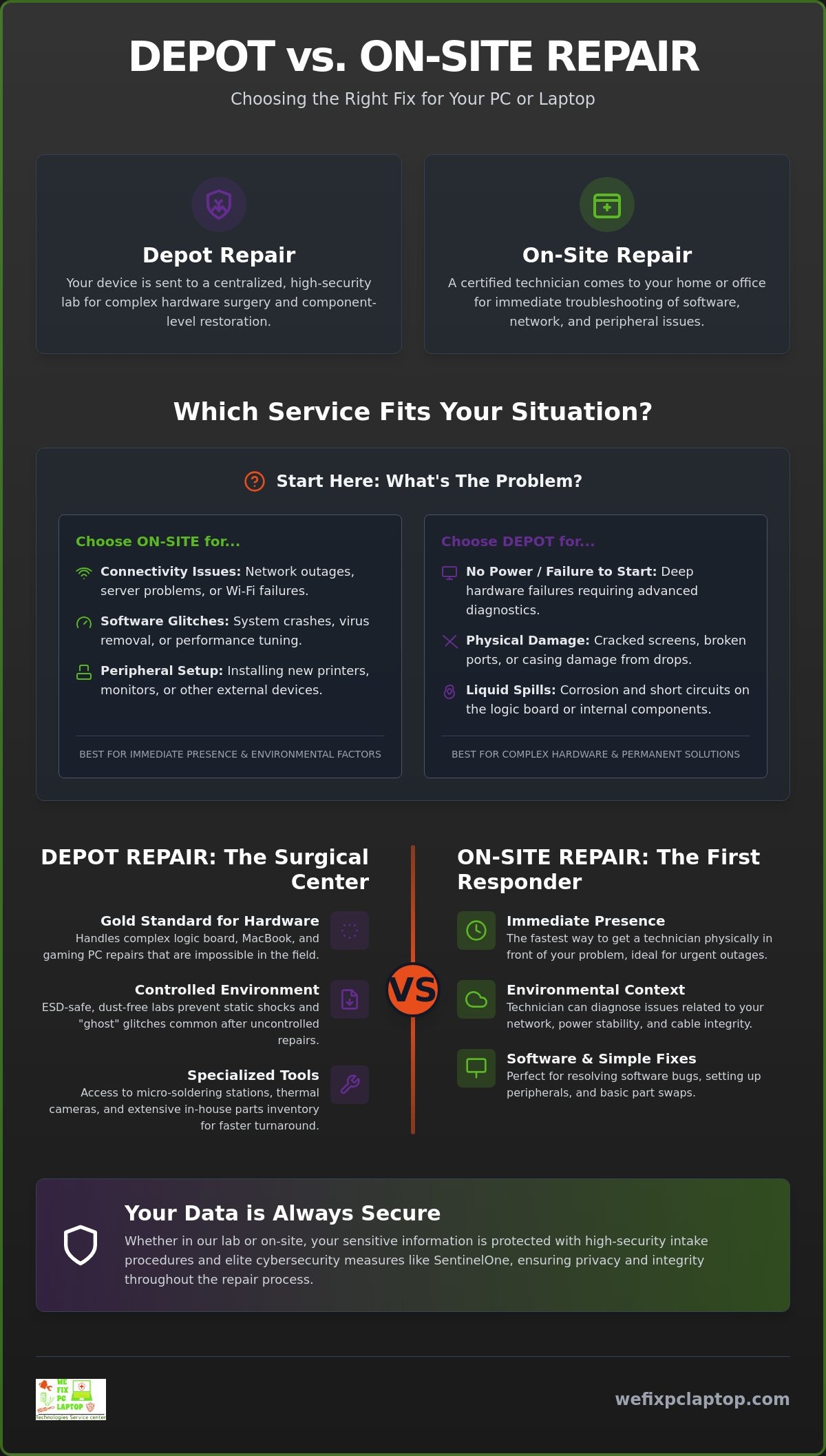
Deciding between depot repair vs on-site repair shouldn’t feel like a guessing game. The most effective way to repair any computer is to identify the specific failure point before booking a technician. If your machine won’t power on or has visible screen damage, the issue is physical. If your computer works but won’t talk to your printer or the office Wi-Fi, the issue is environmental. Matching the service model to the failure point saves you time and prevents the frustration of a technician arriving without the necessary tools.
We want you to feel confident in your choice. Use this 3-point checklist to decide your path in under 60 seconds:
- Is the damage physical or liquid-related? If yes, choose depot repair for a controlled lab environment.
- Is the issue affecting multiple devices or network connectivity? If yes, choose on-site support to troubleshoot the local environment.
- Is the device a high-end specialty machine (MacBook or Gaming PC)? If yes, depot repair is the safest option for proprietary hardware diagnostics.
Specific Hardware Considerations
Different machines have different needs. Our Gaming PC Repair Services almost always require a depot setting because liquid cooling systems and high-end GPUs are incredibly sensitive to dust and static. Similarly, MacBooks use proprietary internal structures that demand specialized jigs for safe disassembly. For business laptops, we balance the need for speed with data integrity. While you might want it fixed at your desk, a lab-based restoration ensures that we can run full 24-hour stability tests that an on-site visit simply cannot accommodate. If your system is failing to boot and you suspect processor damage, our damaged CPU repair and diagnostics guide can help you determine whether your processor can be saved before committing to a full replacement.
The Cost-Efficiency Comparison
Many people assume on-site is faster, but it often carries hidden costs. You may encounter travel fees or hourly rates that continue to climb while a technician waits for a software update to finish. In contrast, our depot model offers flat-rate specialized labor and immediate access to a massive parts inventory. Because we don’t have to wait for a part to be shipped to your house, a same-day depot service is frequently faster than waiting for a scheduled on-site window. If your business is facing a technical crisis right now, our 24/7 Emergency On-Site Support is ready to stabilize your network immediately.
How We Fix PC Laptop Streamlines Your Repair Experience
Our hybrid model takes the guesswork out of the depot repair vs on-site repair debate by providing the right tool for every situation. We maintain elite in-house depot facilities for surgical hardware fixes while offering 24/7 emergency on-site support for network-wide crises. Choosing between depot repair vs on-site repair depends on your specific needs, but our team handles both with equal dedication and technical expertise. Every repair we perform includes advanced cybersecurity protection through SentinelOne; this ensures your data remains secure while your device is in our care. We specialize in high-stakes restorations, including professional gaming pc repair, where precision and cooling system integrity are paramount.
We’ve built our reputation on being a dependable local ally that values your time and digital well-being. Our staff treats every customer as a valued member of the community rather than just another ticket number. By combining technical authority with empathetic support, we lower your stress levels during technical crises and provide a clear path to resolution. You don’t have to settle for cold corporate service when you can have a knowledgeable guide by your side.
Minimizing Business Downtime
We understand that for law offices, healthcare clinics, and manufacturing plants, every minute of technical failure is a direct hit to the bottom line. Our IT consultants work with you to integrate disaster recovery and cloud backup solutions during any hardware transition. If a critical machine needs to spend time in our depot, we offer computer rental options to keep your staff productive. This comprehensive care ensures your business doesn’t stop just because a single piece of technology did. We focus on permanent, high-quality fixes that prevent recurring downtime and protect your professional reputation.
Getting Started with Your Repair
Initiating your restoration is simple and transparent. For hardware issues like broken screens or failing motherboards, you can start a secure intake for our depot service through our website or by visiting us in person. If you’re facing a critical network failure or a server outage that requires immediate attention, request our emergency 24/7 on-site support for a rapid response. We’re committed to moving you from a state of frustration to a state of total resolution with the personal touch you won’t find at a corporate chain. Get your computer repaired by the experts today and experience the difference that dedicated, high-security tech support makes.
Secure Your Digital Future with the Right Repair Strategy
Choosing between depot repair vs on-site repair is no longer just a matter of convenience; it’s about giving your technology the specific environment it needs to thrive. You’ve learned that while on-site service is the hero for network and connectivity crises, a specialized depot facility remains the gold standard for intricate hardware restoration. By matching the failure point to the right service model, you ensure a permanent fix that respects both your timeline and your budget. This approach minimizes your downtime while maximizing the quality of the work performed.
We take the stress out of technical failures by protecting your data with SentinelOne and Atakama cybersecurity during every stage of the process. Whether you require specialized MacBook and gaming PC repair in our high-security lab or 24/7 emergency on-site support at your business, our team is ready to act as your dependable ally. You don’t have to navigate these digital hurdles alone when experts are just a call away.
Restore your technology with expert depot or on-site repair today.
We’re here to turn your technical frustration into total resolution, ensuring your devices return to you faster and more reliable than ever before.
Frequently Asked Questions
Is depot repair safe for my sensitive data?
Depot repair is highly secure when performed in a controlled facility that utilizes enterprise-grade cybersecurity tools. We protect your information using SentinelOne and Atakama during the entire restoration process. Unlike a public space or home office, our lab environment is physically monitored and restricted to authorized technicians only. This setup prevents unauthorized access and ensures your digital well-being is never compromised while hardware is being serviced.
How long does a typical depot repair take compared to on-site?
A typical depot repair usually takes one to three business days, whereas on-site service aims for immediate resolution within a few hours. While on-site seems faster, it often requires a follow-up visit if parts aren’t in the technician’s van. Our depot facility maintains a massive inventory of screens and logic boards; this often makes it the faster choice for complex hardware failures that would otherwise stall an on-site visit.
Can an on-site technician fix a broken laptop screen?
Yes, it’s possible, but we recommend depot service for laptop screen repair to ensure a dust-free and ESD-safe result. Installing a high-resolution 2026 display requires specialized jigs and a clean environment to prevent particles from being trapped behind the panel. A lab setting ensures the frame isn’t warped during disassembly; this preserves the long-term structural integrity of your ultrabook or MacBook.
What happens if an on-site technician can’t fix my computer?
We transition your device to our elite depot facility if an on-site technician identifies a hardware failure they cannot fix in the field. This hybrid approach ensures you don’t pay for a failed visit; instead, we apply the initial diagnostic findings to the lab repair. It’s the most efficient way to handle the depot repair vs on-site repair transition when micro-soldering or advanced diagnostics become necessary.
Do I need to back up my data before sending it to a depot?
You should always back up your data before any repair, though our team prioritizes data preservation during every intake. We use secure backup servers to protect your files while hardware components are being replaced or tested. If your machine won’t power on to allow a backup, our technicians utilize specialized recovery tools to secure your data before beginning any physical logic board work.
Which repair model is more cost-effective for small businesses?
Depot repair is generally more cost-effective for hardware issues due to flat-rate labor and bulk part availability. On-site service provides better value for managed IT needs, such as server maintenance or network-wide cybersecurity threats. Small businesses benefit most from a balanced strategy that uses on-site experts for connectivity and lab-based technicians for individual workstation restorations.
Can gaming PCs be repaired on-site?
Gaming PCs can be repaired on-site for software issues, but hardware failures like liquid cooling leaks or GPU problems require a depot setting. High-performance gaming rigs are incredibly sensitive to static and require the absolute stability of a diagnostic bench. When evaluating depot repair vs on-site repair for a custom build, the lab environment is the only way to safely perform long-form stress testing.
Is 24/7 emergency support available for residential customers?
Yes, we provide 24/7 emergency support to residential customers facing critical technical crises like total network outages or major data loss. While many home users prefer scheduled appointments, our emergency team is always available to stabilize your home office or recover vital files. We understand that a crashed computer at midnight can be just as stressful for a freelancer as it is for a large corporation.
- Houston Small Business Computer Repair: 2026 Guide
- How to Find the Best Notebook Repair Shop: The 2026 Expert Guide
- Professional Hard Drive Recovery Service: Secure Data Restoration for 2026
- CPU Repair Guide 2026: Can a Damaged Processor Actually Be Fixed?
- The Ultimate Guide to Laptop Repair: Restoring Performance and Data in 2026
- Gaming PC Repair: The 2026 Guide to Restoring Peak Performance
- Comprehensive Laptop Screen Repair Guide: 2026 Professional Solutions