.svg)
.svg)
.svg)




The Ultimate Guide to Laptop Repair: Restoring Performance and Data in 2026
You’re staring at a blank screen, and your first thought isn’t about the hardware; it’s about the years of photos and critical work documents trapped inside. When you need a laptop repair in 2026, the stress is often more about your data than the device itself. You’re likely weighing the cost of a fix against the price of a brand-new machine, while feeling a deep sense of anxiety about a stranger accessing your private files. It’s a vulnerable position, but it’s one we can solve together with the right expertise and a focus on security.
I understand that your laptop is your lifeline, and seeing it fail feels like a digital emergency. This guide will help you master the essentials of laptop diagnostics and discover the most reliable paths to professional restoration for your critical hardware. We’ll walk through the latest Right to Repair standards, explain the 40% rule for determining repair value, and show you exactly how to ensure your data remains preserved and private. You’ll move from technical frustration to total resolution with a clear plan for your device’s future.
Key Takeaways
- Learn how to apply the “50% Rule” to confidently decide whether restoring your current device is a smarter investment than buying new.
- Discover why in-house depot restoration provides a higher standard of care for complex issues like liquid damage and logic board failures.
- Master the essential data-first preparation steps to keep your private files secure and fully backed up before starting any laptop repair.
- Explore the specialized techniques required to maintain the cooling systems of gaming rigs and navigate the security chips in the MacBook ecosystem.
- Compare the benefits of manufacturer services versus local professional shops to find the fastest path back to a high-performing machine.
Understanding Laptop Repair: When to Fix vs. When to Replace
Laptop repair is the precise process of diagnosing and resolving hardware or software failures to extend the functional lifespan of your device. It isn’t just about swapping out broken parts; it’s a comprehensive restoration that ensures your machine performs at its peak. In 2026, with the global hardware repair market valued at approximately $7.26 billion, more people are choosing to revive their existing tech rather than contributing to the growing pile of e-waste. Choosing restoration is a powerful way to reduce your environmental footprint while keeping your familiar setup intact.
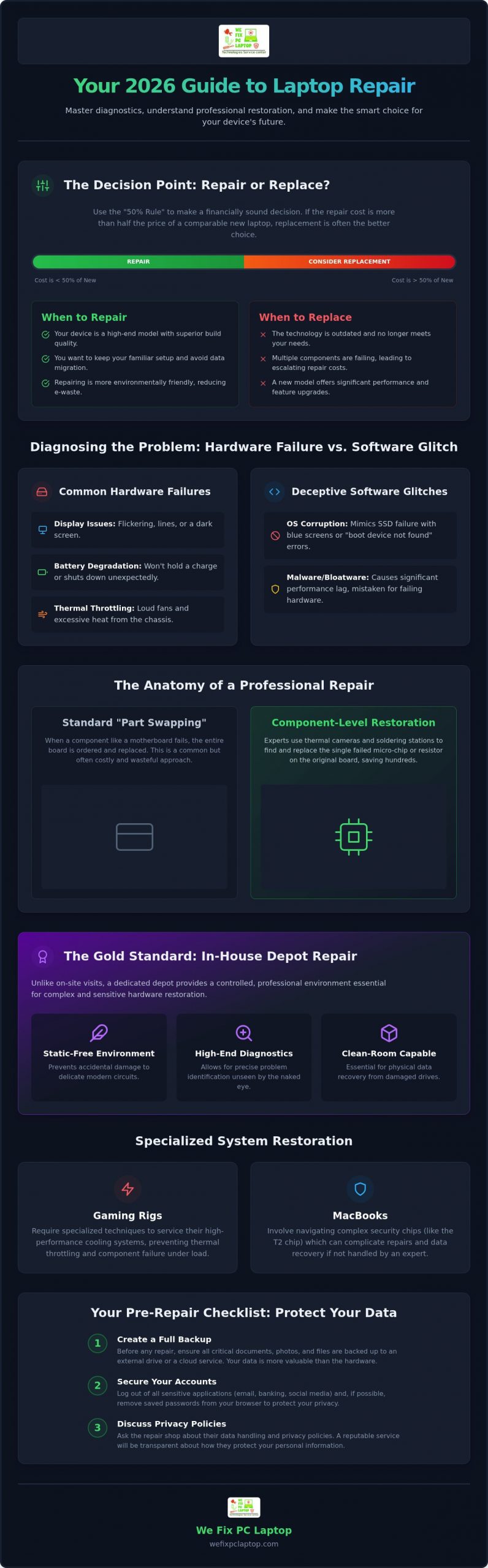
Deciding whether to invest in a professional laptop repair or buy a new machine often comes down to the “50% Rule.” If the cost of a professional restoration exceeds half the price of a comparable new equivalent, you should consider a replacement. However, many high-end machines remain prime candidates for restoration because their build quality far exceeds that of modern, budget-friendly models. Fixing a premium laptop often yields a like-new experience for a fraction of the cost of a modern replacement.
Common Hardware Failures and Their Symptoms
Hardware issues often start small before becoming catastrophic. Flickering or dark displays are classic signs that you need a laptop screen repair. You might also notice battery degradation, where the notebook no longer holds a reliable charge or shuts down unexpectedly even when the meter shows plenty of power. Another red flag is thermal throttling. If your fans are constantly loud and the chassis feels hot to the touch, your internal cooling system likely needs a professional cleaning to prevent permanent component damage.
Software vs. Hardware: Narrowing Down the Issue
It’s easy to mistake a software glitch for a hardware disaster. Operating system corruption can mimic the symptoms of a physical SSD failure, leading to blue screens or “boot device not found” errors. While hardware failures require physical intervention, many performance lags are caused by malware or bloatware that bogs down modern systems. Determining the root cause is the first step toward a functional machine. Thermal runaway occurs when a component generates more heat than the cooling system can dissipate, leading to an uncontrolled temperature increase and an immediate hardware shutdown.
The Anatomy of Professional Laptop Restoration
Professional restoration goes far deeper than the surface level part-swapping you might find at a big-box retailer. While many shops simply order a new motherboard when yours fails, a high-quality laptop repair involves component-level work. This means identifying the specific tiny chip or resistor that has failed and replacing it using precision soldering stations and thermal imaging cameras. These tools allow technicians to see heat signatures that reveal short circuits invisible to the naked eye. By fixing the original board, we can often save you hundreds of dollars compared to the cost of a full manufacturer replacement.
The setting of these repairs matters just as much as the tools used by the technician. This is why our in-house “Depot Repair” model is considered the gold standard for hardware fixes. Unlike a quick on-site visit where a technician is limited by the tools they can carry, a dedicated depot provides a controlled, static-free environment with high-end diagnostic equipment. For sensitive tasks like recovering files from a physically damaged drive, a clean-room environment is essential. Even a single microscopic dust particle can cause further data loss on an exposed drive platter, making a professional setting non-negotiable for critical data restoration.
Logic Board and Internal Circuitry
The logic board is essentially the brain of your device, and diagnosing it requires deep expertise in electrical engineering. Technicians look for specific power rail issues or blown capacitors that prevent the system from receiving energy. Liquid damage restoration is one of the most complex tasks handled at a professional notebook repair shop. When a spill occurs, the primary goal is to neutralize corrosion and repair the damaged traces on the circuitry. Attempting a DIY fix on a logic board often leads to permanent device failure because modern circuits are incredibly delicate. If you’ve had a spill, it’s best to reach out for a professional assessment before the corrosion spreads further into the internal layers.
Screen and Hinge Mechanics
Modern laptops feature bezel-less displays with integrated webcams and sensors, making them much more complex to service than older models. A broken hinge might seem like a minor cosmetic annoyance, but it’s actually a structural emergency for your hardware. The hinge acts as the gateway for the fragile display and antenna cables. When it fails, it can pinch or sever these internal wires, leading to a much more expensive repair. You can use this notebook screen repair checklist to assess the severity of your damage and determine if the internal mechanics are compromised. Addressing these mechanical issues early prevents the total loss of your display signal.
Repair Pathways: Manufacturer, Local Shop, or DIY?
Choosing the right path for your laptop repair depends on your budget, your timeline, and how much you value your data. While manufacturer services from giants like Apple, Dell, or HP offer the peace of mind of original parts, they often come with a hefty price tag and a frustratingly slow turnaround. You might lose your device for weeks as it travels to a centralized hub. In contrast, local professional shops provide a faster, more personalized experience. They often possess the component-level expertise to fix what a manufacturer would simply replace, saving you money while keeping your hardware in expert hands.
The DIY route might seem tempting, especially with the growth of online tutorials. However, modern laptops are more integrated and fragile than ever. A single static discharge from your fingertips or applying the wrong torque to a tiny screw can permanently kill a motherboard. In 2026, many components are soldered directly to the board, making home repairs a high-stakes gamble that could turn a simple fix into a total loss. Beyond the physical risks, you must consider your warranty. While 2026 “Right to Repair” laws have made parts more accessible, opening your device without the proper tools can still lead to denied claims if you cause secondary damage.
Evaluating Repair Shop Credibility
When searching for a local ally, look for a technician-owned business that prioritizes in-house repairs. Many shops act as middle-men, shipping your device to third-party depots, which increases the risk of data exposure and physical damage. A credible notebook repair shop will be transparent about their pricing from the start. They won’t hide behind a “diagnostic fee” trap; instead, they’ll provide a clear explanation of the failure and a firm quote for the restoration. Hands-on experience with complex logic board issues is often more valuable than a generic corporate certification.
Manufacturer Proprietary Hurdles
Even with modern legislation, manufacturers still use proprietary hurdles like “parts pairing” to restrict independent fixes. This software-level lock requires specific diagnostic tools to “introduce” a new part to the system. This is particularly prevalent in the Apple ecosystem, where professional Mac Air repairs require specialized technicians who understand how to navigate security chips. In 2026, Right to Repair laws require manufacturers to provide parts for up to seven years, but you still need a tech-savvy guide to install them without triggering software locks or security warnings.
Data First: Preparing Your Laptop for Repair
Your data is the most valuable part of your machine. While screens and keyboards can be replaced, your family photos and business records are often irreplaceable. Before you commit to a laptop repair, taking a few proactive steps will lower your stress and protect your privacy. This preparation ensures that even if a component needs a total replacement, your digital life remains intact and secure.
Start by performing a full system backup to an external drive or a secure cloud service. This is your ultimate safety net. Next, de-authorize sensitive software like creative suites or specialized accounting tools, and sign out of your financial accounts. It’s also wise to document the physical state of your device with clear photos. This creates a record of existing scratches or cracks before you hand it over. Finally, provide your technician with a written description of the issues. If your laptop only crashes when you open a specific app or after an hour of use, those details help us find the solution much faster.
Privacy Protocols and Technician Access
A common source of anxiety is whether a technician needs your login password. For most hardware-only repairs, a password isn’t strictly necessary. However, if the issue involves drivers or software conflicts, we may need to test the system in a live environment. To keep your personal folders private, you can set up a “Guest” account for testing purposes. If you use modern encryption like BitLocker or FileVault, ensure you have your recovery keys handy. These security measures are excellent for protection, but they can prevent a technician from verifying a fix if the operating system needs to be accessed for final testing. For businesses managing multiple devices, pairing strong endpoint security with properly maintained business computers Houston firms rely on can dramatically reduce the risk of data exposure during any service event.
Hard Drive and SSD Health
Drive failure often gives you warning signs before the final shutdown. If you hear clicking sounds or experience frequent “Blue Screen of Death” errors, your storage is likely on the verge of collapse. Professional shops prioritize creating a data clone before attempting any hardware fixes to ensure your files aren’t lost during the restoration process. Data recovery is a separate, specialized process from standard hardware repair that requires different tools and environments. If you’re worried about losing your files, it’s time to consult with our data security experts to ensure your information is protected before the repair begins.
Specialized Restoration: Gaming PCs and MacBooks
High-performance machines like gaming rigs and MacBooks are built differently than standard office hardware. They are precision instruments that require a specialized approach to laptop repair. A top-tier gaming laptop manages massive wattage through complex cooling arrays, while modern MacBooks rely on sophisticated T2 or M-series security chips. Generic repair shops often treat these devices like budget models, which is a mistake that can lead to degraded performance. For instance, high-refresh-rate gaming screens require specific signal matching; installing a generic panel can result in ghosting or a complete loss of the high-speed visuals you expect.
Stability depends on the quality of the components used during the restoration. We prioritize OEM or high-quality aftermarket parts to ensure your hardware maintains its original performance standards. Using a sub-par battery or a low-grade thermal pad in a high-wattage environment is a recipe for future failure. Our goal is to return a device that feels exactly as it did the day you unboxed it, with every security feature and performance metric fully intact.
Restoring Peak Gaming Performance
Thermal management is the most common hurdle for gaming laptops. Over time, factory thermal paste dries out, leading to high temperatures and performance throttling. We perform precision GPU re-pasting and fan optimization to restore your cooling system’s efficiency. Beyond cooling, we help users meet 2026 gaming requirements by upgrading RAM and NVMe storage for faster load times. We also handle the intricate work of fixing mechanical keyboard failures and RGB controller issues, ensuring your rig looks and feels as good as it plays.
The We Fix PC Laptop Advantage
We believe in a “Repair, Don’t Replace” philosophy that can save you thousands of dollars. By leveraging in-house depot computer repair, we provide the level of board-level work that big-box retailers simply won’t touch. Our technician-owned business, led by Ken, understands that professional users can’t afford downtime. That’s why we offer 24/7 emergency support to get your critical hardware back in service immediately. Whether it’s a liquid-damaged MacBook or a bricked gaming PC, we focus on total resolution and data well-being, treating every device as a valued part of our community’s digital ecosystem.
Secure Your Device’s Future Today
Restoration is more than just a quick fix; it’s a strategic investment in your digital continuity. By applying the 50% rule and prioritizing data privacy, you can extend your machine’s life while avoiding the steep costs of a total replacement. Whether you’re facing a complex logic board failure on a MacBook or thermal throttling on a high-end gaming rig, specialized expertise ensures your hardware returns to peak performance without compromising your security. Every laptop repair should begin with a data-first mindset, ensuring your irreplaceable files are protected before any hardware work starts.
As a technician-owned business, we provide the specialized care your high-end hardware deserves. We focus on secure, in-house depot services for gaming PCs and MacBook logic boards, ensuring your device never leaves our expert hands. If you’re in a technical crisis, our 24/7 emergency on-site support is ready to help you transition from frustration to total resolution. Don’t let a hardware failure stand in the way of your productivity or your peace of mind.
Get a Fast, Professional Laptop Repair Quote Today
You deserve a laptop that performs like new, and we’re here to help you restore your digital lifeline with confidence and speed.
Frequently Asked Questions
How much does the average laptop repair cost in 2026?
The cost of restoration depends entirely on the complexity of the failure and the availability of specific components. While simple fixes like battery swaps or fan cleanings are relatively affordable, specialized logic board restoration or high-end screen replacements represent a larger investment. We always provide a clear, transparent quote after a diagnostic so you can decide if the repair fits your budget.
How long does a professional laptop repair typically take?
We understand that you need your device back quickly, so we offer same-day service for many common hardware issues. Standard repairs like screen or keyboard replacements are often completed within 24 hours. More complex laptop repair scenarios involving liquid damage or board-level soldering may take a few business days to ensure every circuit is tested and stable.
Will I lose my data if I get my laptop screen replaced?
You will not lose your data during a screen replacement because the storage drive is not involved in the repair. This is a peripheral fix that focuses strictly on the display assembly and internal video cables. However, as a data-first shop, we still recommend having a current backup of your files before any service as a standard safety precaution.
Is it better to go to a manufacturer or a local repair shop?
Manufacturer services offer guaranteed parts but often involve long wait times and higher costs due to their “replace over repair” policies. Local professional shops provide a faster, more personalized experience and can perform component-level fixes that manufacturers won’t attempt. This approach often saves you money while keeping your original hardware and data intact.
Can a spilled liquid laptop be truly fixed?
Yes, liquid damage can be resolved if you act quickly and avoid the temptation to turn the device on. We use specialized cleaning processes to neutralize corrosion and repair damaged traces on the logic board. Professional restoration is much more effective than home remedies like rice, which can actually trap moisture and accelerate internal damage.
What should I do if my laptop won’t turn on at all?
First, check your power adapter and charging port for any visible debris or damage. If the charger is functional but the device remains unresponsive, the issue is likely a failed battery or a short circuit on the motherboard. Bring your machine in for a professional diagnostic so we can pinpoint the exact failure and offer a solution.
Do you offer warranties on laptop hardware repairs?
Every professional repair should come with a guarantee of quality and performance. We stand behind our work with a warranty on both the parts installed and the labor performed. This provides you with peace of mind knowing that your device has been restored to a high standard and that we are here to support you if any issues arise.
Can I upgrade my laptop’s processor or graphics card during a repair?
Most modern laptops in 2026 have the processor and graphics card soldered directly to the motherboard, making them impossible to upgrade individually. If your machine feels slow, we often recommend upgrading your RAM or moving to a faster NVMe storage drive instead. These upgrades provide a noticeable boost in speed and are a cost-effective way to modernize your current hardware. Organizations looking to scale their technology infrastructure can also explore purpose-built business computers Houston professionals depend on for reliable, enterprise-grade performance.
- Laptop Repair Near Me: How to Know When Your Laptop Needs Professional Repair
- How to Replace Keyboard on MacBook Pro
- How to Recover Data from a Failed Hard Drive: Step-by-Step
- How to Fix an Overheating Laptop: A Complete Repair Guide
- How to Fix a Water Damaged Laptop: Expert Tips
- Can a Broken Laptop Screen Be Repaired? Everything You Need to Know Before Replacing Your Device
- How to Find the Best Notebook Repair Shop: The 2026 Expert Guide