.svg)
.svg)
.svg)




Comprehensive Laptop Screen Repair Guide: 2026 Professional Solutions
Is that spiderweb crack on your display really a sign that you need to spend over a thousand dollars on a new machine? It’s completely natural to feel a wave of anxiety when your screen flickers or shatters, especially if you’re worried about high replacement costs or losing access to your private files during a laptop screen repair. You’ve worked hard for your tech, and the thought of it sitting in a cold corporate repair shop for weeks while your work or gaming sessions stall is incredibly frustrating.
We’re here to turn that technical crisis into total relief. This guide provides a clear roadmap to restoring your display to peak performance without the typical stress. You’ll learn exactly how to identify different types of damage, compare professional costs for brands like Dell and MacBook, and choose a service partner that prioritizes your data security. We’ll walk you through the financial reality of repairs versus replacements in 2026, ensuring you have the confidence to make the best decision for your budget and your digital life.
Key Takeaways
- Recognize the critical difference between surface cracks and internal display failures before a minor issue leads to a total system blackout.
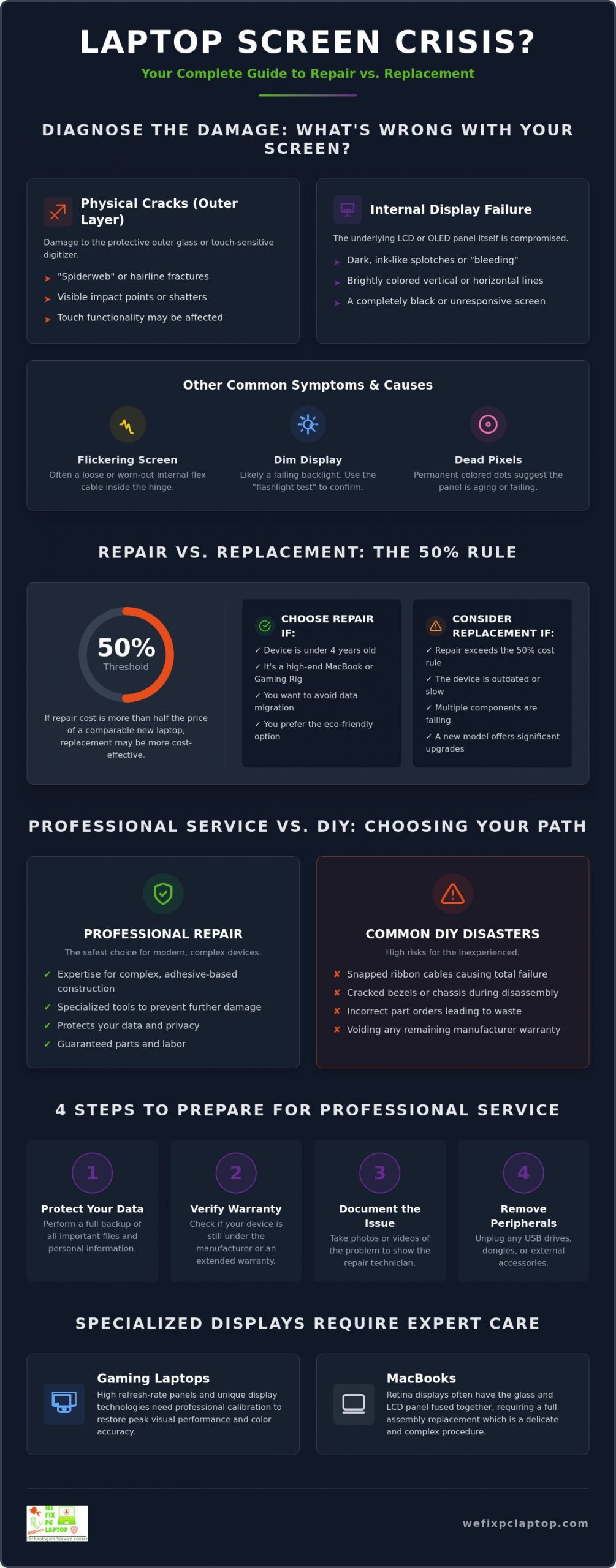
- Apply the “50% rule” to determine if your device warrants a professional laptop screen repair or if it’s more cost-effective to invest in a new machine.
- Protect your hardware from common DIY disasters like snapped ribbon cables by understanding the complexity of modern adhesive-based construction.
- Learn the essential steps to prepare your device for service, including data protection and manufacturer warranty verification for brands like HP and Apple.
- Discover why specialized displays on gaming rigs and MacBooks require expert calibration to maintain their high-performance visual standards.
Identifying the Signs You Need Laptop Screen Repair
Don’t ignore that tiny hairline fracture in the corner of your screen. While it might seem like a minor cosmetic nuisance today, it’s often the precursor to a total system blackout. Pressure from closing the lid or even subtle temperature changes can cause that small crack to expand, eventually severing the delicate connections within the panel. To get a precise handle on what’s going wrong with your hardware, you can use The Ultimate Notebook Screen Repair Checklist: 2026 Expert Guide to systematically diagnose your device before the damage worsens and affects your productivity.
Physical Cracks vs. Internal LCD/OLED Failure
Most modern laptops utilize a Liquid-crystal display (LCD) or an OLED panel to produce the crisp images you rely on. When you see “spiderweb” cracks, you’re usually looking at damage to the protective outer glass or the digitizer. This is common in high-end ultrabooks where the glass is incredibly thin. However, if you notice dark, ink-like spots or colorful vertical lines, the internal liquid or pixels have been compromised. This “bleeding” effect indicates that the internal hardware is failing, even if the outer glass feels smooth to the touch. If you own a touch-screen laptop, the laptop screen repair process is more complex because the touch-sensitive digitizer is often fused directly to the display, requiring a full assembly replacement rather than just a glass swap.
Flickering, Dimming, and Dead Pixels
Is your screen flickering like a strobe light every time you move the lid? This could be a simple software driver conflict, but it more likely points to a worn-out or loose flex cable buried inside the hinge. For older models, a screen that suddenly goes dark might involve failing backlights or inverter issues. You can perform a simple “flashlight test” to find out. Shine a bright light directly against the glass at an angle. If you can see your desktop icons faintly under the light, your backlight has likely failed while the panel itself still functions. This is a clear sign you need a professional laptop screen repair to restore the internal lighting system. Dead pixels, which appear as tiny permanent dots of black, white, or red, are different. A few scattered dots might be a minor manufacturing defect, but a cluster appearing suddenly suggests the panel’s lifespan is nearing its end due to heat or age.
Identifying these symptoms early saves you from the frustration of a sudden failure during a critical meeting or gaming session. Whether it’s a flickering backlight or a shattered OLED, knowing what you’re looking at is the first step toward a total resolution.
Repair vs. Replacement: The Cost-Benefit Analysis for 2026
Deciding between a repair and a brand new purchase is often the most stressful part of a technical crisis. You don’t want to throw good money after bad, but you also don’t want to waste a perfectly capable machine. A standard guideline in the industry is the “50% Rule.” If a professional laptop screen repair costs more than half the price of a comparable new machine, it might be time to move on. However, for most modern laptops under four years old, restoration is usually the smarter financial move. This is especially true for high-end MacBooks and gaming rigs, where the internal components remain powerful enough to handle heavy software demands for years to come.
Beyond the raw numbers, there’s a significant environmental benefit to choosing restoration over replacement. Electronic waste is a growing global concern. By repairing your display, you’re keeping heavy metals and plastics out of landfills while extending the life of your hardware. If you’re a Dell user, you should specifically review the Dell laptop screen replacement cost to see how it aligns with your budget. Most common repairs for these models remain significantly more affordable than purchasing a new XPS or Latitude of equal quality.
Evaluating the Age and Specs of Your Device
Is your current processor still snappy? If you’re running a relatively recent i7 or Ryzen chip, your laptop is likely more than capable of handling today’s heaviest applications. Buying a new entry-level laptop to avoid a repair often results in a downgrade in build quality and screen resolution. You also have to consider the “data migration tax.” Setting up a new PC, moving files, and re-installing specialized software can take hours of downtime. A fast, professional laptop screen repair allows you to get back to work with your familiar setup intact.
The Hidden Value of Your Current Hardware
Your current laptop might have hidden advantages that new budget models lack. If you’ve already invested in custom RAM or a high-capacity SSD, your machine likely outperforms the base models sitting on retail shelves today. Many users also find that older business-grade machines like the ThinkPad or Latitude series offer superior keyboard tactile feedback and a wider array of ports compared to the limited options on newer, thinner designs. Preserving these features through a display fix keeps your workflow comfortable. Even if you eventually upgrade, having a fully functional secondary device provides a vital safety net for emergencies. If you’re feeling overwhelmed by the choice, our team is always ready to help you evaluate your repair options with honest, expert advice.
Professional Repair vs. DIY: Choosing the Right Path
It’s tempting to pull up a video tutorial and try to handle a laptop screen repair yourself to save a few bucks. However, the hardware landscape of 2026 is vastly different from the user-serviceable machines of the past. Modern laptops are masterpieces of engineering held together by industrial-grade adhesives, proprietary screws, and microscopic ribbon cables. Successfully opening a device without cracking the bezel or damaging the internal frame requires specialized heat guns and precision suction tools that most home toolkits simply don’t include.
Choosing in-house depot computer repair is the safest alternative for anyone who values their data and their device’s long-term health. When you send your machine to a professional depot, it enters a controlled environment designed specifically for hardware restoration. This eliminates the guesswork and the high-stakes risks associated with kitchen-table repairs where one wrong move can turn a simple screen fix into a permanent paperweight.
The Hidden Dangers of DIY Screen Replacement
One single spark of static electricity from your fingertip can instantly fry a motherboard’s delicate circuits during a screen swap. Beyond the risk of a total system short, sourcing the right parts is a significant challenge for DIYers. Many online marketplaces are flooded with low-quality third-party knockoffs that look identical to the original but fail to deliver. These “cheap” panels often suffer from poor color accuracy, reduced brightness, and uneven backlighting that ruins the visual experience of a high-end machine. Professional shops have access to genuine OEM panels that match your original specs perfectly, ensuring your display looks exactly as it did the day you bought it.
What to Look for in a Professional Repair Partner
Not all repair shops are created equal. You need a partner that understands the specific architecture of your device, whether it’s a high-refresh-rate gaming panel or a Retina display. Look for these key indicators of quality:
- Technician Expertise: Ensure the shop has documented experience with your specific brand and model.
- Comprehensive Warranty: A reliable partner stands behind their work with a warranty that covers both the replacement part and the labor involved.
- Specialized Focus: A dedicated laptop and PC shop is always a better choice than a general “cell phone and tablet” store. Laptops have complex thermal management and hinge assemblies that require a level of skill many smartphone technicians simply haven’t mastered.
Trusting your laptop screen repair to an expert doesn’t just fix your display. It protects your entire investment and gives you the peace of mind that your machine is being handled with the care it deserves.
How to Prepare Your Laptop for Professional Screen Service
Getting your device ready for a laptop screen repair is about more than just putting it in a box. It’s the first step in ensuring a smooth, fast restoration. Before you drop off your device or ship it for national service, take a moment to verify your warranty status. Visit the official support pages for manufacturers like HP, Lenovo, or Apple to see if your coverage includes accidental damage. Even if your warranty has expired, knowing the exact status helps your technician understand the machine’s history and which genuine parts are required for the fix.
Document the current state of your hardware before it leaves your hands. Use your smartphone to take clear, high-resolution photos of the screen from multiple angles. Capture images with the power both on and off to show the “bleeding” pixels or the physical cracks. Write down a few specific diagnostic notes to include with the device. If the flickering only happens when the lid is at a 45-degree angle, or if the touch response is dead only in the top-right corner, tell us. These specific details can shave hours off the diagnostic phase and significantly speed up your repair timeline.
Backing Up Critical Data and Privacy
Your data is your most valuable asset. Before handing over your laptop, use a reliable cloud service or an external drive to secure your sensitive files. While our professional technicians prioritize data integrity, hardware testing sometimes requires access to system settings to verify color calibration and touch sensitivity. You should never feel forced to share your primary login password. Instead, enable “Guest Mode” or create a temporary user account with limited privileges. This simple step allows our team to verify the new display’s performance while keeping your personal documents and private browsing history completely locked away.
Understanding the In-House Depot Repair Process
Once your laptop arrives at our specialized facility, it enters a methodical restoration cycle. The journey begins with a full intake inspection to confirm the reported damage and check for any secondary issues caused by the initial impact. Next, the precision testing phase involves checking the replacement panel for dead pixels and ensuring perfect color uniformity across the entire display surface. After the final assembly, every machine undergoes a rigorous burn-in test. We monitor the screen under sustained use to ensure the internal connections are secure and that the display remains stable under the thermal stress of a long workday. Ready to get back to peak performance? You can schedule your professional repair today and let our experts handle the technical heavy lifting.
Specialized Screen Solutions for MacBooks and Gaming Laptops
High-performance machines require a level of precision that goes far beyond a standard laptop screen repair. While a basic office laptop might be straightforward, gaming rigs and premium ultrabooks operate under entirely different technical rules. If you’re a competitive gamer or a creative professional using a workstation, your display isn’t just a piece of glass. It’s a finely tuned instrument that requires expert calibration to maintain its factory standards. A generic repair shop might get the lights back on, but they often fail to preserve the high-end features that made you buy the machine in the first place.
High-Performance Display Fixes for Gamers
Gaming laptops equipped with 144Hz or 240Hz refresh rates aren’t plug-and-play devices. Sourcing the correct high-response-time panel is only half the battle. Without proper calibration, you might experience ghosting or input lag that ruins your competitive edge. We also pay close attention to the structural integrity of your machine. Gaming laptop hinges are notoriously prone to failure because of the heavy-duty plastics and frequent use they endure. During the repair process, we often reinforce these hinges to prevent future breaks. We also ensure that the new display assembly doesn’t interfere with your laptop’s complex heat management systems, keeping your GPU cool during intense sessions.
Precision MacBook Screen and Logic Board Care
Apple hardware presents its own set of unique challenges. For those seeking mac air repairs, it’s vital to understand that the display is deeply integrated with the rest of the system. Modern MacBooks use T2 or M-series security chips that pair the display specifically to the logic board. Simply swapping a screen without the right diagnostic tools can lead to the loss of True Tone functionality or even system-wide security lockouts. This serialization means your technician needs more than just a screwdriver; they need specialized software to re-pair the components correctly.
Many Apple users also face the dreaded “Flexgate” issue, where the backlight fails because of a fragile flex cable. In these cases, what looks like a shattered screen might actually be a deeper hardware failure that requires logic board diagnostics. We focus on preserving the color accuracy and retina-level detail you expect from your Mac. Whether you’re dealing with a flickering backlight or a cracked OLED, a professional laptop screen repair ensures your high-end investment continues to perform like new. Don’t settle for a generic fix when your specialized hardware deserves a technician who understands its unique architecture.
Restore Your Display and Your Productivity Today
A technical crisis doesn’t have to mean the end of your favorite device. You now have the knowledge to make an informed decision for your hardware, from applying the “50% rule” to understanding why modern, high-performance displays require more than just a standard tool kit. By prioritizing your data security and verifying your warranty status, you’ve already taken the most important steps toward a total resolution. Your laptop is a vital part of your daily life, and it deserves a restoration process that matches its sophisticated engineering.
Our team specializes in the complex needs of MacBooks and high-end gaming PCs, providing expert in-house depot service that retail chains simply can’t match. Whether you’re facing a shattered OLED or a flickering backlight, we provide the specialized care needed to protect your investment, backed by 24/7 emergency support for those urgent moments. Choosing the right partner for your laptop screen repair ensures that your machine returns to you in peak condition, with every pixel and connection perfectly restored.
Don’t let a damaged screen slow you down another day. Get a Professional Laptop Screen Repair Quote Today and experience the relief of a fully functional, high-quality display. We’re here to help you get back to work and play with total confidence.
Frequently Asked Questions
Is it worth replacing a screen on a 5-year-old laptop?
Replacing a screen on a five-year-old laptop is usually only worth it if the machine was a high-end workstation or a premium MacBook when purchased. Since the typical lifespan of a laptop is between three and eight years, a five-year-old budget model is likely nearing the end of its useful life. If the repair cost exceeds 50% of the price of a new, faster machine, investing in a replacement is often the more sensible financial choice.
How much does a professional laptop screen repair typically cost?
A professional laptop screen repair typically costs between $150 and $350 for most common models in 2026. While basic LCD panels for Chromebooks might be as low as $129, high-end OLED or high-refresh-rate gaming screens can exceed $400 or even $600. These market rates include both the specialized replacement part and the expert labor required for a safe, calibrated installation.
Can I still use my laptop with a cracked screen and an external monitor?
You can absolutely use your laptop with a cracked screen by connecting it to an external monitor via HDMI, DisplayPort, or USB-C. This is an excellent temporary solution that allows you to continue working or back up your critical files before sending the device for service. It also helps confirm that the internal graphics card and motherboard are still functioning correctly despite the physical display damage.
Will a screen replacement void my manufacturer warranty?
Standard manufacturer warranties are generally voided if an unauthorized technician opens the device or performs a repair. If your laptop is still under its original coverage period, check with the manufacturer’s support team first to see if accidental damage is covered. For out-of-warranty machines, choosing a professional repair partner who offers their own parts and labor warranty provides the protection you need for your investment.
How long does a professional depot screen repair take to complete?
A professional depot repair typically takes between one and three business days, depending on part availability and the specific model. While same-day services are available for many common laptops, specialized gaming displays or Retina panels might require a short waiting period for precise calibration and burn-in testing. The goal is always to minimize your downtime while ensuring the highest level of hardware integrity.
What is the difference between an OEM and a third-party replacement screen?
OEM screens are manufactured by the original brand and match your laptop’s factory specifications for color, brightness, and resolution exactly. Third-party screens are often cheaper alternatives that may lack the same level of quality control or color accuracy. Choosing an OEM replacement during your laptop screen repair ensures that your display looks and performs exactly like the original did on the day you bought it.
Can a cracked screen cause other hardware problems inside the laptop?
A cracked screen can definitely lead to secondary hardware issues if the damage is left unaddressed for too long. Tiny glass shards can fall into the keyboard assembly or damage the delicate ribbon cables that connect the display to the motherboard. Over time, the uneven pressure from a shattered panel can also cause the backlight to short out or lead to a total system blackout.
Do I need to wipe my data before sending my laptop for screen repair?
You don’t need to wipe your data, but you should always perform a full backup to a cloud service or external drive before any hardware service. Professional repair facilities prioritize your privacy and typically only need access to a guest account to verify display functionality. Setting up a temporary account allows the technician to check for dead pixels and touch sensitivity without ever seeing your personal files or login credentials.
- Depot Repair vs. On-Site Repair: How to Best Repair Any Computer in 2026
- Gaming PC Repair: The 2026 Guide to Restoring Peak Performance
- Laptop Repair or Replacement? How to Decide Before Spending Hundreds of Dollars
- Why Is My Laptop Suddenly Running Slow? 12 Problems a Computer Repair Technician Can Fix
- Dell Laptop Screen Replacement Cost: 2026 Pricing and Repair Guide
- The Ultimate Notebook Screen Repair Checklist: 2026 Expert Guide
- How to Navigate PC Repair in 2026: A Step-by-Step Guide to Saving Your Computer