.svg)
.svg)
.svg)




Why Is My Laptop Suddenly Running Slow? 12 Problems a Computer Repair Technician Can Fix
When you open your laptop to complete some work, everything feels excruciatingly sluggish. Your browser freezes, programs take a long time to launch, and even basic chores become annoying. This is one of the most frequent complaints that computer repair companies receive on a daily basis, so if it sounds similar to you, you’re not alone.
The good news? Seldom does a sluggish laptop indicate that a new one is necessary. Most of the time, the problem is caused by a few known factors, such as an outdated hard drive or a clogged starting process, many of which can be identified and fixed at a reasonable cost. It’s important to know what’s truly going on beneath the hood, what you can do on your own, and when it makes sense to hire a local computer repair specialist who can accurately diagnose the issue before you think about replacing your machine.
What Causes a Laptop to Suddenly Become Slow?
Seldom does a laptop slow down for a single cause. Usually, it’s a confluence of minor problems that accumulate over time. Real laptop diagnostics begin with determining the underlying reason.
Typical offenders include of:
- Aging hardware: The demands of current software are simply too much for older CPUs and mechanical hard drives to handle.
- Background apps: These programs use up memory and processing power while operating quietly in the background.
- Spyware and malware: are examples of hidden applications that may stealthily use up system resources.
Full storage: Your system has no breathing room when your drive is almost full. - Failing SSD/HDD: A drive that is getting close to the end of its life significantly reduces read/write performance.
- Overheating: Your CPU must reduce performance in order to defend itself from excessive heat.
- Pending Windows updates: Performance might be subtly hampered by incomplete or stalled upgrades.
- System files: That are corrupted might result in latency and instability.
- Low RAM: When your laptop has insufficient memory, it continuously swaps data, which slows down everything.
- Outdated or corrupted drivers: Bottlenecks are caused by poor hardware-software communication.
A few of them are straightforward software solutions. Others indicate actual hardware repair needs, which is when a qualified technician’s computer troubleshooting comes in handy.
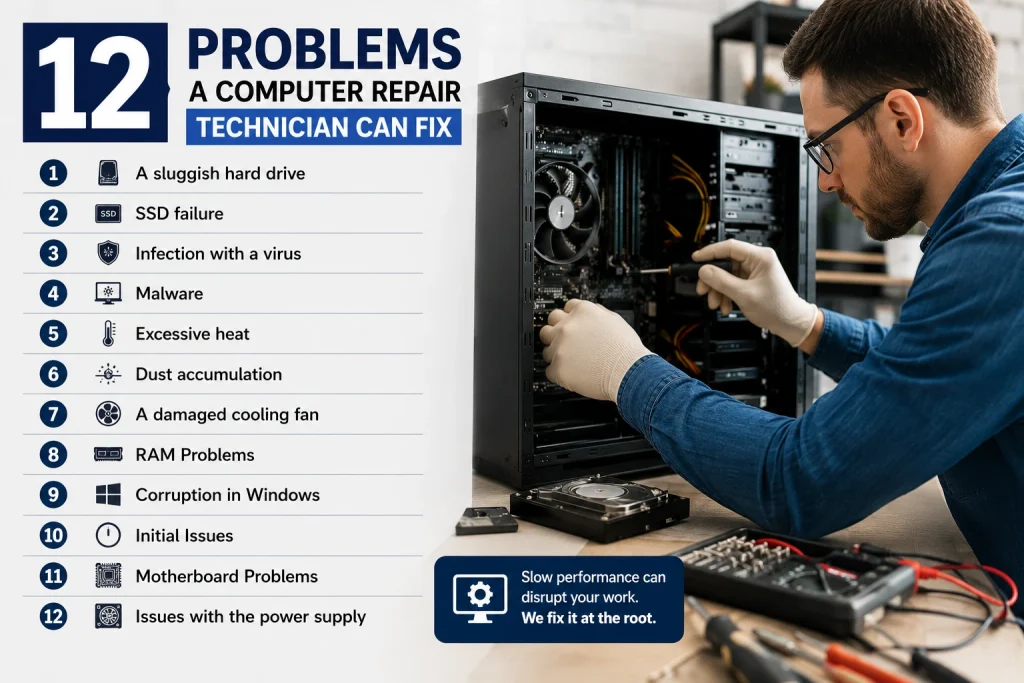
12 Problems a Computer Repair Technician Can Fix
1. A sluggish hard drive
Symptoms include frequent lag, delayed file access, and lengthy boot times. Cause: Age and fragmentation cause mechanical drives to slow down.
Are you able to solve it on your own? Partially, disk cleansing provides short-term assistance.
When to contact a technician: Professional SSD upgrades can significantly increase speed if performance doesn’t improve.
2. SSD failure
Symptoms include abrupt crashes, files that won’t save, and random freezes. Cause: The read/write lifetime of SSDs is limited.
Are you able to solve it on your own? No, diagnostic instruments are needed for this.
When to call a technician: Right away to avoid data loss and, if necessary, to set up safe data recovery.
3. Infection with a virus
Symptoms include pop-ups, slow browsing, and the launching of unknown applications. Cause: Resource consumption by malicious software.
Are you able to solve it on your own? With antivirus scans, the answer is usually yes.
When to contact a technician: If the virus has corrupted system files or continues to exist after scans.
4. Malware
Symptoms include delayed starting, intrusive toolbars, and redirected searches. Cause: Background processes that are hidden.
Are you able to solve it on your own? Occasionally, using reliable virus removal software.
When to contact a technician: If removal tools don’t work or malware keeps coming back.
5. Excessive heat
Symptoms include a noisy fan, a laptop that is hot to the touch, and sporadic shutdowns. Cause: Deteriorated internal cooling or blocked vents.
Are you able to solve it on your own? Simple cleaning is beneficial.
When to hire a technician: For replacement of thermal paste and extensive cleaning.
6. Dust accumulation
Symptoms include increased temperatures, decreased ventilation, and fan noise. Cause: After months of usage, dust builds up inside fans and vents.
Are you able to solve it on your own? External assistance can be provided via compressed air.
When to hire a technician: To safely clean interior parts without causing damage.
7. A damaged cooling fan
Symptoms include abrupt shutdowns, overheating, and no fan sound. Cause: A jammed or worn-out fan motor.
Are you able to solve it on your own? Without experience, it is not advised.
When to hire a technician: Replacing a fan requires precise hardware repair.
8. RAM Problems
Symptoms include system freezes, program crashes, and multitasking slowdown. Cause: Memory modules that are insufficient or defective.
Are you able to solve it on your own? For many models, a RAM increase is feasible.
When to contact a technician: If you require diagnostics or are uncertain about compatibility.
9. Corruption in Windows
Blue displays, error warnings, and programs that won’t launch are symptoms. Cause: Unsuccessful upgrades or corrupted system files.
Are you able to solve it on your own? Sometimes simple repair tools are effective.
When to hire a technician: For a thorough, expert Windows repair that preserves data.
10. Initial Issues
Symptoms: The laptop becomes stuck on the logo screen and won’t start up. Cause: Failing storage or corrupted boot files.
Are you able to solve it on your own? In rare cases, without technological expertise.
When to contact a technician: Immediately, as this frequently indicates more serious hardware problems.
11. Motherboard Problems
Symptoms include power outages, malfunctioning ports, and sporadic shutdowns. Cause: Component failure, liquid leaks, or physical harm.
Are you able to solve it on your own? No.
Calling a specialist is always a good idea because motherboard repair calls for specific tools.
12. Issues with the power supply
Symptoms include the laptop’s inability to charge, rapid battery depletion, and sporadic shutdowns. Cause: An old battery, a defective charger, or a port.
Are you able to solve it on your own? Replacing a charger is easy.
When to call a technician: For battery replacement or problems with internal power.
Indications to See a Local Computer Repair Technician
Certain symptoms shouldn’t be put off. Go right away to a nearby computer repair shop if you observe:
- Frequent freezing or crashes
- Errors with blue screens
- Unplanned shutdowns
- A fragrance of burning
- A laptop that often overheats
- Swelling of batteries
- Physical harm, such as a broken screen
- Extremely sluggish boot times
- Any indications of possible data loss
Our laptop screen repair services can swiftly and securely restore your display if it is broken or exhibiting visual issues.
Is It Possible to Fix a Slow Laptop Without Replacing It?
Yes, most of the time. Replacement ought to be the final option rather than the first. Numerous performance problems can be fixed by:
- RAM upgrades to improve multitasking
- SSD replacements for outdated, sluggish drives
- Reinstalling Windows will remove corrupted files.
- To return to normal speed, remove the virus.
- Cleaning the inside to prevent overheating
- Replacing thermal paste to improve heat management
- Updates to drivers for improved hardware connection
- Specific hardware fixes for particular malfunctioning parts
The precise mix of things that can revive your laptop can be ascertained by a skilled expert.
Repair vs Replace
| Factor | Repair Makes Sense | Replacement Makes Sense |
| Laptop Age | Under 4–5 years old | Over 5–6 years old |
| Repair Cost | Less than 40–50% of a new laptop’s price | Repair costs approach new laptop pricing |
| Performance | Slowness tied to fixable causes (RAM, storage, software) | Multiple core components failing at once |
| Hardware Condition | Motherboard and CPU still healthy | Motherboard or CPU damaged |
| Business Use | Files, licenses, and setup worth preserving | Business needs have outgrown the hardware |
| Gaming Use | Upgradable RAM/SSD can meet current needs | Graphics hardware can’t be upgraded |
| Student Use | Budget-friendly repair extends usability | Laptop can no longer handle coursework software |
| Long-Term Value | Repair extends usable life by 1–3 years | New laptop offers better long-term value |
In summary, repair is nearly always more cost-effective than replacement if your laptop is less than five years old and the issue is limited to one or two parts.
DIY Advice Prior to Contacting a Technician
Try these actions before scheduling a repair:
- Restart the laptop completely, not only in sleep mode.
- Eliminate any startup apps that aren’t needed.
- Get rid of temporary files.
- Do a thorough antivirus check.
- Verify the amount of storage space that is available.
- Update to the most recent version of Windows.
- Update out-of-date drivers.
- Empty the cache in your browser.
- Eliminate unnecessary files to free up storage space.
- Installing random “optimization” software should be avoided because many of them are more detrimental than beneficial.
If these actions don’t fix the slowdown, it’s probably a hardware problem, and you should speak with knowledgeable computer repair specialists.
How Time and Money Can Be Saved with Professional Laptop Repair
Repetitive do-it-yourself repairs might be more time-consuming than beneficial. Laptop repair experts provide:
- Precise diagnosis with the right instruments
- Repairs that are accurate and long-lasting rather than speculative
- Data security while the repairs are being made
- Parts and labor warranty coverage
- Authentic, interchangeable parts
- Quicker turnaround compared to trial-and-error debugging
- An extended lifespan for your laptop in general
Our expert laptop repair services are intended to get you back up and running with the least amount of downtime for hardware-related slowdowns.
Frequently Asked Questions
1. Why is my laptop acting so slowly all of a sudden?
Aging hardware, such as a failing hard drive, inadequate storage capacity, malware, or an excessive number of background processes are typically the causes of sudden slowdowns. Driver problems and Windows updates may also be involved. The precise reason may typically be determined in a matter of minutes with a brief diagnostic examination.
2. Can my laptop be sped up by a computer repair specialist?
Indeed. A specialist may determine if the delay is caused by malware, software problems, inadequate RAM, or a failing disk and implement the appropriate solution, which might be an SSD upgrade, a fresh Windows reinstall, or hardware repair.
3. If my laptop is sluggish, should I get a new one?
Not always. Repairing your laptop is typically less expensive than purchasing a new one if it is less than five years old and the essential parts are in good condition. Only when several significant components are failing does replacement make more sense.
4. What is the price of laptop repair?
The price varies according on the problem; software repairs are usually cheap, while component replacements, such as SSD or RAM upgrades, are more expensive. After identifying the precise issue, a technician may provide a precise price.
5. How long does it take to fix a laptop?
It is frequently possible to finish simple software fixes in a single day. Depending on the availability of parts, hardware fixes like replacing a motherboard or screen might take several days.
6. Is my PC sluggish because of a virus?
It is feasible. Malware and viruses operate covert programs that demand memory and CPU, resulting in discernible slowdowns. To rule this out, a thorough antivirus check is a smart place to start.
7. What distinguishes a failing SSD from a sluggish HDD?
While a failing SSD exhibits warning indicators like file corruption, crashes, or the drive not being identified, a sluggish HDD is frequently simply old or fragmented. An update typically has a positive effect on both.
8. Can my laptop sustain irreversible harm from overheating?
Indeed, extended overheating can reduce the lifespan of internal parts such as the battery and CPU. Long-term damage can be avoided with regular cleaning and adequate ventilation.
9. Do I have to make a backup of my data before fixing it?
It is always advised. Backing up crucial information in advance gives an additional degree of security, particularly for storage-related repairs, even if professionals take care to safeguard your data.
10. Where can I locate a trustworthy local computer repair specialist?
Seek out a store with honest pricing, authentic parts, and expertise in hardware and software repairs; ideally, they should provide diagnostics prior to beginning any repairs.
Important Lessons
- Most problems with a sluggish laptop may be fixed, so replacing it is rarely necessary.
- Full storage, virus, overheating, limited RAM, and aged disks are common culprits.
- Minor slowdowns can be fixed with simple do-it-yourself actions like deleting cache and upgrading drivers.
- Professional diagnostics are necessary for persistent problems like crashes, blue screens, or overheating.
- The largest performance gains are frequently obtained with SSD and RAM upgrades.
- For computers under five years old, repair is typically less expensive than replacement.
- Over time, a reputable computer repair specialist may help you save money and time.
In conclusion
Although a sluggish laptop might be annoying, it’s rarely a reason to panic or get a new one right away. The majority of performance problems, such as congested beginning applications or an old hard disk, may be identified and fixed without having to replace your complete computer. Start with the easy do-it-yourself solutions. If the problem continues, it’s a clear indication that a more serious issue, such as a failing drive, overheating, or hardware malfunction, has to be fixed by a professional.
Our laptop repair services can identify the precise problem and restore your computer to like-new condition if, despite attempting the fundamentals, your laptop is still sluggish. Also, our laptop screen repair services are prepared to assist if a damaged or flickering screen is a contributing factor.
- How to Fix an Overheating Laptop: A Complete Repair Guide
- How to Fix a Water Damaged Laptop: Expert Tips
- Can a Broken Laptop Screen Be Repaired? Everything You Need to Know Before Replacing Your Device
- How to Find the Best Notebook Repair Shop: The 2026 Expert Guide
- Laptop Screen Repair vs. Buying a New Laptop: Which Saves You More Money in 2026?
- The Ultimate Guide to Laptop Repair: Restoring Performance and Data in 2026
- Computer Repair Houston: 10 Signs Your PC Needs Professional Repair Before It Fails Completely