.svg)
.svg)
.svg)




Dell Laptop Screen Replacement Cost: 2026 Pricing and Repair Guide
Imagine you are finishing a critical legal brief or reviewing patient records when a single slip leaves your Dell XPS with a spiderweb of cracked glass. The immediate panic isn’t just about the damaged hardware; it’s the fear of losing access to your files or facing a repair bill that feels like a down payment on a new machine. Understanding the Dell laptop screen replacement cost doesn’t have to be a guessing game filled with high-stress quotes and technical jargon. You likely believe that a broken screen shouldn’t mean the end of a perfectly good laptop, and you are absolutely right. We are here to help you navigate the 2026 pricing landscape so you can make an informed decision without the corporate runaround.
In this guide, you will discover the exact factors that dictate your repair price, from the difference between premium 4K OLED panels and standard non-touch screens to the specific needs of Latitude and Inspiron models. We’ll show you how to identify a fair quote and why a professional depot repair can safely add two or more years to your device’s life. By the end, you’ll have the clarity you need to choose the best path forward for your data and your budget.
Key Takeaways
- Learn how panel technology and model-specific assemblies drive the Dell laptop screen replacement cost in 2026.
- Understand the pricing differences between business-class Latitude models and high-performance XPS series to set realistic budget expectations.
- Evaluate the hidden risks of DIY attempts against the precision of professional depot repairs that utilize specialized tools for modern, thin-bezel screens.
- Use our “Total System Health” framework to determine if a screen fix is a smart investment that will extend your laptop’s life by two or more years.
- Discover how local, expert-led services provide a faster, data-secure alternative so you don’t have to wait on manufacturer shipping cycles or navigate corporate call centers.
Understanding the Factors Influencing Dell Screen Replacement Costs
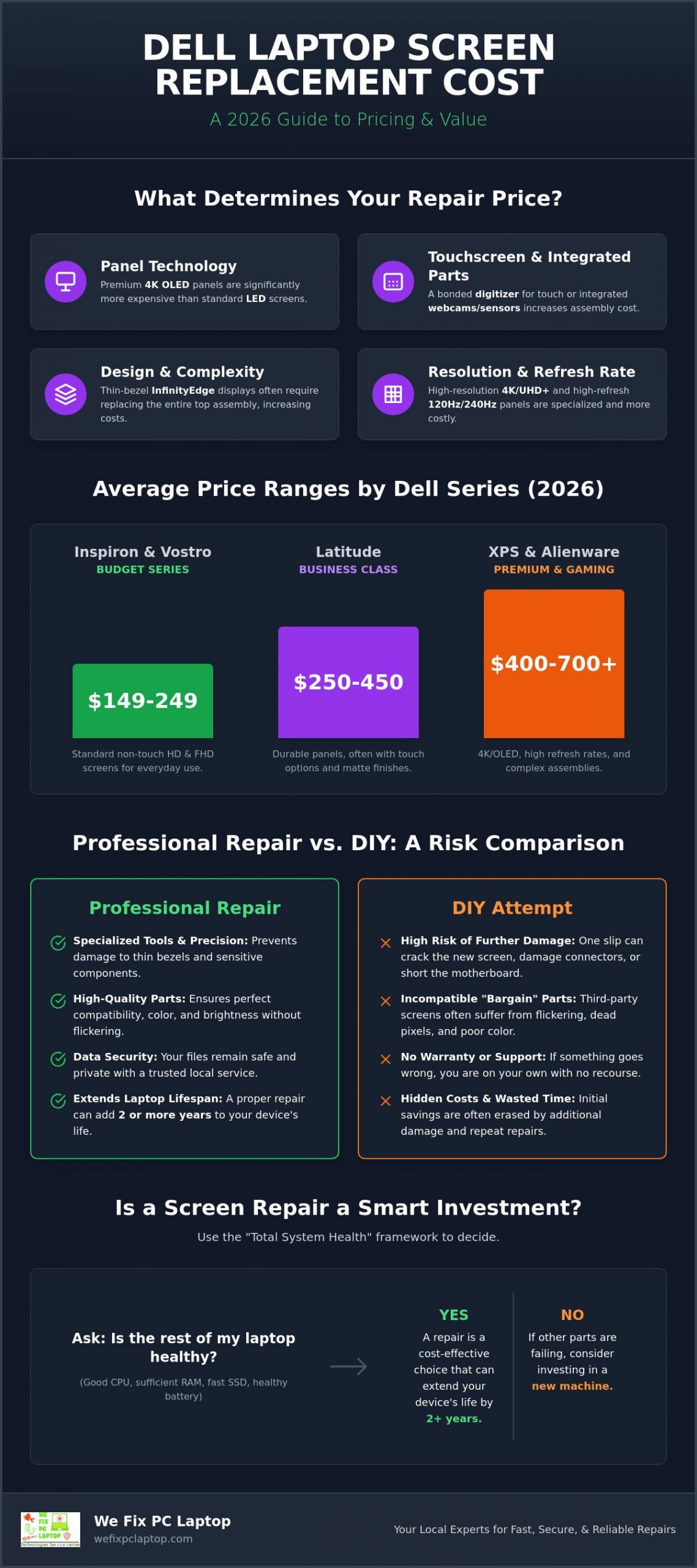
When you’re looking for a clear answer on the Dell laptop screen replacement cost, it’s helpful to realize that no two repairs are exactly alike. You might expect a flat fee for hardware fixes, but the reality of modern tech is more nuanced. Your specific price depends heavily on the technology tucked behind that glass. While a standard Inspiron might use a traditional LED panel, a high-end XPS or Alienware often utilizes sophisticated OLED technology. By 2026, OLED has become more common in premium models, providing stunning colors but requiring a higher investment when things go wrong.
Model complexity plays a massive role in the final quote. Dell’s popular InfinityEdge displays offer beautiful, bezel-less views, yet they require extreme precision to disassemble. These sleek designs often mean the screen is fused to the top assembly. Replacing just the glass isn’t always an option. This drives up both the part prices and the labor time required to ensure everything fits back together perfectly. Precision matters here. A technician must handle these thin-bezel units with care to avoid damaging the surrounding frame.
Don’t forget the extra components integrated into your laptop lid. Modern Dell machines house high-definition webcams, microphones, and even infrared sensors for Windows Hello facial recognition. If these components are part of a sealed display unit, a simple crack might require replacing the entire upper assembly to maintain your laptop’s full functionality. This integrated approach protects the sensors but adds to the overall Dell laptop screen replacement cost because you’re buying more than just a piece of glass.
Touchscreen vs. Non-Touch Displays
Choosing between touch and non-touch isn’t just about how you use your device; it’s a major cost driver. A touchscreen includes a digitizer layer that translates your finger movements into commands. In many 2-in-1 convertible models, this digitizer is chemically bonded to the LCD. This integration often doubles the part cost compared to a standard non-touch display. Because these units are so delicate, the Professional Repair vs. DIY debate becomes critical, as one wrong move during a home repair can shatter the entire assembly and lead to even more expensive problems.
Resolution and Refresh Rates
Resolution is the final piece of the pricing puzzle. A standard Full HD (1080p) panel is the budget-friendly workhorse of the industry. However, if you’re a creative professional using a 4K or UHD+ panel, the replacement parts are significantly more expensive due to the high pixel density. Gamers using Alienware or G-Series laptops with 120Hz or 240Hz refresh rates also face higher costs. These specialized panels are built for speed and low latency, making them much more specialized than a standard office display.
Average Price Ranges for Popular Dell Models in 2026
Getting a clear picture of your budget is the first step toward relief. Market trends in 2026 show that while display technology has advanced, the Dell laptop screen replacement cost is heavily influenced by the specific series and intended use of your device. General market pricing for screen assemblies varies based on the tier of your hardware. Business-class repairs for the Latitude line often focus on long-term durability and matte finishes, whereas consumer-grade Inspiron repairs prioritize affordability and standard brightness levels. You aren’t just paying for the glass; you’re paying for the specialized engineering unique to each Dell family.
Part availability also plays a major role in your final quote. Common 15.6-inch panels are produced in massive quantities, keeping costs lower and repair times faster. Conversely, a specialized 17-inch Precision workstation screen or a high-refresh-rate Alienware panel might take longer to source. Beware of “bargain” third-party screens found on discount marketplaces. These often lead to secondary failures like backlight flickering, poor color reproduction, or even connector damage that can short out your motherboard. If you’re worried about finding the right part for your specific model, you can consult with a local technician to ensure you get a high-quality, compatible match.
Budget Series: Inspiron and Vostro
Inspiron and Vostro models are the reliable workhorses for students and small businesses. For standard 14 and 15-inch versions, industry rates for parts and labor in 2026 typically range between $149 and $249. These models are often the most economical to repair because their internal designs are more modular. However, a common pitfall with budget-grade replacement panels is lower peak brightness. Always verify that your replacement matches the original Nits rating to maintain the same outdoor visibility you’re used to.
Premium and Business: XPS, Latitude, and Precision
Moving into the XPS and Precision lines changes the financial equation. XPS models with InfinityEdge designs are stunning, but their fused assemblies mean an XPS 13 or 15 screen replacement often costs between $300 and $550. If you own an XPS 15 with an OLED panel, market costs frequently exceed $600. Latitude and Precision models usually sit in the $150 to $300 range, balancing professional display quality with better serviceability. Precision workstations add a premium for color accuracy, which is essential for engineers and designers who require 100% sRGB coverage.
Professional Repair vs. DIY: Calculating the Risk and Reality
It’s natural to look at a YouTube tutorial and think you can handle the job yourself. The allure of cutting out labor fees to lower the total Dell laptop screen replacement cost is strong, especially when you’re already facing an unexpected expense. However, modern Dell laptops are no longer the modular machines they used to be. They require specialized tools like ultra-thin nylon spudgers and precision suction cups just to open the casing without snapping the plastic clips or scratching the finish. Precision is everything. Without the right gear, a simple repair can quickly turn into a cosmetic nightmare. For a broader look at how professionals approach display damage across all brands and damage types, our comprehensive laptop screen repair guide walks you through every step of the process.
Professional technicians also prioritize Electrostatic Discharge (ESD) protection. A single static spark from your fingertips, completely invisible to the eye, can fry a motherboard instantly. Choosing a professional notebook screen repair ensures that your device remains grounded and stable throughout the entire restoration process. This protects your data and your hardware investment from the invisible threats that home environments often harbor. We focus on the details so you don’t have to worry about a sudden system failure a week after the fix.
The Hidden Dangers of DIY Screen Swaps
One of the most common mistakes in home repairs is damaging the Embedded DisplayPort (EDP) cable. This delicate ribbon is secured with tiny, fragile latches that are incredibly easy to break. If you own a newer Dell with an adhesive-heavy assembly, using a heat gun without experience is a recipe for disaster. You risk melting internal components or warping the bezel beyond repair. You might also fall into the “No Warranty” trap. If your DIY part arrives with dead pixels or a faulty backlight, you’re often stuck paying for return shipping and waiting weeks for a replacement, leaving you without a computer for even longer.
Benefits of In-House Depot Repair Services
Opting for in-house depot computer repair places your laptop in a sterile, controlled environment designed specifically for hardware restoration. You aren’t just getting a part swap; you’re getting a comprehensive diagnostic to ensure no other components were jarred loose during the initial damage. Professional shops offer a solid warranty on both the part and the labor, giving you total peace of mind. For critical business machines, same-day turnaround options mean you can drop off your laptop in the morning and have it back in your hands by the afternoon, ready for your next big project.
The Is It Worth It Framework: When to Repair vs. Replace
Facing a cracked screen often leads to a difficult crossroads where you must decide if your current machine is worth the investment. It isn’t just about the immediate Dell laptop screen replacement cost; it’s about the long-term value remaining in your hardware. You’ve likely spent years customizing your settings and organizing your files, making a repair much more than just a part swap. Beyond the personal connection, repairing your device is a powerful choice for the environment. By choosing to fix rather than discard, you’re actively reducing e-waste and keeping high-quality components out of landfills, which is a win for both your wallet and the planet.
To make this decision easier, industry experts rely on a simple financial benchmark. The 50 percent rule for laptop repairs states that if the total cost of the restoration exceeds half of the device’s current market value, purchasing a new machine is typically the more logical choice. However, this calculation requires looking at the “Total System Health” rather than just the broken glass. If the rest of your Dell is running perfectly, a professional screen fix can easily extend its life by another two to three years.
The 50 Percent Rule for Hardware Repairs
Calculating the value of your Dell involves more than just checking eBay prices. You have to factor in the hidden “migration tax” that comes with a new purchase. Buying a new laptop often requires paying for new software licenses and spending hours, or even days, on data migration and setup. If your Dell laptop screen replacement cost is $200 but a comparable new machine is $800, the repair is a clear winner. However, if your processor is struggling with modern apps or your hinges are failing, that screen crack might be the final signal that it’s time for an upgrade.
Assessing Remaining Component Lifespan
Before you commit to a repair, take a moment to look under the hood. Check your battery health in the BIOS; if it’s still holding a strong charge, the rest of the system likely has plenty of life left. You should also evaluate your SSD wear levels and ensure your specific Dell model is still receiving critical security updates. Many users find immense value in keeping a familiar, high-performance keyboard and a sturdy chassis they already trust. If the bones of the machine are solid, a new screen is a small price to pay for continued reliability. To get a professional opinion on your system’s overall health, contact our team for a comprehensive diagnostic before you make your final choice.
Getting Your Dell Screen Fixed with We Fix PC Laptop
When your screen goes dark or shatters, you don’t have time to wait for a manufacturer’s shipping cycle that could take weeks. We Fix PC Laptop is built on the foundation of immediate availability and expert-led care. Led by Ken, our lead technician, we offer a level of personal connection you simply won’t find at a corporate call center. We understand that your Dell laptop screen replacement cost is an investment in your productivity; we focus on getting you back to work as quickly as possible. Most of our screen fixes are completed with same-day service, ensuring your life isn’t put on hold for a hardware failure.
While we specialize in all Dell models, our expertise extends across the entire tech spectrum. Whether you need help with a Latitude or you’re seeking mac air repairs, we apply the same level of precision to every device. Our transparent quoting process means you’ll never face hidden diagnostic fees. If you choose to move forward with a repair, the initial assessment is part of the service. We believe in honest, upfront communication so you can make the best choice for your digital well-being without any financial surprises.
Our Streamlined Professional Repair Process
Our process begins with a thorough diagnostic to ensure the problem is actually the screen. Sometimes, a flickering display is caused by a failing GPU or a loose internal cable rather than the panel itself. Once we confirm the issue, we source high-quality, compatible OEM or Grade-A panels to match your original display’s specifications. After the installation, we perform rigorous stress testing. We check for zero dead pixels and ensure there’s no backlight bleed. Your screen should look just as good as the day you bought the laptop.
Data Safety and Warranty Protections
Your data is your life, and we treat it with the highest level of integrity. Unlike some big-box retailers that might wipe your drive during a simple hardware swap, we maintain a data-safe environment for all our professional clients. Every repair comes with a comprehensive warranty on both parts and labor to give you total peace of mind. If you’re stressed about your Dell laptop screen replacement cost or worried about your files, we’re here to lower that pressure. You can start your repair today by sending us a text, giving us a call, or walking into our shop. We’re ready to help you transition from technical failure to a state of total resolution.
Restore Your Dell Display Today
We’ve explored how panel technology and model series dictate your budget, and why the 50 percent rule is your best guide for deciding between a fix or a new purchase. Professional intervention protects you from the hidden dangers of DIY attempts, like damaged video cables or motherboard shorts. By choosing an expert-led restoration, you’re not just fixing glass; you’re extending the life of a machine you already know and trust. Your data and your productivity are too valuable to risk on uncertain home repairs or slow corporate shipping cycles.
Navigating the Dell laptop screen replacement cost doesn’t have to be a source of stress when you have a reliable local partner. Get a fast, transparent quote for your Dell screen replacement today and experience the relief of our same-day service and data-first security protocols. Don’t let a cracked screen slow you down. Our expert in-house depot repairs are designed to get you back to peak productivity with confidence and ease. We look forward to helping you restore your device to its original brilliance.
Frequently Asked Questions
How long does a Dell laptop screen replacement usually take?
Most Dell screen repairs are completed within a single business day at our local depot. We maintain an inventory of common panels to ensure you aren’t left without your machine for long. While manufacturer shipping cycles can take a week or more, our in-house approach prioritizes your schedule. If we have the part in stock, you can often drop it off in the morning and pick it up by the afternoon.
Will replacing my Dell screen delete any of my personal data?
Replacing a physical display panel does not involve touching your hard drive or SSD. Your personal files, photos, and professional documents remain exactly where you left them. We follow strict data-first security protocols to ensure your digital life is protected throughout the entire hardware intervention. You won’t need to worry about factory resets or lost information during this specific repair process.
Is it cheaper to buy the screen part myself and have a professional install it?
Buying your own part rarely saves money when you factor in the risks of receiving a faulty or incompatible panel. Most professional shops cannot offer a warranty on parts provided by the customer; this means you’d pay for labor twice if the screen fails. We source Grade-A components that we trust, allowing us to provide a comprehensive warranty on the entire repair for your peace of mind.
Can a cracked Dell screen be fixed without replacing the entire panel?
Modern display technology requires a full panel replacement because the glass and the underlying LCD or OLED are typically fused together. It isn’t possible to “patch” a crack in the glass without compromising the visual integrity and structural strength of the display. Replacing the entire assembly ensures your Dell laptop screen replacement cost provides a long-term solution rather than a temporary, low-quality fix.
Does a screen replacement include a warranty on the new part?
Yes, every professional screen installation comes with a solid warranty covering both the replacement part and our labor. This protection ensures that if you encounter manufacturing defects like dead pixels or backlight issues, the resolution is handled at no extra cost to you. We stand behind our work because we want you to feel confident that your laptop will remain reliable for years to come.
What is the price difference between a touch and non-touch Dell screen?
Touchscreens are significantly more expensive because they include a digitizer layer bonded to the display. This extra technology often doubles the part cost compared to a standard non-touch version. When calculating the Dell laptop screen replacement cost, the presence of touch capability is one of the biggest variables. If you rarely use the touch features, you might consider if a standard panel is a more budget-friendly alternative.
How can I find my Dell laptop model number to get an accurate quote?
You can find your specific model number on a small sticker on the underside of your laptop or by looking for the Service Tag. Alternatively, you can press the Windows key and type “System Information” to see your model name listed clearly. Having this information ready allows us to give you a precise quote and check our current part inventory immediately so we can get your repair started right away.
What happens if the repair shop finds other issues during the screen replacement?
If we discover secondary issues like a swollen battery or a loose hinge during the repair, we’ll contact you immediately before proceeding. We believe in total transparency and will never perform extra work without your explicit approval. Our goal is to provide a complete picture of your device’s health so you can make an informed decision about the long-term value of the machine and your total investment.
- Gaming PC Repair: The 2026 Guide to Restoring Peak Performance
- Comprehensive Laptop Screen Repair Guide: 2026 Professional Solutions
- Why Is My Laptop Suddenly Running Slow? 12 Problems a Computer Repair Technician Can Fix
- The Ultimate Notebook Screen Repair Checklist: 2026 Expert Guide
- How to Navigate PC Repair in 2026: A Step-by-Step Guide to Saving Your Computer
- How to Choose Between Data Recovery Companies: A Complete 2026 Comparison Guide
- How to Protect Personal Data Before Sending a PC for Repair