.svg)
.svg)
.svg)




Logic Board MacBook Pro: Failures, Repair, and Costs
Your MacBook Pro was working normally yesterday. Today, it shows no chime, no keyboard backlight, and no image, even with a charger you know works. That silence makes a complete computer replacement feel inevitable, but a dead MacBook Pro doesn't automatically mean the logic board is beyond saving.
The right decision starts with diagnosis, not a replacement quote. A board-level fault can sometimes be repaired at component level, while a board swap on a newer Apple silicon model can create pairing, data, and compatibility problems that aren't obvious from the initial price. The practical question is whether the fault, the machine's age, its resale value, and your data justify the work.
Table of Contents
- When Your MacBook Pro Won't Turn On and Why the Logic Board Leads the Suspects
- What the Logic Board Does Inside a MacBook Pro
- The Apple Silicon Shift and Why Modern Logic Boards Are Different
- Common Logic Board Failures and the Symptoms You Actually See
- How Technicians Diagnose a MacBook Pro Logic Board
- Repair vs Replacement and What a MacBook Pro Logic Board Actually Costs
- Part Pairing, Touch ID, and the Reality of Board Swaps
- Your Decision Checklist Before Authorizing Any Logic Board Work
When Your MacBook Pro Won't Turn On and Why the Logic Board Leads the Suspects
A MacBook Pro that won't turn on can fail at several points before macOS ever appears. The charger may not negotiate power, a USB-C port may be damaged, the battery may be disconnected, or the board may have a short on a primary power rail. The logic board becomes the leading suspect because it contains the circuits responsible for power management, startup sequencing, and the boot process.
Start with the external checks. Inspect each USB-C port with a light, looking for compacted lint, bent contacts, or signs of liquid. Try another compatible charger and cable, then test every charging port. On Intel models, an SMC reset can clear a power-management condition. On Apple silicon models, a DFU revive using Apple Configurator can sometimes repair firmware without replacing hardware.
Bench rule: A black screen is a symptom, not a diagnosis. Confirm whether the Mac is actually drawing power before calling the board dead.
A technician also checks for signs that the computer is running without displaying an image. Listen for fan activity, connect an external display where appropriate, and shine a flashlight across the built-in screen at an angle. A faint desktop under the light points toward a backlight circuit rather than a total no-power failure. For broader symptom triage, owners can also review this MacBook troubleshooting guide.
If known-good power, port inspection, reset procedures, and firmware recovery produce no response, the board deserves electrical testing. A no-power MacBook often has a localized failure, such as a shorted capacitor or damaged power controller, rather than a completely unusable multilayer board. That distinction matters because component repair may preserve the original storage and user data, while a replacement board may not.
What the Logic Board Does Inside a MacBook Pro
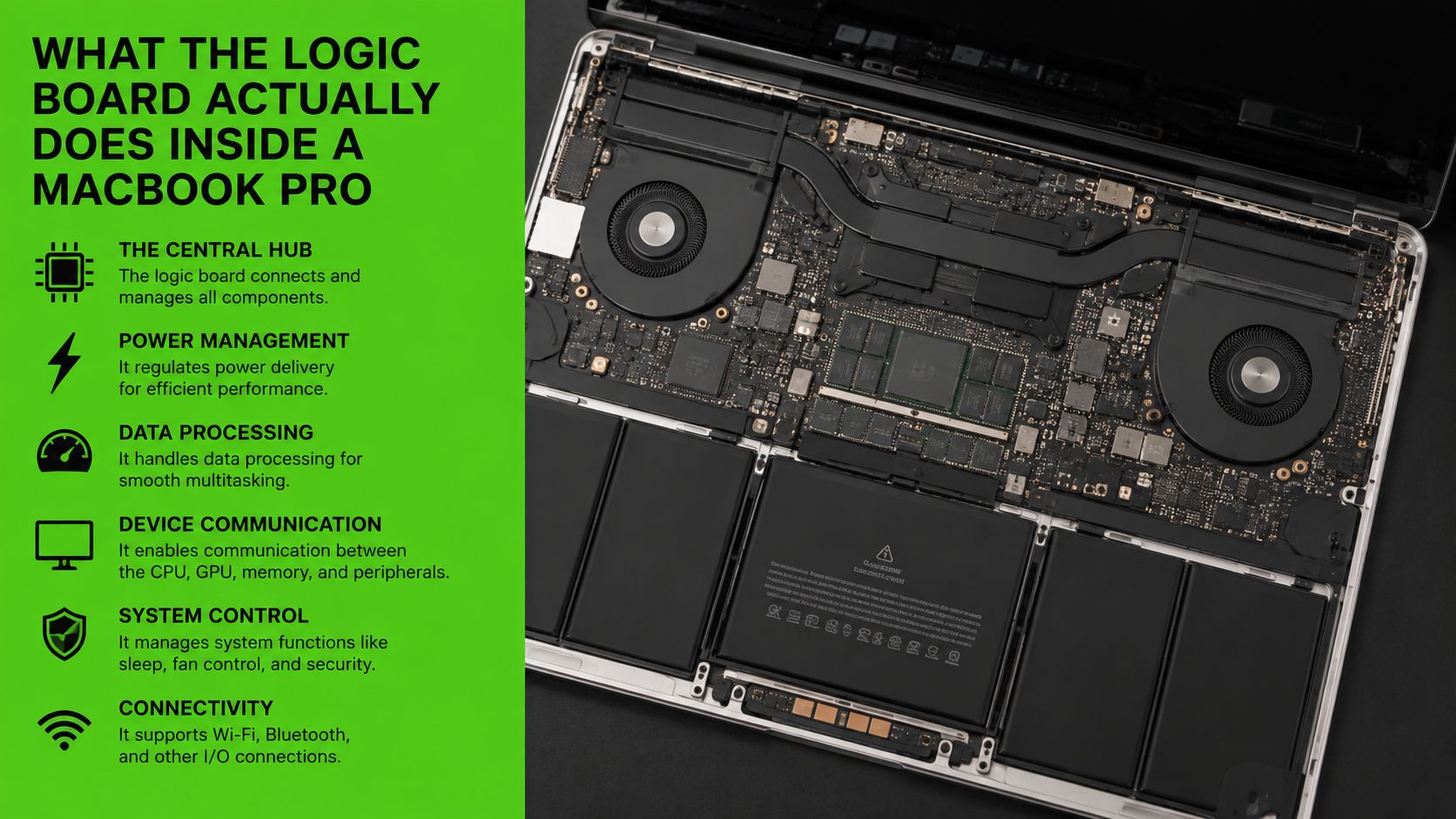
The logic board is the foundation beneath every MacBook Pro component. It carries power and signal layers, supports the main processing package, routes data between subsystems, and controls how the computer starts, charges, displays an image, and communicates with accessories.
On a 2021 M1 Pro board, a technician may identify the SoC package, NAND storage chips, USB-C controller ICs, the backlight driver, audio codec, and Type-C ports. The layout changes by model, but the diagnostic method remains consistent. A charging-controller fault can affect one port while the rest of the Mac continues working. A failed backlight circuit can leave an image present but invisible without external light.
Symptoms follow the circuit
A damaged USB-C controller can create a charging fault limited to one port. A short near the backlight driver can produce a dark display even while the MacBook boots. An audio codec or its surrounding power circuit can remove speaker output or microphone input while other functions remain normal.
The board also carries the connections that make the MacBook operate as one computer. Display data, storage access, Wi-Fi communication, Touch ID input, battery management, and external I/O all depend on board-level paths. That is why a technician traces the symptom to a circuit before recommending a major assembly replacement.
Earlier Intel designs generally separated more functions across individual chips and modules. Apple silicon boards integrate more of the system into a tightly connected platform. A single fault can therefore affect several functions at once, while board replacement becomes more restrictive because storage, memory, security, and device identity are closely tied to the original board.
The Apple Silicon Shift and Why Modern Logic Boards Are Different
The 13-inch MacBook Pro with M1, introduced in 2020, shipped with 8GB of unified memory as standard and could be configured to 16GB. The 14-inch MacBook Pro introduced in 2021 shipped with the M1 Pro chip and 16GB of unified memory, with configurations reaching 32GB with M1 Pro or 64GB with M1 Max, according to Apple's MacBook Pro technical specifications.
These specifications mark an architectural change, not only a performance increase. The logic board now houses the SoC and unified memory system instead of mainly connecting separate CPU, RAM, and I/O components. Performance, memory capacity, security functions, and much of the Mac's identity are tied closely to that board.
The repair trade-off
The integration improves size, power coordination, and performance control. It also narrows the repair options. A board-level repair can preserve the original board, storage, and device identity. A replacement board can restore operation, yet still require service-history updates, calibration, or biometric setup before the MacBook is fully usable.
The repair decision for an M1, M2, M3, or M4 model differs from an older Intel repair. A donor board is not interchangeable because it came from a MacBook Pro with the same screen size. The chip family, memory configuration, board identifier, firmware state, and paired components all need to match.
For an owner, the cost threshold is practical: compare a board-level repair on the original board with a replacement assembly, then account for data, Touch ID, compatibility, and post-repair setup. Saving the original board can preserve functions a swap may complicate, while a replacement may be the more sensible choice when the original board has extensive damage.
The Apple silicon era made the logic board the computer's central identity and memory platform. Repair planning must account for that architecture before anyone removes a screw.
Ask the shop one direct question: are they repairing your original board or installing another one? Those are different services, with different consequences for data, Touch ID, service records, and compatibility.
Common Logic Board Failures and the Symptoms You Actually See
Owners usually describe a failure by what the MacBook does, not by the component that caused it. A technician starts with that symptom cluster, then tests the relevant power or signal path before condemning the entire board.
No power
A completely unresponsive MacBook may have a short on a primary rail, a failed upstream MOSFET, or corrosion from liquid exposure. The first move is usually visual inspection followed by resistance and current testing around the main power inputs. The technician wants to know whether the board is receiving power and whether a rail collapses as soon as power is applied.
Charging faults
A MacBook that runs on battery but won't charge points toward the charging path rather than the entire board. A damaged USB-C port, its connector, or a USB-C controller can prevent negotiation on one port or several. The first diagnostic step is to test each port with known-good equipment and measure the board's response before replacing a controller.
Graphics artifacts
Colored snow, vertical bands, flickering, or repeated graphics-related crashes can indicate trouble in the GPU, video memory, display power, or the surrounding signal path. On Intel models with integrated or discrete graphics, a technician checks whether the artifact appears on an external display and reviews panic information before deciding whether the fault is board-level.
Liquid damage
Liquid damage often looks deceptively minor at intake. The MacBook may work after a spill, then develop charging, keyboard, display, or startup problems as residue corrodes contacts and traces beneath packages. The first step is controlled disassembly and inspection, not repeated power cycling, because continued operation can worsen an existing short.
| Symptom Cluster | Likely Board Cause | First Diagnostic Step |
|---|---|---|
| No power | Shorted rail, failed power component, or liquid corrosion | Inspect the board and measure power input and rail resistance |
| Charging fault | Damaged USB-C port, connector, or charging controller | Test every port with known-good equipment and monitor power behavior |
| GPU artifacts | GPU, video memory, display power, or signal-path fault | Compare internal and external display behavior and review panic data |
| Liquid damage | Corroded traces, connectors, or components under packages | Disconnect power, inspect for residue, and map affected circuits |
Thermal behavior can complicate diagnosis because a failing board may also throttle or shut down under load. Owners dealing with heat symptoms can review this guide to overheating laptop repair, but a MacBook that fails to start still needs board-specific testing.
How Technicians Diagnose a MacBook Pro Logic Board
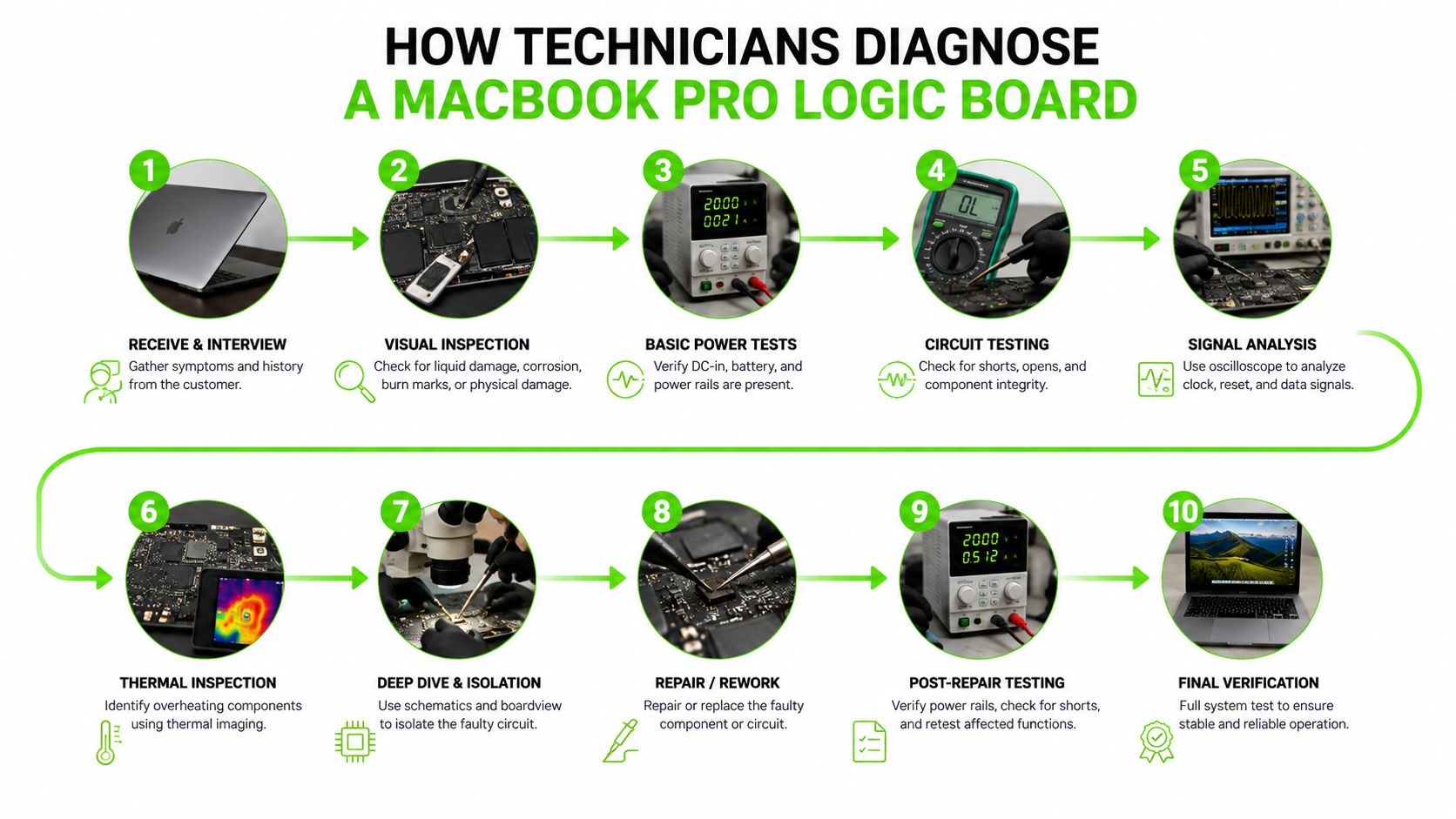
Board repair begins with identification. The printed 820-xxxx board number tells the technician which schematic and board-view files apply. Using the wrong reference can send the repair toward the wrong rail, component, or connector, so the number should be recorded before disassembly whenever possible.
The next stage is DC power analysis. A USB-C ammeter or current-limited bench supply shows whether the board accepts power, remains at standby, or immediately enters a fault condition. The technician then checks primary rails such as PP3V42_G3H, PP3V3_G3H, PP5V_S5, PP1V8_S0, and PPBUS_G3H, comparing measured values against the expected circuit behavior for that board.
Isolation beats guesswork
If a rail is shorted, the technician narrows the search rather than replacing the board. The battery can be disconnected, USB-C ports can be isolated, and sub-boards or flex cables can be removed from the circuit. A controlled voltage injection, thermal camera, or freeze spray can reveal the component warming first, but the method depends on the rail and board design.
Apple's service model also records logic board service history in System Settings under Parts & Service on supported MacBook Pro models. Apple's service-history documentation says that if a part has been serviced more than once, only the most recent service appears. That record doesn't replace electrical diagnosis, but it helps establish whether the board has already been changed.
An independent diagnostic usually focuses on finding the fault before recommending a repair path. An Apple-authorized service path may instead quote a complete board or assembly replacement. Ask what the initial fee includes, whether data recovery is part of the service, and whether the shop will return the original board if you decline the repair.
Repair vs Replacement and What a MacBook Pro Logic Board Actually Costs
The price gap between component repair and full board replacement is large enough to change the answer. Independent repair estimates can range from about $199 to $799, while Apple-authorized full logic board replacement can exceed $600 to $1,500 or more, depending on model and region, according to this 2026 MacBook Pro logic board repair cost guide.
Those ranges aren't interchangeable services. Component-level work may address a charging IC, backlight circuit, or localized short while preserving the original board. Full replacement exchanges the central computer assembly, which can be appropriate when the board has severe damage, but it can also create data and pairing limitations.
| Repair Path | Typical Cost (USD) | Turnaround | Data Recovery Possible |
|---|---|---|---|
| Independent component-level repair | $199 to $499 | Depends on diagnosis and parts | Often possible if the original board and storage remain usable |
| Complex independent board repair | $399 to $799 | Depends on parts and board condition | Possible, but not guaranteed |
| Apple-authorized full board replacement | Over $600 to $1,500 or more | Depends on model and region | No promise if the original board is dead |
The economic threshold
A repair quote should be compared with the current value of a comparable working MacBook, not its original purchase price. As a practical rule, if repair exceeds 50% of the machine's current resale value, replacement usually deserves priority. The same applies when the model is more than 5 years old, unless the repair protects critical data or the computer has an unusually valuable configuration. These thresholds are decision rules, not guarantees, and they should be applied alongside battery condition, display quality, keyboard condition, and software support.
A lower quote isn't automatically better. Ask whether it covers microsoldering on your original board, a donor board, or a complete replacement. Also ask what happens if the technician restores power but discovers storage or biometric pairing problems.
For a broader framework on weighing repair cost against remaining value, owners can use this laptop repair or replacement decision guide.
Part Pairing, Touch ID, and the Reality of Board Swaps
A newer MacBook Pro board swap is not a plug-and-play exchange. Apple's service model includes part pairing and service tracking. On the 14-inch MacBook Pro introduced in 2021, the Touch ID sensor is uniquely paired to the factory logic board, according to iFixit's logic board replacement documentation.
After replacement, Touch ID may stop functioning. A Touch ID sensor from another MacBook Pro still won't function without Apple's proprietary calibration process. The shop may need a properly paired donor board, access to Apple's calibration workflow, or a repair plan that keeps your original board in service.
Questions to ask before approval
- Board identity: Record the exact model, year, and 820-xxxx identifier.
- Repair type: Confirm whether the technician will repair your board or install another one.
- Biometric function: Ask how Touch ID will be restored, calibrated, and tested.
- Data outcome: Confirm whether the work preserves access to the original storage and user files.
- Compatibility: Verify that the replacement matches the machine's memory and chassis configuration.
The risk extends beyond Touch ID. The board contains the SoC, memory architecture, storage relationships, firmware, and device-specific history. A cheap donor board can leave you with a MacBook that powers on yet operates differently from the original. On Apple silicon models, memory is integrated into the board, so a mismatch can affect the machine's usable configuration rather than just its startup behavior.
If the shop cannot explain pairing and calibration for your exact model, do not authorize a board swap based on price alone.
Your Decision Checklist Before Authorizing Any Logic Board Work
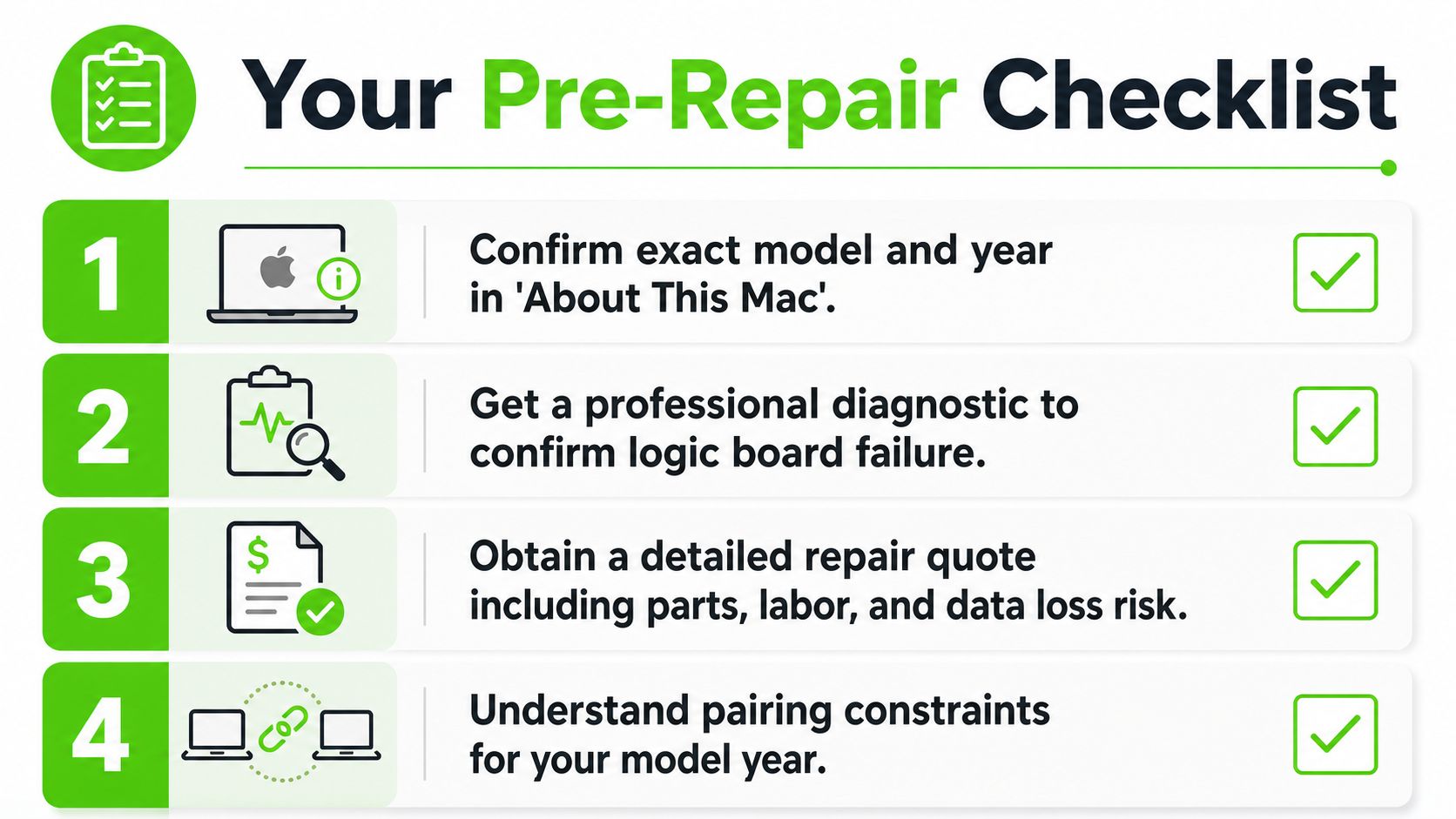
Write down the machine's identity before anyone opens it. Check About This Mac, record the serial number from the bottom case, and ask the technician to document the board number before removing the logic board. A model description such as “14-inch MacBook Pro” isn't precise enough for board-level work.
Then request a written diagnostic. It should identify the observed fault, the tests performed, and whether the recommendation is component repair or full board replacement. A quote that only says “logic board issue” doesn't tell you what you're buying.
Use these decision filters
- Compare value: Replace the MacBook when the repair quote exceeds 50% of a comparable used machine's value, unless the data or configuration justifies the exception.
- Consider age: Component-level repair deserves closer consideration on Intel-era machines with a sound display, battery, and chassis. It can also make sense when coverage such as AppleCare changes your financial exposure.
- Protect pairing: Skip a non-paired board swap on 2021 and later models unless the shop can complete the required calibration and demonstrate that Touch ID and other affected functions work.
- Prioritize data: If files matter, ask about data recovery before approving a replacement board. Preserving the original board may be more important than restoring the laptop quickly.
- Define the outcome: Get testing details for charging, display brightness, Touch ID, ports, sleep, wake, and thermal behavior.
Photograph or save this five-point summary before visiting a shop: model, board number, fault, quote type, and pairing status. Those details prevent a vague symptom from turning into an expensive, incompatible replacement.
For Houston owners, We Fix PC Laptop provides in-house MacBook diagnostics, logic board repair, component-level laptop service, and data recovery assessment. If your MacBook Pro won't start or a board replacement quote doesn't make sense, visit We Fix PC Laptop for a documented diagnosis and repair options before replacing the computer.