.svg)
.svg)
.svg)




Cost of Repairing MacBook Pro Screen: 2026 Guide
Most MacBook Pro screen repairs land between $329 and $1,100+, depending on screen size, model year, and whether Apple or an independent shop handles the work. AppleCare+ can reduce the screen-damage service fee to $49, while newer and larger displays can push the bill toward the top of that range.
You're probably looking at a cracked panel, black screen, flickering image, or colored lines right now. The MacBook may still power on, but a damaged display turns an otherwise useful computer into an expensive paperweight, and the first question is usually simple: What will this cost me?
The blunt Houston answer is that there isn't one universal price. A 13-inch Retina display, a 14-inch Liquid Retina XDR assembly, and a 16-inch panel are different repair jobs with different parts, labor, and failure risks. Apple's official repair program confirms that out-of-warranty pricing varies by model and repair type, while independent repair guides place the wider no-AppleCare market around $200 to $1,100 or more for MacBook screen work. (Apple's Mac laptop repair information)
Before approving any quote, decide whether the display is unusable, whether the frame or logic board may also be damaged, and whether the machine still has coverage. If you're keeping a working MacBook after the repair, a portable laptop cooling solution can improve airflow and positioning at your desk, but it won't fix a cracked panel or a failing display circuit.
Table of Contents
- What a MacBook Pro Screen Repair Really Costs in 2026
- Repair Prices by MacBook Pro Model and Screen Size
- Key Factors That Drive the Final Repair Price
- AppleCare Plus, Apple Store, or Independent Shop
- What OEM Quality Really Means for a MacBook Pro Display
- Turnaround Times and How to Get It Faster
- Common Mistakes That Make a Cheap Repair Expensive
- Picking the Right Repair Option for Your Situation
What a MacBook Pro Screen Repair Really Costs in 2026
A cracked MacBook Pro can still boot, show notifications, and sound normal while the display repair bill climbs quickly. In Houston, the starting point is the model's complete display assembly, not just the size of the glass. Current market pricing commonly places 13-inch repairs at $329 to $549, 15-inch repairs at $429 to $649, 14-inch repairs at $599 to $899, and 16-inch repairs at $799 to $1,100. These are model-based ranges, not a universal flat rate. (MacBook Pro screen repair pricing by size and model)
Apple usually sits near the higher end. Official Retina MacBook Pro service can run around $455 to $755, while newer M4-era models may reach about $900 or more without coverage. The final quote depends on the model identifier, Apple's inspection, and whether the frame, cable, or logic board suffered damage too. (Apple repair program and service-fee information)
The first inspection matters
Before approving a display replacement, have the technician identify which of these problems you have:
- Cosmetic damage: The outer surface looks damaged, but the image, brightness, and other display functions still work. A full replacement may be unnecessary, although MacBook Pro construction often makes glass-only work impractical.
- Functional display failure: Black areas, lines, flickering, dead pixels, distorted colors, or no image usually point to a complete lid or display-assembly replacement.
- Board-level damage: A working panel can still produce a bad image if the cable, connector, backlight circuit, or logic-board component has failed. Diagnosis comes before ordering an expensive screen.
AppleCare+ changes the bill sharply. Apple lists a $49 service fee for screen damage with AppleCare+. Out-of-warranty service follows the model and repair type. Independent repair commonly falls around $300 to $600, while Apple Store pricing often reaches $450 to $900 or more.
Practical rule: Do not approve a screen replacement until the shop confirms whether the fault follows the panel or the logic board.
A 16-inch Liquid Retina XDR assembly or a complicated board-level failure can exceed the normal market range, with some real-world quotes moving beyond $1,500. Treat that as a warning to request a written diagnosis, not as a standard price. If the estimate approaches the computer's value, compare repair with replacement. If the MacBook remains usable after service, a portable laptop cooling solution can improve airflow and desk positioning, but it cannot repair a cracked panel or failing display circuit.
Repair Prices by MacBook Pro Model and Screen Size
Screen size gives you the fastest estimate, but model generation determines whether that estimate is realistic. Older 13-inch Retina assemblies are easier for independent shops to source, while newer 14-inch and 16-inch systems use more complex display assemblies with tighter calibration requirements.
The verified market ranges place 13-inch models at $329 to $549, 15-inch models at $429 to $649, 14-inch models at $599 to $899, and 16-inch models at $799 to $1,100. (Model-based MacBook Pro screen pricing) The table below uses those ranges as the pricing map. Apple and independent-shop figures inside a particular quote can vary because the source, warranty, and assembly condition differ.
| MacBook Pro Cohort | Screen Type | Apple Out-of-Warranty Range | Independent Shop Range |
|---|---|---|---|
| 13-inch Intel era | Retina LCD | $455 to $755 | $329 to $549 |
| 13-inch M1 and M2 | Retina LCD | $455 to $755 | $329 to $599 |
| 14-inch M1 Pro through M3 Pro | Liquid Retina XDR | $599 to $899 | $599 to $899 |
| 16-inch M1 Pro through M3 Max | Liquid Retina XDR | $799 to $1,100 | $799 to $1,100 |
How to read the table
The 13-inch Intel and Apple Silicon machines usually sit near the low end because their Retina LCD assemblies are less costly than the larger mini-LED-style assemblies used in newer professional models. That doesn't mean every 13-inch repair is cheap. A damaged lid, bent hinge, or failed display connector can add work that a basic screen-only quote doesn't include.
The 14-inch and 16-inch MacBook Pro models deserve more caution. Their Liquid Retina XDR displays are integrated into assemblies that demand careful removal, alignment, and testing. A shop that quotes an unusually low figure may be using a lower-grade panel, a used pull, or a repair process that doesn't include full feature testing.
Older unibody MacBook Pros from 2012 through 2015 still appear in Houston repair queues. They can run cheaper when aftermarket panels are available, but availability and condition vary by machine. For comparison, owners of smaller Apple laptops can also review this guide to MacBook Air 13-inch screen replacement, though Air and Pro assemblies aren't interchangeable.
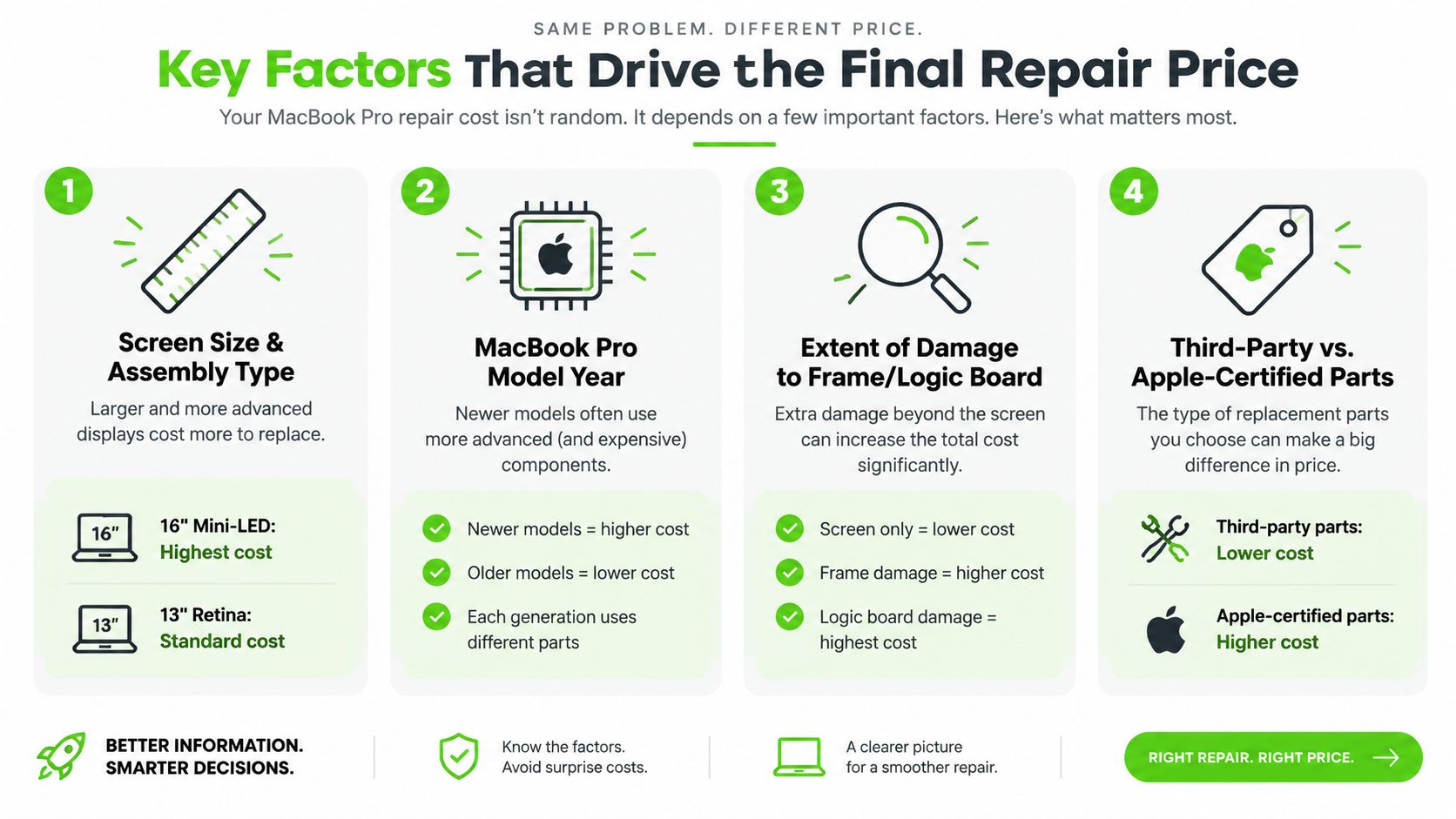
Key Factors That Drive the Final Repair Price
A cracked MacBook Pro screen is only the starting point. The final quote depends on the display assembly, removal risk, part source, and whether the visible failure points to another problem.
Screen size and display construction
A 13-inch Retina LCD and a 16-inch Liquid Retina XDR assembly are different repair jobs. Larger panels cost more to source, while bonded construction increases the risk of damage during removal and reassembly. Screen size is the first pricing variable, followed closely by display technology.
ProMotion, True Tone, wide-color support, and XDR brightness requirements make newer professional displays harder to replace correctly. The technician must test those functions after installation, not stop after confirming that the screen produces an image.
Model year and part availability
Age changes both the available parts and the repair route. A newer MacBook Pro may qualify for a genuine Apple assembly through an authorized channel. An older model may instead require an OEM-equivalent or refurbished assembly, depending on supply.
Ask the shop to identify the exact part category, condition, and warranty in writing. “OEM” alone is too vague to justify a premium.
Damage beyond the panel
Disassembly reveals problems a glass-only inspection can miss. If the lid does not separate evenly, the technician checks the frame for twist before fitting a replacement. Uneven hinge resistance, displaced screw posts, or a lid that will not sit flat can signal chassis or hinge work that must be priced separately.
The diagnostic decision is straightforward: a stable lid with a clean image points toward an assembly replacement; a misaligned lid requires frame and hinge evaluation; a replacement that still shows flicker, lines, or no backlight requires connector, backlight, or board testing. That distinction prevents paying for a screen when the fault is elsewhere.
Parts source and labor complete the calculation. Genuine Apple assemblies cost more, while high-grade refurbished or aftermarket parts can reduce the bill. Houston depot labor may be lower than Apple's service route, but the shop must still test connectors, calibration, brightness, and display features. For a closer comparison of panel replacement decisions, read this OLED and touchscreen laptop repair cost-benefit guide.
AppleCare Plus, Apple Store, or Independent Shop
A cracked 14-inch MacBook Pro can follow three very different repair paths. The visible damage may look identical, but the process, wait, data exposure, and coverage consequences are not.
If AppleCare+ is active and the damage qualifies, use it. Apple lists a $49 screen-damage service fee, with the remaining repair handled under the plan's terms. Confirm eligibility before approving work, because accidental-damage coverage depends on the plan and the device condition. AppleCare+ and Mac repair service details
Apple's out-of-warranty route keeps the repair inside its service network and uses Apple service parts. Expect an inspection, a service estimate, and a wait tied to parts and appointment availability. Apple's process is the safer choice when factory specifications, an Apple service record, or coverage documentation matters more than speed. Pricing varies by model and damage classification, as noted in the MacBook Pro screen repair pricing guide.
An independent depot can reduce handoff time, especially when the correct display assembly is already stocked. Ask whether the repair is completed locally or shipped to another facility. That detail determines whether “same day” means a finished repair or only an intake appointment.
Data handling deserves a direct question. Back up the Mac before service, ask whether your password is required, and confirm whether technicians can work without accessing personal files. A shop should explain how it stores the computer during inspection and who performs the repair.
Coverage after third-party work also needs a clear answer. AppleCare+ terms may not treat an independent repair the same way as Apple service, and a local shop's warranty covers only what that shop promises. Get the warranty period, excluded damage, and return process in writing.
Which route makes sense
Use AppleCare+ for a covered screen incident. Choose Apple service when factory documentation and Apple's process justify the wait. Choose a local depot when the Mac is out of coverage, downtime matters, and the shop will document the part, testing, data policy, and warranty before starting.
Price matters, but it is only one part of the decision. The right repair channel is the one whose process matches your coverage, privacy needs, and deadline.
What OEM Quality Really Means for a MacBook Pro Display
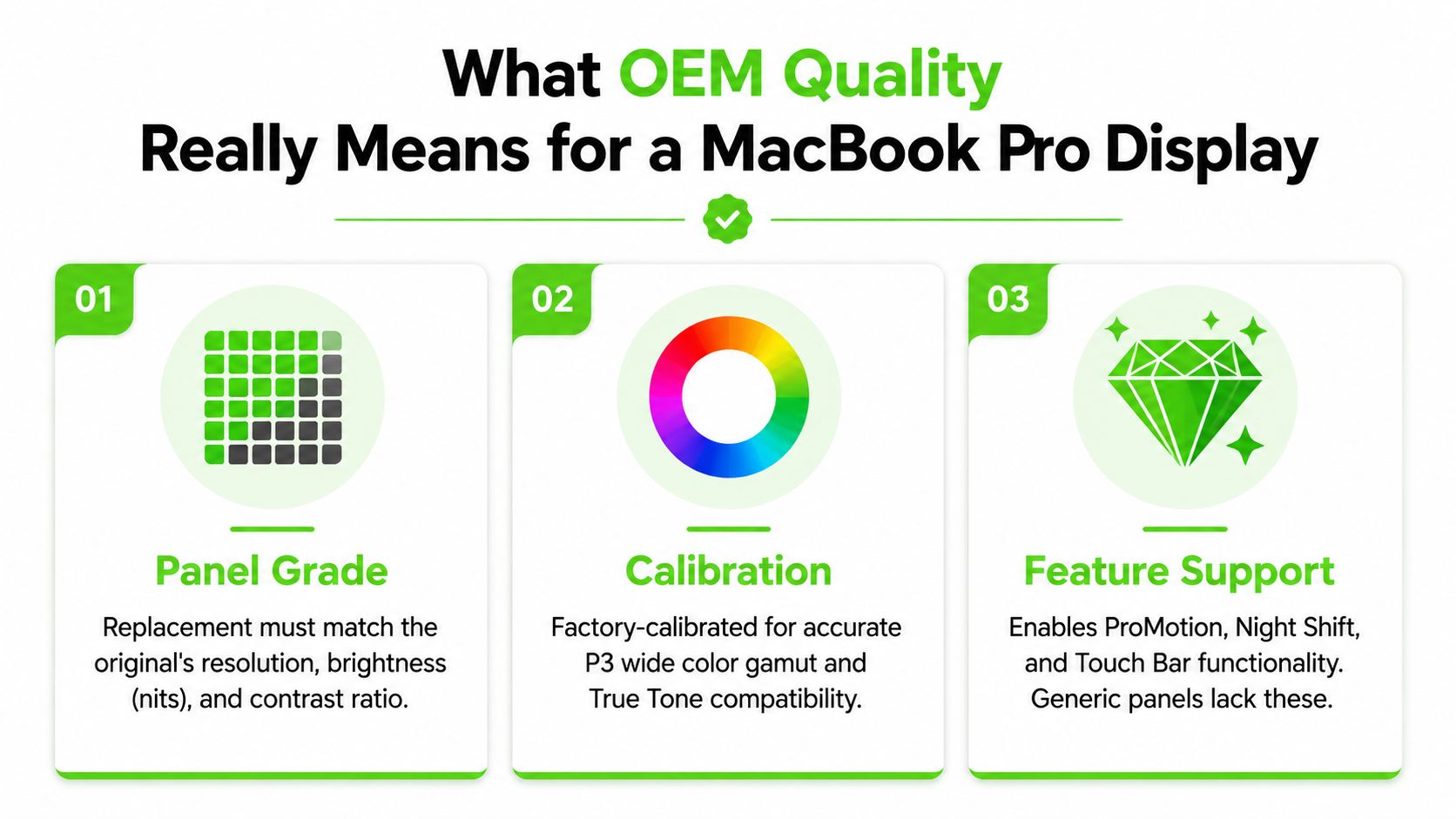
“OEM quality” should describe measurable performance, not a cheap screen with a reassuring label. A proper replacement must match the original MacBook Pro's resolution, brightness behavior, color reproduction, and supported features.
Panel grade comes first
A Retina replacement should match the original Retina specification. A Liquid Retina XDR replacement should preserve the characteristics that make the display suitable for professional work. A generic compatible LCD may show a picture, but weaker brightness, uneven lighting, restricted color range, or visible banding can make the repair frustrating.
Calibration is the second test. The technician should check brightness uniformity, P3 color behavior, white point, and True Tone compatibility. Some repairs also require transferring or programming display data so macOS can use the panel correctly.
Features separate a proper repair from a visual patch
A screen replacement should preserve the MacBook's relevant display features:
- True Tone: The ambient-light color adjustment should work after the repair.
- ProMotion: Supported models should retain their high-refresh behavior rather than defaulting to a visibly slower setting.
- Touch Bar support: Applicable models need the correct upper assembly and functioning controls.
- Lid-angle sensing: The display should respond properly as you open and close the lid.
- Hinge alignment: The lid should move smoothly without excessive resistance or looseness.
Ask the shop to identify the part as genuine Apple, refurbished Apple, or Tier-1 OEM-equivalent. Request the part number when available, ask whether calibration is included, and get the warranty terms in writing. If the answer is only “it's compatible,” you haven't received enough information to approve the repair.
A clean adhesive reseal matters too. Loose edges, uneven bezels, excessive adhesive, and incorrect hinge torque can turn a successful panel installation into a second repair. Before leaving, inspect the display at multiple brightness levels, test True Tone and ProMotion where applicable, open and close the lid, and confirm that the frame sits evenly.
Turnaround Times and How to Get It Faster
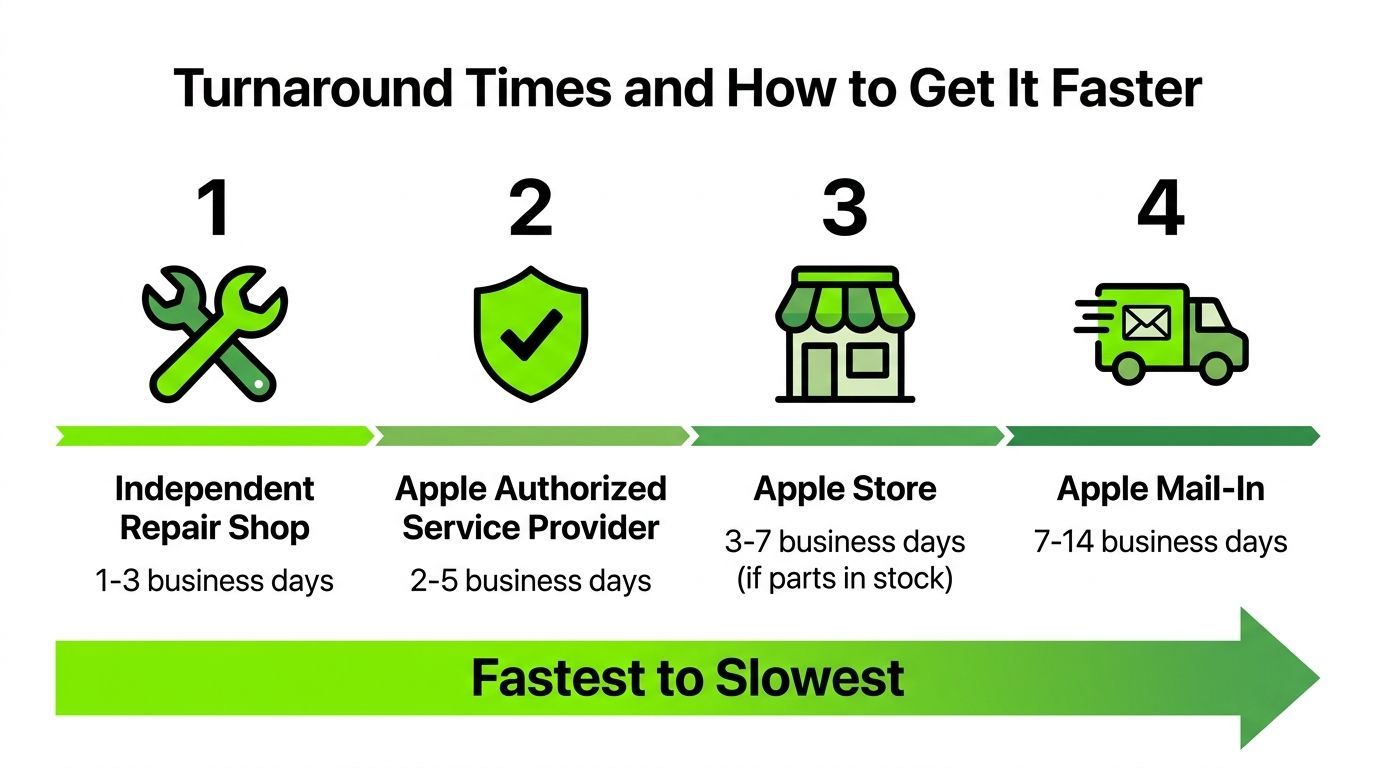
A cracked display may be a straightforward repair, yet the waiting time usually comes from parts logistics and bench availability. Apple Store service often takes several business days when the required assembly is available. Mail-in service takes longer because packing, shipping, intake, repair, and return transit all add time. Check Apple's current process through Apple Mac repair service information before choosing that route.
An authorized provider follows a similar parts and workflow schedule. A local depot can finish sooner when it already has the correct display assembly, particularly for common 13-inch and 14-inch MacBook Pro models. Ask for the expected completion date, not just a promise of “fast service.”
Practical ways to cut the wait
- Confirm stock first: Send the exact model identifier and screen size before visiting. A matching assembly on the shelf can save a shipment delay.
- Book early in the week: Dropping off early gives the technician more working days before the weekend.
- Avoid unnecessary mail-in service: Transit and intake add waiting time when a local depot can handle the repair.
- Ask about diagnostics: The estimate can change after the shop checks the lid, hinge, display cable, connector, and board.
- Back up before drop-off: Use Time Machine or another trusted method while the MacBook still starts normally.
For urgent work, choose same-day local depot service only after confirming part availability and the actual damage. Large displays, scarce assemblies, bent frames, or logic-board faults can extend the repair, even when a technician is ready.
Common Mistakes That Make a Cheap Repair Expensive
A low quote can hide the work that keeps a replacement reliable. Compare the part grade, damage scope, installation method, testing, and written warranty, not only the first number.
Mistake one is choosing a panel that only looks acceptable
A non-OEM panel may restore the image while compromising daily use. Colors can look washed out, True Tone may disappear, brightness can vary across the screen, and banding may show against light backgrounds. For photo, video, presentation, or design work, that cheaper panel can weaken the MacBook Pro's main advantage.
Ask whether the quote covers a complete display assembly or only a panel. The distinction affects fit, calibration, and installation risk.
Mistake two is overlooking the frame, hinge, and board
A screen-only estimate may exclude a bent lid, damaged hinge, display cable, connector, backlight circuit, or logic-board fault. Installing a replacement without checking those areas can leave the display crooked or cause another failure. Require a diagnostic that covers the frame, hinge, cable, connector, and board-level power path.
Mistake three is accepting poor adhesive or undocumented condition
A technician who rushes the adhesive reseal can leave gaps, pressure marks, loose trim, or contamination inside the lid. Ask how the display is secured and whether the shop replaces damaged adhesive instead of reusing it. Before drop-off, document existing dents, scratches, display defects, ports, and the machine's working condition with photos. That record prevents disputes over damage that was already present.
Other costly errors include:
- Accepting verbal promises: “OEM” and “warranty included” are vague without a part description, testing list, and written terms.
- Skipping the final feature test: A bright picture is not enough if True Tone, ProMotion, the Touch Bar, camera, microphone, or lid sensor fails.
- Choosing the lowest quote without asking what is excluded: A price may omit diagnostics, adhesive, calibration, taxes, or follow-up work.
Ask for the part number, supplier description, adhesive method, calibration process, testing checklist, and warranty terms before handing over the MacBook.
A credible shop explains what it installs and what it tests. It also tells you when a screen repair no longer makes financial sense. A badly bent frame or extensive logic-board damage can turn a display job into a broader hardware decision.
Picking the Right Repair Option for Your Situation
The right repair starts with four facts: your MacBook Pro's model year, screen size, coverage status, and deadline. If the display still works, find the model in macOS. If it does not, give the technician the serial number. “14-inch MacBook” is not enough. Each generation can use a different display assembly, cable, connector, and service process.
Make the decision by scenario
- AppleCare+ coverage: Use Apple's service unless shipping or scheduling would disrupt your work. The covered route is usually the clearest choice. Review the coverage terms and the fee listed earlier.
- Out-of-warranty 13-inch Retina model: Compare Apple's quote with a reputable independent depot. A local shop can be the better option when the machine is otherwise in good condition and you need faster handling.
- 14-inch Liquid Retina XDR model: Require a written quote that identifies the display assembly and includes calibration, feature testing, and frame inspection. This model is not a good candidate for an unexplained bargain repair.
- 16-inch professional model: Compare the repair quote with the MacBook's current resale value before approving the job. Use the pricing table in the opening section as your baseline, then judge the quote against the machine's condition and remaining useful life.
- Urgent work computer: Call local depots first and ask whether the correct assembly is physically in stock. A same-day repair is only useful if the shop has the right part and can test the completed machine.
- Older or heavily damaged machine: Get the frame, hinge, connector, cable, and board checked before authorizing a display replacement. If the quote exceeds 60% of the machine's current resale value, replacement is typically the better financial choice. A bent lid, liquid damage, or logic-board fault can make a screen-only repair poor value.
Do not choose by price alone. Ask what the quote includes, whether the shop is replacing the complete display assembly or a smaller component, how it will test the camera and lid sensor, and what warranty terms apply. Written answers make Apple, a local depot, and do-it-yourself work easier to compare without relying on vague promises.
For Houston owners, use this guide to choosing a reliable MacBook repair service near you when checking diagnostics, parts, warranty coverage, and communication. The practical choice matches your coverage, MacBook generation, deadline, and required display quality.
We Fix PC Laptop provides MacBook Pro screen diagnostics and display replacement through an in-house Houston depot. Request an upfront estimate, a parts explanation, and a turnaround expectation before approving the repair.