.svg)
.svg)
.svg)




Apple MacBook Pro Display Replacement: Costs, Options
You open your MacBook Pro for a video call and find a spiderweb crack across the display. Or the screen flickers, shows vertical lines, or stays black while the machine continues running behind it. The urgent question is usually, “How much will this cost?” The more useful question is whether the repair will restore enough value to justify the investment.
An Apple MacBook Pro display replacement can involve a complete display assembly, model-specific parts, hinge hardware, sensors, flex cables, calibration, and post-repair configuration. The right choice depends on more than the quoted repair price. You also need to consider your MacBook Pro's current resale value, remaining useful life, AppleCare+ status, part quality, and the risk that a cheaper assembly may not preserve every feature.
Table of Contents
- When Your MacBook Pro Screen Cracks
- Why Modern MacBook Pro Displays Are Complex Replacements
- Comparing Repair Channels and Cost Expectations
- Preparing Your MacBook Pro Before the Repair
- Repair or Replace the Entire MacBook Pro
- True Tone Calibration and Parts Pairing Requirements
- Your Display Replacement Decision Checklist
When Your MacBook Pro Screen Cracks
A cracked MacBook Pro display creates pressure to accept the first price you find. The computer may still boot, your files may still be accessible, and an external monitor may provide a temporary workaround. That combination makes the decision feel simple, but the visible damage often hides a more involved repair.
A client with a damaged display may describe the problem as “just the screen.” In practice, the technician still has to determine whether the image failure comes from the panel, display flex, lid assembly, hinge area, or another related component. A black display can be caused by impact damage, but it can also require a diagnostic process before anyone should order parts.
Practical rule: Don't approve a screen replacement from a photo alone. Confirm the exact model and whether the MacBook produces a usable image through an external display.
Modern MacBook Pro repairs also carry a much higher parts exposure than older laptop repairs. iFixit lists a 13-inch MacBook Pro A2338 display assembly at $494.99, while its 16-inch MacBook Pro A2485, A2780, and A2991 display assembly is $729.99. An older mid-2012 15-inch Unibody display is listed at $269.99, illustrating how Retina and Liquid Retina XDR assemblies have changed the economics of the job through iFixit's MacBook Pro screen catalog.
That price difference matters before labor, shipping, diagnostics, or any post-repair configuration. It also explains why a repair quote that seems surprisingly high may reflect the cost of the assembly rather than excessive labor.
What the decision really involves
Before authorizing work, establish four facts:
- Exact model: MacBook Pro generations use different assemblies, connectors, hinges, sensors, and service procedures.
- Damage scope: A cracked panel may also affect the camera, lid, hinge alignment, or display cable.
- Feature preservation: True Tone and related display behavior may depend on correct configuration.
- Total value: Compare the complete repair cost with the machine's condition, resale value, and expected remaining service.
An external monitor can buy time, but it doesn't turn a damaged portable computer into a normal one. If you rely on the built-in camera, travel with the MacBook, or need reliable color for creative work, the display remains central to the machine's usefulness.
Why Modern MacBook Pro Displays Are Complex Replacements
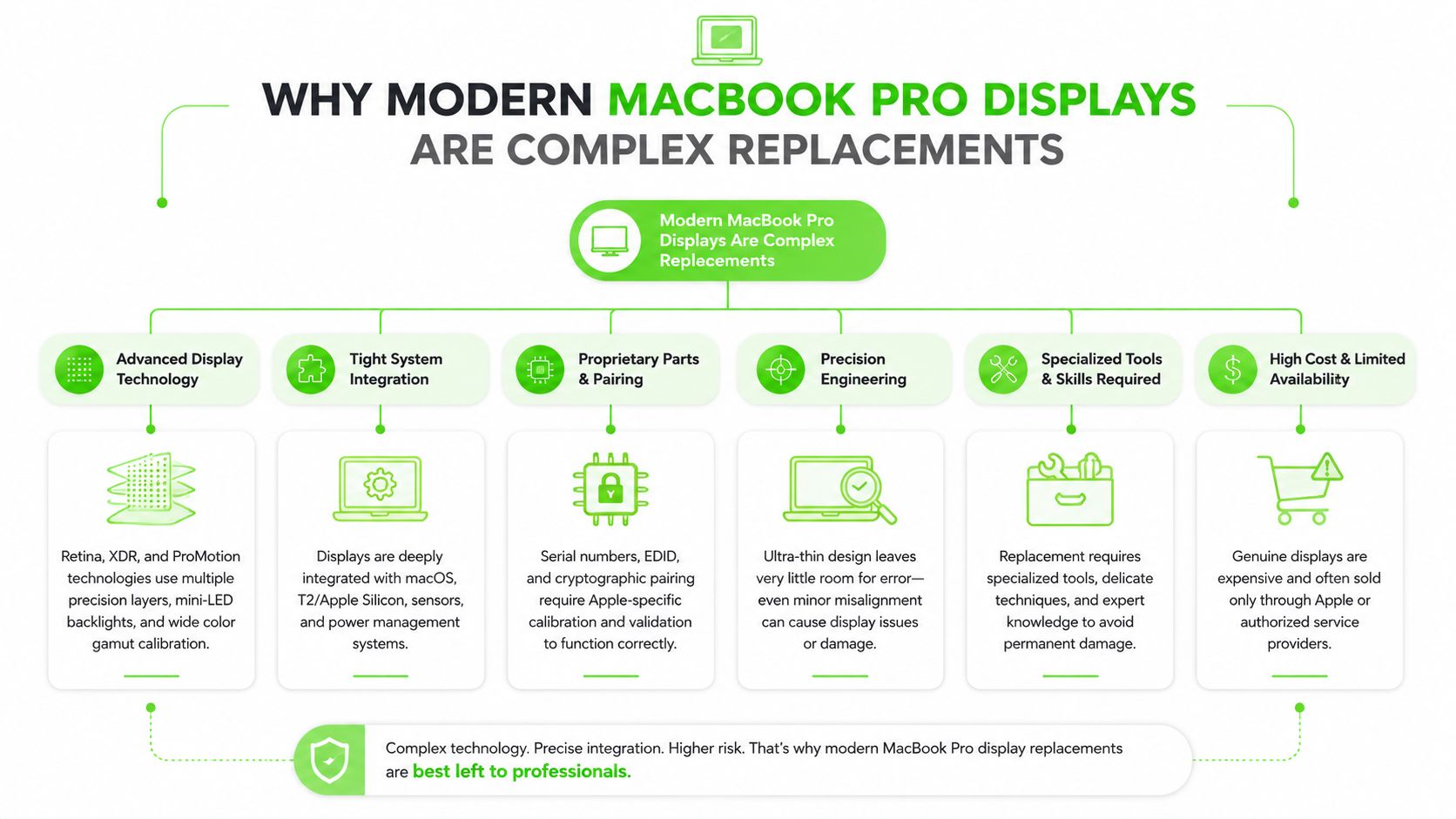
A current MacBook Pro display is an integrated assembly, not a generic LCD panel that a technician can remove and replace in isolation. Depending on the model, the assembly can include the display panel, cover glass, camera components, hinge hardware, lid angle sensor, and display flex routing.
Apple's repair documentation requires the technician to back up the Mac before beginning display work. The procedure also covers the lid angle sensor, hinge hardware, and display flex routing, and modern models can require software-based repair completion after physical installation, as described in Apple's official MacBook Pro display repair documentation.
Why assembly design affects the quote
Older Unibody MacBook Pro designs generally offered a different repair proposition from newer Retina and Liquid Retina XDR models. The newer construction places more components into a tightly integrated lid, so the technician isn't merely matching a panel size and plugging in a cable.
The assembly must fit the chassis correctly, open and close without abnormal resistance, route the flex cable safely, and preserve the behavior of sensors and camera hardware. A careless installation can create problems that don't appear during the first power-on, including cable strain, hinge misalignment, intermittent image faults, or lid-angle behavior that doesn't respond correctly.
This is why a professional quote should identify the assembly being installed, not only say “screen replacement.” iFixit's catalog contains distinct parts for many MacBook Pro generations and screen sizes, with listed prices ranging from $49.99 for smaller accessories to $729.99 for a 16-inch display assembly in the referenced catalog. That model-specific structure reinforces the value of accurate identification before a repair is scheduled, as shown in the MacBook Pro A2338 display assembly listing.
What inexperienced repair attempts miss
A DIY repair can fail even when the replacement part physically fits. The technician must protect delicate connectors, manage adhesive and lid components, avoid damaging the display flex, and complete the required testing after reassembly.
A useful technical overview is available in this comprehensive laptop screen repair guide, but MacBook Pro owners should still treat the exact service manual for their model as the controlling reference. Generic laptop instructions can't account for every Apple-specific sensor, assembly, or configuration requirement.
Comparing Repair Channels and Cost Expectations
The lowest part price does not predict the lowest completed repair cost. A useful quote identifies the display assembly and states whether labor, diagnosis, calibration, software configuration, testing, and warranty coverage are included. Without those details, two apparently similar prices may describe very different work.
Apple does not publish one universal MacBook Pro screen fee. Its product-specific repair process asks customers to check coverage and out-of-warranty pricing for the exact machine through its official repair and service information. That distinction matters because an older, smaller model and a newer large-format MacBook Pro can use very different assemblies.
The available pricing overview places out-of-warranty Apple repair at roughly $459 to $1,200 or more, depending on the model. Third-party estimates commonly fall around $300 to $800, while parts-only routes can cost less for selected models. Treat these figures as planning ranges, not promises for a particular machine. The MacBook screen replacement cost overview provides the cited comparison.
| Repair Channel | Estimated Cost Range | Turnaround Time | Warranty Coverage |
|---|---|---|---|
| Apple official service | Roughly $459 to $1,200 or more, model dependent | Depends on service availability and parts | Apple service includes a 90-day service and parts guarantee |
| Authorized service provider | Model dependent, usually quoted after identification | Depends on local inventory and authorization workflow | Provider and Apple coverage terms should be confirmed in writing |
| Independent repair shop | Commonly around $300 to $800, model dependent | Often faster when the correct part is in stock | Shop-specific warranty, part quality, and exclusions vary |
| DIY parts purchase | Part price only, with tools and risk added separately | Controlled by the owner | Usually limited to the part seller's terms, if offered |
Apple's channel gives you a defined service path and a stated guarantee, but the bill can approach the MacBook's resale value. An independent shop may reduce the initial cost or offer used, OEM-grade, or third-party assemblies. Ask what type of assembly is included, how long the warranty lasts, and what happens if True Tone or another display function is unavailable after installation.
The part choice changes the risk
A used original assembly may offer better compatibility than an inexpensive unknown assembly, but panel wear, hinge condition, camera performance, and cosmetic defects vary. A third-party assembly can lower the upfront bill while introducing pairing or calibration limits that affect True Tone and related behavior.
Panel-only repair preserves undamaged components and can reduce material cost. It requires specialized equipment and careful separation work, however. On many modern MacBook Pro models, replacing the complete assembly is the more predictable professional choice because it reduces delicate operations inside the lid.
The repair-versus-replace decision should include resale value. If the finished repair consumes most of the computer's current value, compare that amount with the value of a working replacement MacBook Pro and the risk of future component failure. A lower quote is useful only when the assembly quality, calibration result, warranty, and total ownership value still make sense.
DIY fits a narrow situation: you understand the model-specific procedure, accept the chance of damaging additional components, and can test the finished machine. The labor saved becomes your time, repair risk, and responsibility for the final result.
Preparing Your MacBook Pro Before the Repair
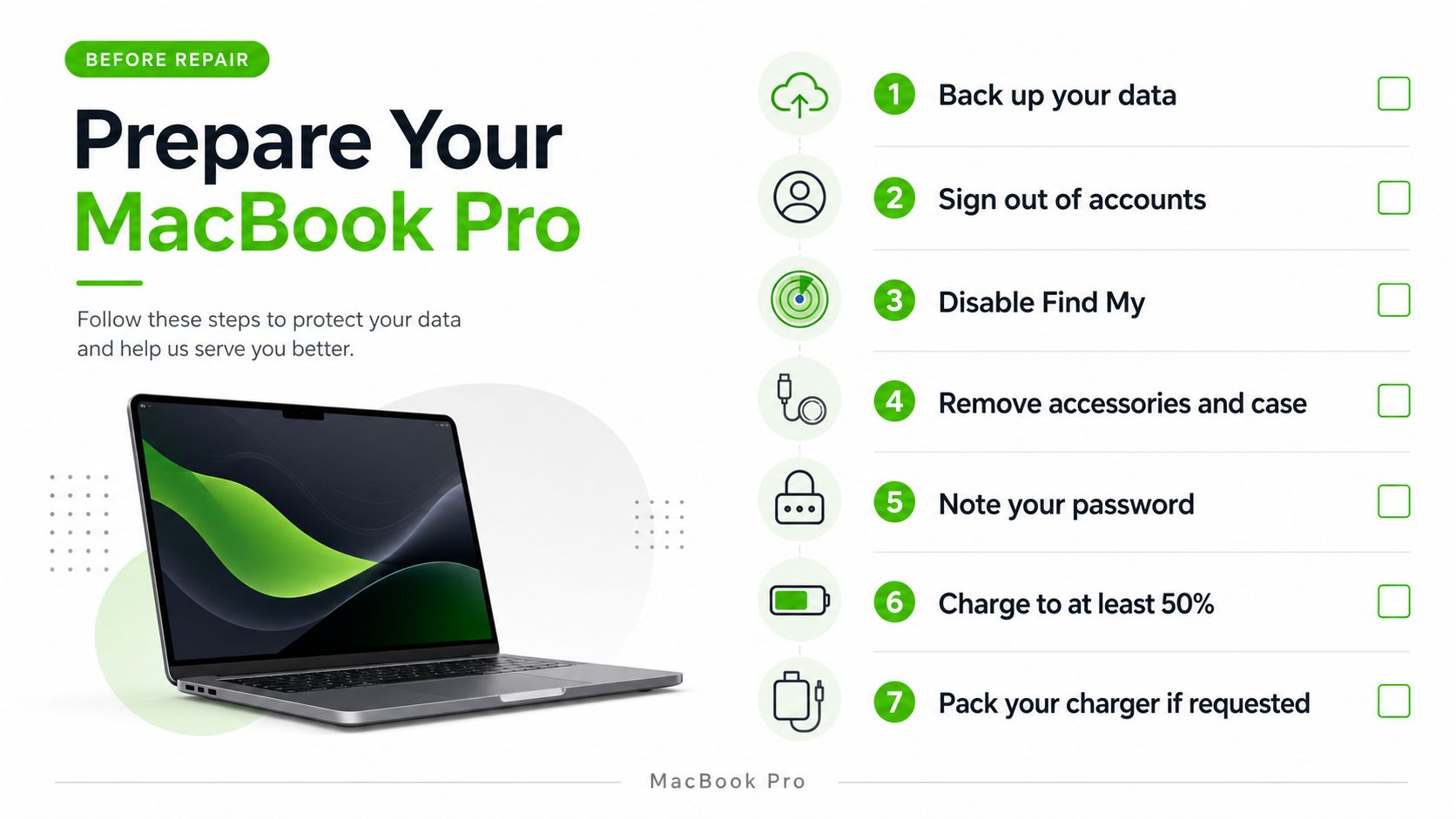
Back up the Mac before handing it to anyone. Apple's display repair documentation specifically requires a backup before service, and that requirement protects you from turning a display problem into a data-access problem.
If the screen still works, use Time Machine or a trusted cloud backup and verify that important files can be opened from the backup. If the display is unreadable, ask the technician whether they can connect an external monitor or assist with data recovery before the repair begins. You can also review this guide to protecting personal data before sending a computer for repair.
Identify the machine before ordering a part
Don't rely on “13-inch MacBook Pro” as the model description. Record the model identifier, serial number, year if known, chip information, and screen size. Apple's repair ecosystem and aftermarket catalogs separate assemblies by exact generation, so a visually similar machine may still require a different part.
Ask the repair provider these questions before approving the work:
- What assembly is being used? Request the supplier description and whether it's new, used, original, or third-party.
- What does the quote include? Confirm labor, diagnostics, shipping, calibration, configuration, and testing.
- What warranty applies? Ask what happens if the display develops lines, loses brightness, or shows intermittent faults.
- Will True Tone be checked? The provider should verify supported features after installation.
- What happens to the old part? Decide whether you want it returned for insurance, inspection, or disposal.
A professional intake should also document the MacBook's condition before work begins. That includes noting existing dents, keyboard issues, charging behavior, camera operation, and any external-display result. Clear documentation prevents unrelated pre-existing damage from becoming part of a confusing post-repair conversation.
The following video can help owners understand why laptop display work involves more than removing a visible panel:
Don't erase the Mac unless the repair provider specifically requires it and you've confirmed your backup. A display repair shouldn't normally require surrendering your files, but a shop may need your cooperation for testing, diagnostics, or post-repair configuration.
Repair or Replace the Entire MacBook Pro
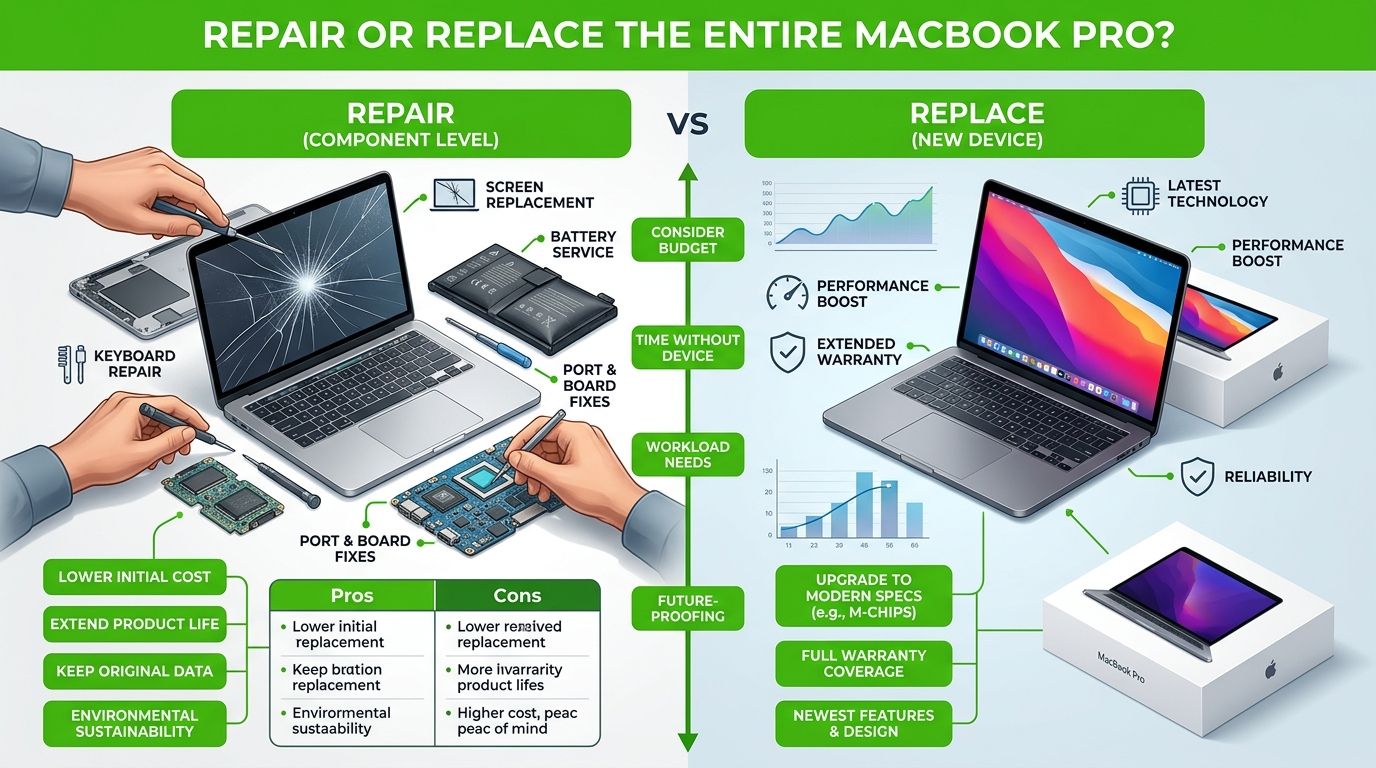
A cracked display can turn a productive MacBook Pro into an expensive decision. Compare the finished repair cost with the computer's current resale value, remaining useful life, and the price of a replacement machine. The original purchase price no longer reflects what the laptop is worth today.
Third-party repairs commonly fall in a broad mid-hundreds range, while Apple's out-of-warranty service can cost substantially more depending on the model. That spread creates a crossover point. A repair may preserve a valuable, familiar machine, or it may put too much money into hardware already approaching several other failures. Use the earlier pricing comparison as a starting point, then build the calculation around your own MacBook.
Build a personal value model
Start with the amount a working version of your exact MacBook Pro could reasonably sell for now. Subtract the complete repair quote, not merely the display assembly. Include diagnostics, shipping, accessories needed during downtime, and known faults such as battery wear, keyboard problems, liquid damage, or charging issues.
Then estimate useful life. A MacBook Pro with adequate performance, a healthy battery, and no serious secondary faults can justify a costly screen repair because the investment restores an otherwise dependable system. A machine with several unrelated problems may cross the replacement point after one repair, since the new display fixes only one failing component.
For a broader repair-versus-replacement calculation, review this laptop screen repair versus buying a new laptop cost comparison. AppleCare+ can change the result, so check coverage before authorizing independent work. Apple's service information also describes a 90-day service and parts guarantee, giving the official route a defined period of post-repair protection.
Value test: Repair the MacBook when the finished cost buys dependable continued use. Replace it when the display quote only delays a larger set of hardware problems.
Three outcomes are common
A newer, high-value MacBook Pro with one damaged display usually deserves a serious repair quote before replacement enters the discussion. A midlife machine may also be worth repairing when a compatible assembly is reasonably priced and the provider can explain its condition, testing, and warranty.
The difficult case is an older MacBook Pro whose display quote approaches its current resale value. Compare that repair with a replacement machine, the value of your existing software setup, migration time, and the risk of buying another used computer with hidden faults. Parts pairing and calibration can also affect the final value, because a cheaper installation that causes sensor or display-feature problems may require more work later.
Attachment should not decide the economics, and neither should the lowest parts listing. A properly tested repair can preserve useful hardware, while a bargain assembly can consume its apparent savings through repeat service and reduced usability.
True Tone Calibration and Parts Pairing Requirements
A display can light up and still be incorrectly serviced. The first post-repair question shouldn't be only, “Is there an image?” It should be whether the image, ambient-light response, sensor behavior, and system recognition match what the MacBook Pro is designed to provide.
Apple states that True Tone is available only on supported displays in its display feature guidance. On supported MacBook Pro models, the replacement assembly and its configuration can affect whether True Tone appears and behaves correctly.
What pairing and calibration affect
The replacement assembly may contain components that the Mac recognizes through its repair workflow. If the part isn't correctly configured, the computer may remain usable while losing expected display behavior. Owners may notice missing True Tone controls, inconsistent ambient-light adjustment, or other signs that the repair wasn't fully completed.
Calibration also matters for people who edit photographs, video, illustrations, or color-sensitive documents. A screen that appears normal in a quick shop test may still produce a different viewing experience if the replacement isn't properly matched or configured.
The repair provider should explain whether the job includes:
- Physical installation: Correct routing of the display flex and secure installation of hinges and related hardware.
- Software configuration: Completion of any required Apple repair workflow for the model.
- Feature verification: Testing True Tone where supported, camera function, brightness control, sleep and wake behavior, and lid-angle response.
- Visual inspection: Checking for dead pixels, lines, uneven brightness, dust, pressure marks, and abnormal hinge movement.
Test before accepting the Mac
Open System Settings and verify that True Tone appears when the model and display support it. Change brightness, close and reopen the lid, test the camera, and inspect the screen against a plain light background and a dark background.
Run the Mac on battery and connected power, because intermittent flex or sensor issues can reveal themselves during movement or sleep and wake transitions. If the repair shop can't tell you what was calibrated, what was tested, or what warranty applies to a post-repair pairing issue, the quote isn't complete enough to approve.
Your Display Replacement Decision Checklist
Use this checklist before authorizing an Apple MacBook Pro display replacement:
- Identify the exact MacBook Pro model: Record the model identifier, serial number, chip, and screen size.
- Protect your data: Complete and verify a Time Machine or cloud backup before service.
- Confirm the diagnosis: Ask whether the fault is limited to the display assembly or may involve the hinge, flex, camera, or sensor.
- Compare complete quotes: Include labor, parts, calibration, configuration, shipping, diagnostics, and warranty terms.
- Evaluate total value: Compare the finished repair cost with current resale value, remaining useful life, AppleCare+ coverage, and replacement options.
- Ask about the part: Find out whether the assembly is new, used, original, or third-party, and ask about compatibility risks.
- Require post-repair testing: Verify brightness, camera operation, True Tone where supported, lid behavior, sleep and wake, and image quality.
- Get the warranty in writing: Make sure display defects and configuration-related problems are addressed clearly.
The best repair decision is the one that balances cost, reliability, feature preservation, and future use. A transparent provider should diagnose the machine, explain the available part strategies, and give you enough information to choose repair or replacement without pressure.
We Fix PC Laptop provides MacBook screen replacement, diagnostics, and related laptop repair from its Houston in-house depot, with same-day turnaround available for some repairs when parts are in stock. Visit We Fix PC Laptop to request an assessment, discuss display assembly options, and receive an upfront estimate for your MacBook Pro.