.svg)
.svg)
.svg)




HP Laptop Screen Change Price: What to Expect in 2026
HP laptop screen replacement in the U.S. typically lands between $150 and $400 for mainstream models, and premium Spectre, EliteBook, or OLED panels can push past that. The final bill gets shaped by the panel, the labor, the assembly, and whether the exact part is readily in stock.
You're probably staring at a laptop that still boots, still makes noise, and still connects to an external monitor, but the screen is cracked, black, or full of lines. That's the frustrating part, because the machine isn't dead, and yet you can't use it normally. The number on the repair quote is only the start. The part you need, the way HP built the lid, and how fast you want the work done are what move the total.
Table of Contents
- Why HP Laptop Screen Change Prices Vary So Much
- HP Laptop Screen Change Price by Panel Type
- Typical Price Ranges Across HP Model Lines
- Part Quality Levels and What You Are Paying For
- The Hidden Costs Behind the Cheapest Quote
- Same-Day Service and What It Requires
- Repair, Replace, or Claim Insurance, the Smart Decision
Why HP Laptop Screen Change Prices Vary So Much
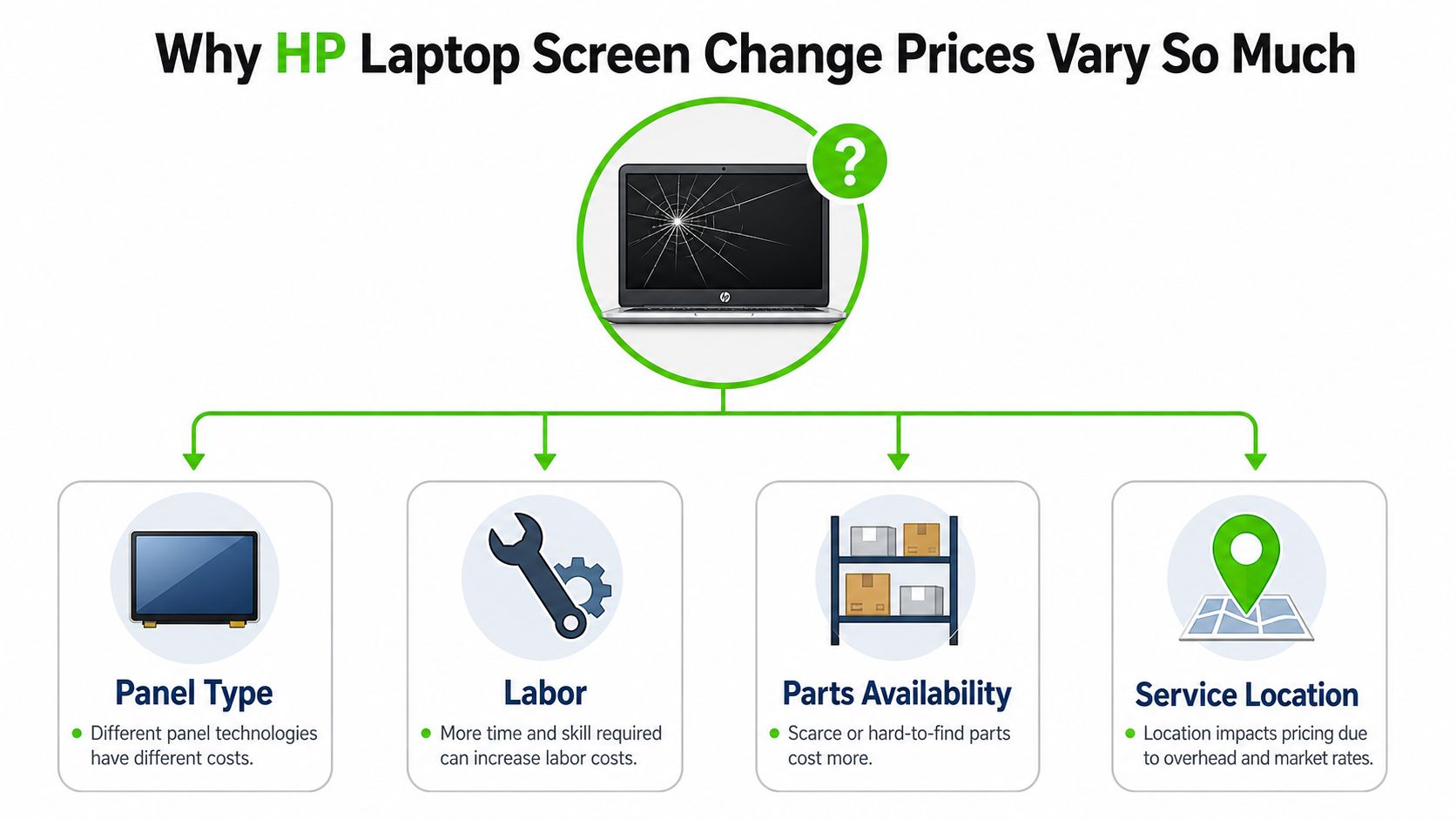
The screen breaks, the laptop still powers on, and suddenly the repair quotes look nothing alike. That's because hp laptop screen change price isn't really one price, it's a stack of decisions hidden inside one number. A budget Pavilion with a standard LCD and a premium Spectre with an OLED or touch panel are not the same repair, even if both happen to be 15.6 inches.
The four things that move the quote
The first driver is panel technology. Standard LCD and Full HD replacements sit near the bottom of the market, while touch, OLED, and high-resolution panels cost more because the part itself is more specialized. The second driver is screen size, but size is only part of the story. A 15.6-inch panel can still be cheap or expensive depending on what's behind the glass.
The third driver is parts availability. HP business laptops and premium consumer models often use panels that are more specific to the exact chassis, so the technician may need a rarer part. The fourth driver is labor intensity, because some HP lids are simple panel swaps and others need a more complete teardown. When a technician has to open the whole display assembly, the quote rises fast.
A normal Pavilion FHD repair and a Spectre OLED repair can look similar to a shopper skimming the top line, but they're priced differently for good reasons. The Pavilion usually uses a more common panel and simpler assembly. The Spectre often needs a higher-grade display and more careful handling, which is why premium HP display repair sits higher than commodity laptop work latest HP repair pricing guide.
Practical rule: if the quote doesn't tell you the exact panel type, assume the final bill can still move.
| Cost Driver | What It Means | Impact on Price |
|---|---|---|
| Panel Type | LCD, Full HD, touch, OLED, or high-refresh parts are not interchangeable | Big swing, often the main reason two quotes differ |
| Screen Size | Bigger panels can cost more, but size alone doesn't set the price | Moderate impact |
| Parts Availability | Common parts are easier to source than model-specific panels | Can raise cost and delay turnaround |
| Labor | Simple panel swaps cost less than full assembly work | Adds to the total, especially on premium lids |
If you want a useful second opinion before you approve anything, stop losing work on price and compare the quote to the actual parts and labor being bundled into it.
HP Laptop Screen Change Price by Panel Type
The panel type decides more of the cost than most owners realize. A standard non-touch LCD on an HP Pavilion is a different purchase than a touch screen, and both are different again from OLED or a high-refresh gaming panel. If you ask for a quote without naming the panel class, you're asking for a surprise later.
How to identify the panel you actually have
Use the model number first. HP's model line, such as Pavilion, Envy, EliteBook, Spectre, Omen, or Chromebook, gives the technician the starting point. Then check Windows display settings for the resolution and touch support, because those details narrow the part down before anyone opens the lid.
The wrong panel guess is where most repair headaches start. A quote based on a basic FHD screen can jump once the shop confirms touch, OLED, or a higher-refresh panel.
A standard LCD is usually the lowest-cost path, because it's common and widely stocked. Full HD IPS panels cost more when they're better quality or built for wider viewing angles. Touch-enabled panels climb higher because they add digitizer complexity and tighter compatibility. OLED and high-refresh panels sit at the premium end, since they're tied to more specialized sourcing and exact model matching.
If you're comparing repair versus replacement choices for touch and OLED machines, the practical breakdown is easier to see in this HP OLED and touchscreen repair guide.
A clean quote should tell you whether the part is standard, touch, OLED, or high-refresh. If it doesn't, ask before approving anything. Panel misidentification is the fastest way to turn a fair estimate into an annoying bill.
Typical Price Ranges Across HP Model Lines
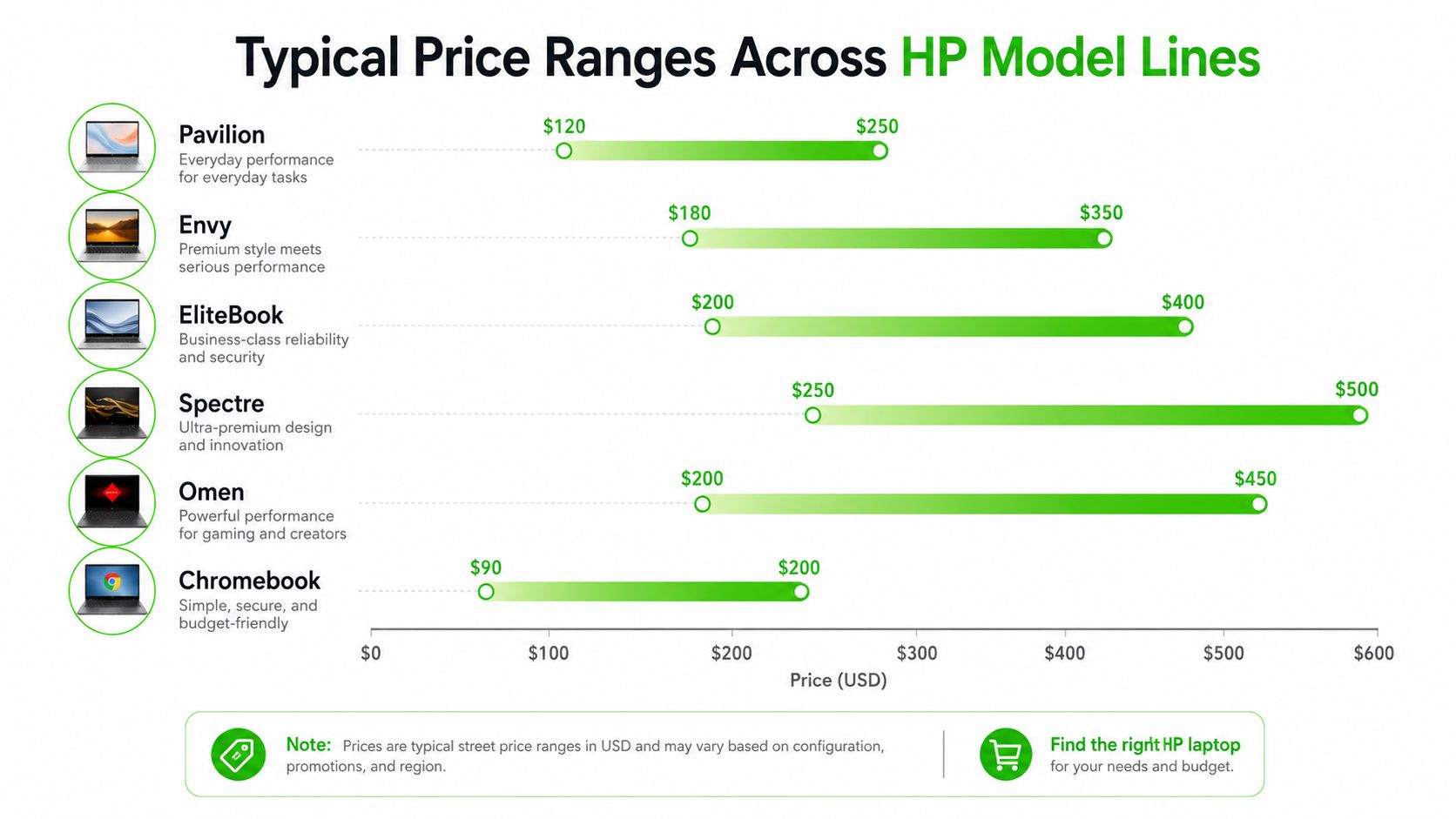
Walk into a shop with an HP screen issue, and the model line tells me most of what I need to know before I even open the lid. Pavilion usually stays on the lower end because the parts are common. Envy and EliteBook move up because the screens are more specific, and Spectre and Omen sit at the top because premium and gaming panels cost more to source and swap.
What each HP family usually costs
For U.S. repair guides, HP repairs commonly range from about $120 to $350 for standard LCD and Full HD replacements, while touch and high-resolution panels move higher. One guide places typical HP repair at $150 to $400, and another says common 13 to 15 inch models often cost $180 to $350 including parts and labor HP repair pricing guide. That is the broad market picture, but the model line still matters more than most quotes admit.
- Pavilion: usually the budget end, because commodity LCD supply keeps the price lower.
- Envy: higher than Pavilion, especially when the panel is touch-capable or better than entry-level LCD.
- EliteBook: often climbs further because business-class models use more model-specific parts.
- Spectre: premium pricing is the norm, especially on high-resolution and touch configurations.
- Omen: gaming screens land near the top because high-refresh panels cost more.
- Chromebook: often low to mid range, unless the panel is unusually specific.
The India pricing picture shows the same ladder. Pavilion replacement spans ₹3,800–₹10,500, including 14-inch non-touch FHD at ₹3,800–₹6,500, 15.6-inch non-touch FHD at ₹5,500–₹8,500, and 15.6-inch FHD touch at ₹7,000–₹10,500. Higher HP families move much wider, with EliteBook at ₹2,000–₹14,000+, Spectre at ₹2,500–₹15,000+, Omen at ₹2,000–₹24,000+, and Chromebook panels as high as ₹22,500+ India pricing breakdown.
That same source also lists a market average of ₹3,500–₹8,500. A buying guide says genuine or high-grade third-party HP screens range from ₹3,990 to ₹29,999 in India and $150 to $400 in the U.S., with labor adding ₹1,500–₹3,500 or $50–$120 technical buying guide.
Part Quality Levels and What You Are Paying For
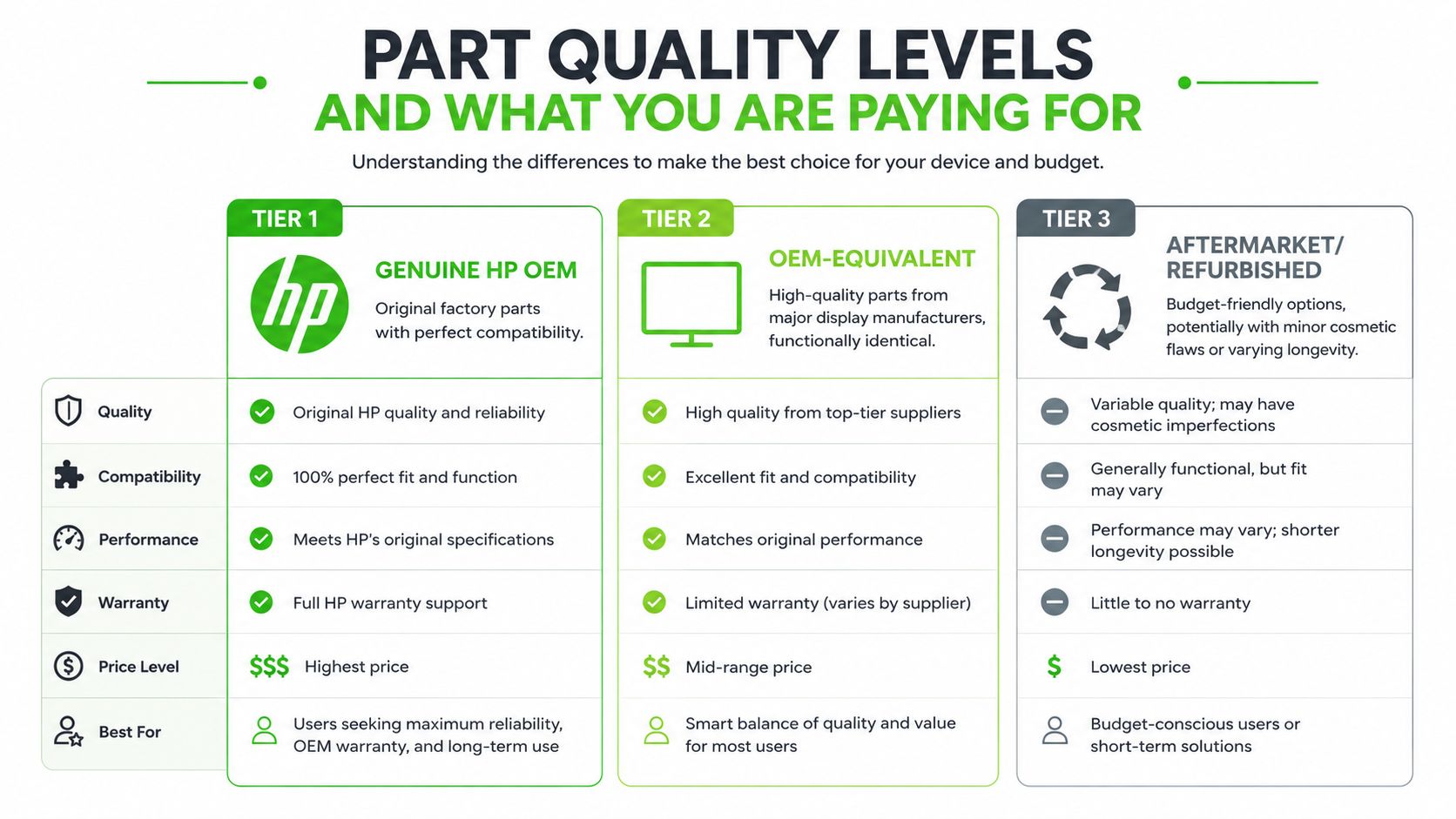
Not every replacement panel is the same product. A repair shop can quote you a cheap screen and still hand you a part that's fine for web browsing, or it can quote a premium part that matches the original display more closely. The difference is in quality tier, not just the size stamped on the box.
The three tiers you'll actually be offered
Genuine HP OEM is the safest choice when you want factory-level compatibility. It's the closest match to what shipped in the laptop, and it's what I'd push for on business machines, color-sensitive work, or customers who don't want surprises. It usually costs the most, but it removes a lot of compatibility risk.
OEM-equivalent is the practical sweet spot for many users. These panels come from major display manufacturers and are functionally close to the original, with solid brightness and color performance. For everyday users, this is usually where value and quality meet without paying for branding you won't notice in normal use.
Aftermarket or refurbished is the budget route. It can save money, but the trade-off is more variation in brightness, finish, bezel fit, and long-term consistency. If the laptop is a stopgap machine, this can make sense. If you rely on the screen all day, it's a compromise.
My rule in the shop: if the laptop is a daily driver, don't save a tiny amount on the panel and create a bigger annoyance later.
For standard home use, I'd usually stop at OEM-equivalent unless the original display had a special feature that matters to you. For design work, fleet devices, or premium laptops where you want the machine to feel original, stay with genuine OEM. If the machine is older and the goal is just to get it usable again, aftermarket can be acceptable, but only if you understand what you're giving up.
The panel tier matters because it changes touch feel, brightness, color accuracy, and how long the replacement stays pleasant to use. A cheap screen that looks uneven on day one isn't a good deal just because the invoice was lower.
The Hidden Costs Behind the Cheapest Quote
The cheapest quote usually wins attention, not the repair. A low panel price can hide the actual work behind the job, and that's where the invoice grows. The biggest mistake is comparing a bare screen part to a complete repair estimate.
What gets added after the first quote
Some shops quote panel-only, which means they're pricing just the glass and backlight assembly. Others quote full assembly replacement, which includes more parts and more labor because the entire lid module gets swapped. That difference alone can make two quotes look like they belong to different laptops.
Calibration is another quiet add-on. A shop may need to reset display behavior, verify image alignment, or confirm the new part is reading correctly in the system. Shipping matters too, especially if the panel isn't sitting on the shelf and has to be ordered. Then there are diagnostic fees and labor surcharges when the chassis is difficult to open or the hinges are tight.
A budget Pavilion can be quoted at $120 panel-only and still end up much higher once you move to a full assembly with calibration. That's not a scam, it's just the true cost of the repair once the technician does all the work needed to make the machine usable again. HP's own repair guidance makes the same point in a broader way, with DIY screens sometimes available for $50 to $100, professional repair usually around $300, and customer-damage out-of-warranty repair at $250 to $500 when parts, shipping, and labor are included HP repair guidance."
When the cheap quote is actually the right choice
If the panel is common, the chassis is simple, and the laptop doesn't need a full display assembly, the lower quote can be the smart move. If the machine is older, basic, and the goal is just to restore functionality, you don't need to overbuy.
If the panel is premium, touch-enabled, or tied to a fragile hinge setup, chasing the lowest quote usually backfires. You want the shop to tell you whether the quote is panel-only or assembly-level before you approve the work.
Same-Day Service and What It Requires
Same-day repair sounds easy until you look at the actual checklist. The shop needs the exact panel on hand, a technician who knows that HP model, and a schedule that lets the laptop go straight to the bench. Miss one of those pieces, and same-day turns into next-day or longer.
Which HP models are realistic for same-day turnaround
Mainstream Pavilion, Envy, and common EliteBook models with standard FHD panels are the easiest same-day jobs. Those screens are more likely to be stocked, and the repair itself is usually straightforward. If the part is already on the shelf and the display assembly is not unusually fragile, same-day service is a realistic expectation.
Premium Spectre OLED, Omen high-refresh, and any model that needs a full display assembly swap are harder to promise for the same day. The reason is simple. The part is less common, and the labor is more exacting. A shop can do the work, but it needs the right inventory and enough bench time to do it cleanly.
We Fix PC Laptop operates an in-house depot at 1301 Waugh Dr., Suite 200, Houston, TX 77019, with same-day turnaround available for many repairs when parts are in stock. If you are in Houston and your HP screen failed today, that kind of local setup matters more than a polished website claim We Fix PC Laptop.
Before you approve anything, ask one direct question. Is the exact panel already here? If the answer is yes, same-day is on the table. If the answer is no, do not let anyone pretend the timing is guaranteed.
For emergency planning, this Houston screen repair guide is the next read if you need to know what to do before the laptop gets worse.
Repair, Replace, or Claim Insurance, the Smart Decision
A cracked HP screen forces a real decision fast. Pay for a local repair, send it through HP or a protection plan, claim insurance, or replace the laptop outright. The right call comes down to the laptop's age, the panel type, and how close the repair sits to the machine's real market value.
A simple rule for most owners
Repair the machine locally when it is still in solid use and the panel is a standard one. That is the cleanest value case, because the laptop still has useful life left and the screen fix does not bury you in cost. If the device is still covered for accidental damage, use HP or the protection plan instead of paying cash at the counter.
Once the repair bill starts creeping toward a big chunk of what the laptop is worth used, stop and compare replacement options. That is the point where a screen job starts looking like money spent on a machine that is already on the back end of its life. I would use that same rule on a Pavilion, an Envy, or a premium model, because pricey OLED and high-refresh parts can push the total into replacement territory fast. If you want a straight comparison, the screen repair versus new laptop guide lays out where repair stops making sense.
Insurance is the cleaner path when the damage is covered and the deductible is lower than the repair bill. Claims only make sense when the paperwork is worth the payout, and the plan is not going to punish you later with a higher out-of-pocket cost than the screen itself. If the coverage is weak or the deductible is high, skip the claim and pay only if the laptop still deserves the investment.
If you need a local repair in Houston, pick a shop that identifies the exact panel, separates parts from labor, and tells you whether the job is a simple panel swap or a full assembly replacement before anyone starts work. That is the difference between a controlled repair and a quote that grows after the laptop is already on the bench.