.svg)
.svg)
.svg)




Laptop Charger Port Repair Cost: A Complete Guide 2026
Most straightforward laptop charger port repairs cost between $75 and $250, but soldered USB-C ports or motherboard-level damage can push the bill to $300 to $700+ depending on the laptop's design. If your machine is plugged in and still dead, don't guess. Diagnose first, because the wrong fix is how people waste money on parts they didn't need.
The question isn't, “What does a charger port cost?” It's, “What failed, and how deep does the repair go?” That's the only way to make sense of the quote sitting in front of you.
Table of Contents
- What Laptop Charger Port Repair Costs
- Why Port Architecture Drives the Price
- Detailed Cost Breakdown by Repair Type
- Before You Pay for Repair Rule Out These Issues First
- When Repair Makes Sense and When It Doesn't
- Choosing the Right Repair Provider
- Your Action Plan for Charger Port Problems
What Laptop Charger Port Repair Costs
You plug in the laptop, the charging light stays dark, and now you have a dead machine and a repair quote to sort through. For a simple DC jack or charging-port job, $75 to $250 is the normal range. Soldered USB-C work or motherboard-level failures can climb to $300 to $700+ depending on the hardware and how much board work the technician has to do. A 2025 cost guide puts common estimates at $75, $150 to $250, and $300 to $500 for repair or port replacement, and says straightforward port soldering or replacement on mainstream laptops often lands at $100 to $250 total including parts and labor (laptop charger port repair cost guide).
That spread is tied to the diagnosis, not guesswork. A port that comes out cleanly and goes back in cleanly is a small repair. A port that is bonded to the board, or has burned nearby circuitry, turns into delicate board work fast.
Practical rule: if a shop gives you one flat number before checking the port, charger, and board, treat that quote as a starting guess, not a diagnosis.
A good technician should tell you whether the job is a simple connector swap, a soldering job, or a board repair. If they cannot explain that in plain language, keep looking. For a rough planning estimate, a price calculator for home service pros can help you separate labor, parts, and markup instead of treating the whole quote like one mystery number.
Why Port Architecture Drives the Price
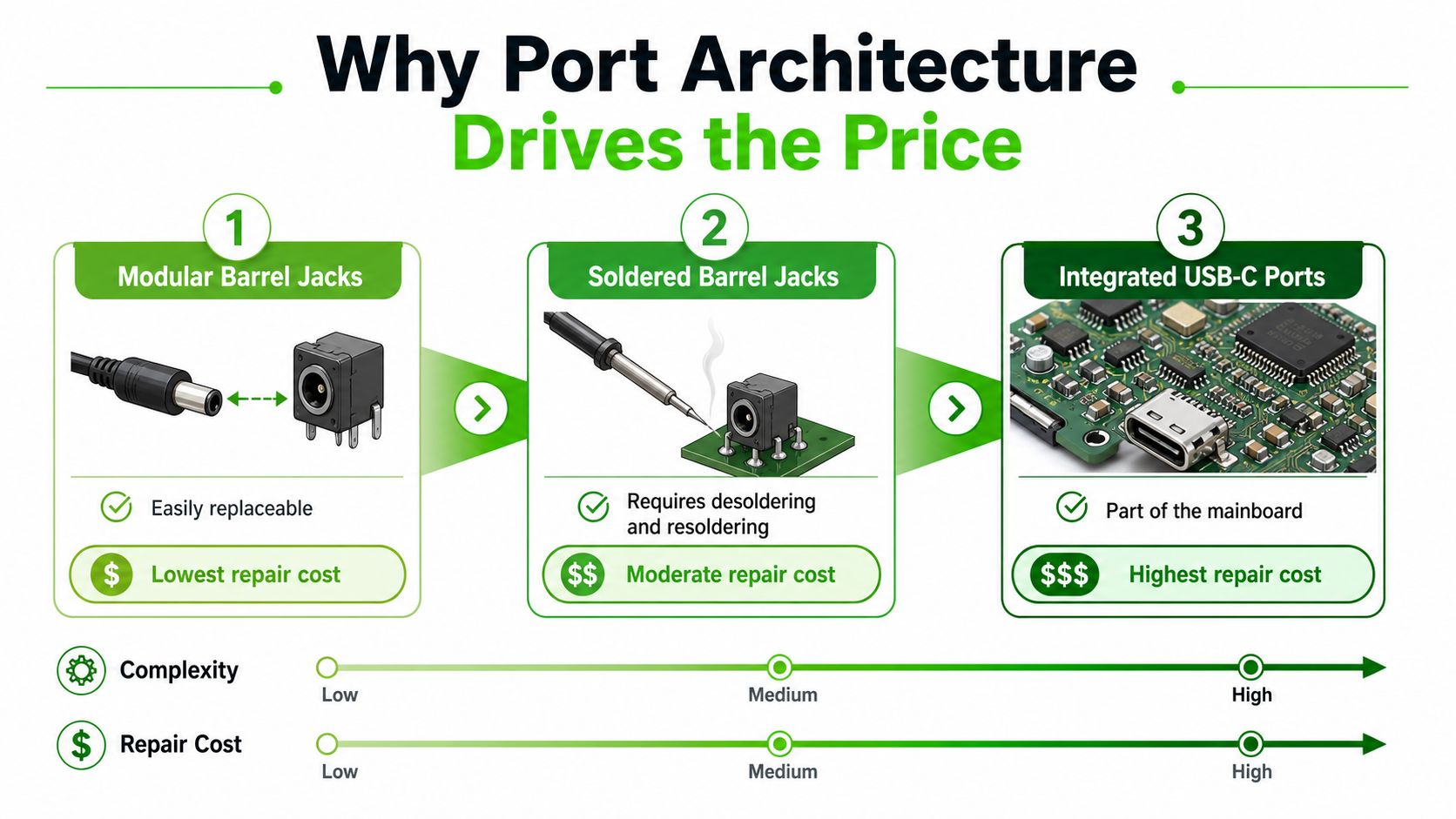
The price moves because the port is built differently from one laptop to the next. A modular barrel jack is the easiest case. A soldered barrel jack takes more skill and more time. A USB-C charging port is often tied into the motherboard or a small daughterboard, which turns the job into precision electronics work instead of a simple parts swap.
Modular versus soldered versus integrated
A modular port is the cleanest repair. The technician removes the part, installs a new one, tests it, and sends the machine back. A soldered port is a different job, because the connector is physically attached to the board and has to be desoldered and resoldered correctly.
The most expensive repairs start when the damage reaches the surrounding board. At that point, the technician may need to remove the main board, inspect nearby power circuitry, and check for shorts before reassembly. The repair is no longer just about the connector. It becomes a full look at the charging path.
Board design drives the labor. Newer laptops are thinner and more compact, and that makes the charging port harder to access and harder to service. The machine may look cleaner on the outside, but the repair gets slower, riskier, and more technical inside.
A thin laptop does not just feel lighter. It often makes the charging repair harder, too.
Detailed Cost Breakdown by Repair Type
A good quote starts with the fault, not the sticker price. If the shop cannot tell you whether you are paying for a loose connector, a full replacement, or board-level work, the number is just a guess.
| Repair Type | Typical Cost Range | What It Includes |
|---|---|---|
| Loose port or minor soldering fix | $30 to $60 | Basic inspection, small solder touch-up, limited parts |
| Full port replacement | $80 to $150 | New connector, labor, test fit, basic post-repair testing |
| Cabled barrel jack work | $80 to $180 | Connector replacement plus access to the power lead |
| Soldered barrel jack repair | $150 to $300 | Desoldering, resoldering, board handling, verification |
| Soldered USB-C charging port | $180 to $350 | Microsoldering, alignment, board inspection, power testing |
| Burned motherboard traces | $300 to $600+ | Trace repair, board-level restoration, deeper diagnostics |
The pattern is consistent across repair guides and service estimates. Simple port work lands in the lower range, while burned traces or motherboard damage push the bill much higher, as shown in the repair-cost breakdown, the port-architecture pricing guide, and the Canada service estimate. Labor dominates the bill once the job becomes technical. In Canada, charging-port service is listed at CA$137 to CA$344, with CA$27 to CA$110 in parts and CA$110 to CA$234 in labor, which shows you where the money goes when the repair moves beyond a simple connector swap.
What you're really paying for
A low quote usually means a fast bench job with limited teardown. A higher quote usually includes board handling, microscope work, testing under load, and the chance that the technician finds a second fault while the machine is open. Two laptops can show the same charging problem and still land in very different price bands because the repair path is not the same.
A cheap port fix is the best-case outcome. Once the damage spreads into the board, the quote stops being about one connector and starts covering diagnosis, recovery work, and risk. That is why a shop should explain the repair type before it names the price, not after.
Bottom line: if the shop cannot tell you whether the charge port is modular, soldered, or board-integrated, they are not ready to price the repair accurately.
Before You Pay for Repair Rule Out These Issues First
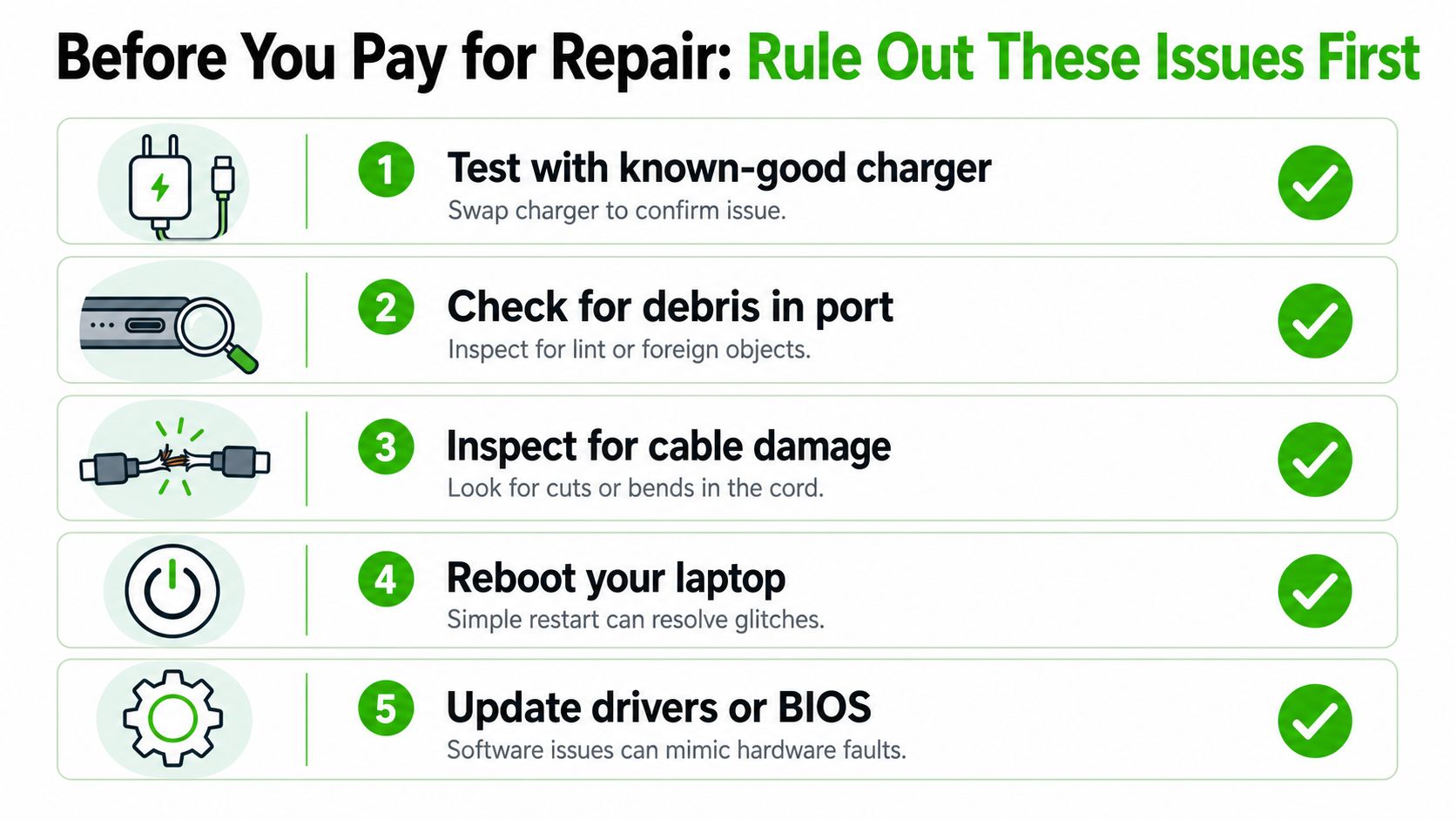
A dead charge indicator doesn't prove the port is bad. It just means the laptop isn't charging the way it should. Start with the cheap checks first, because they solve more problems than people expect.
Check the obvious culprits first
- Test with a known-good charger: swap in a charger that you know works, because a bad adapter is easier and cheaper to replace than a port.
- Check for debris in the port: lint, dust, and compacted debris can block contact and mimic a failed connector.
- Inspect for cable damage: a frayed cord or bent plug can interrupt charging even when the port itself is fine.
- Reboot the laptop: a simple restart can clear a stuck power state.
- Update drivers or BIOS: software issues can sometimes look like hardware failure.
A debris clean or charger-tip replacement can run $0 to $40 or $25 to $90, which is a lot less than opening the machine for no reason (cleaning and charger-tip pricing). That's why the first good repair shop test is always the charger, then the port, then the board.
If you want a simple step-by-step checklist before you book a repair, use this guide from We Fix PC Laptop on what to do when a laptop isn't charging. The point is to avoid paying for a port replacement when the charger or cable was the actual fault.
When Repair Makes Sense and When It Doesn't
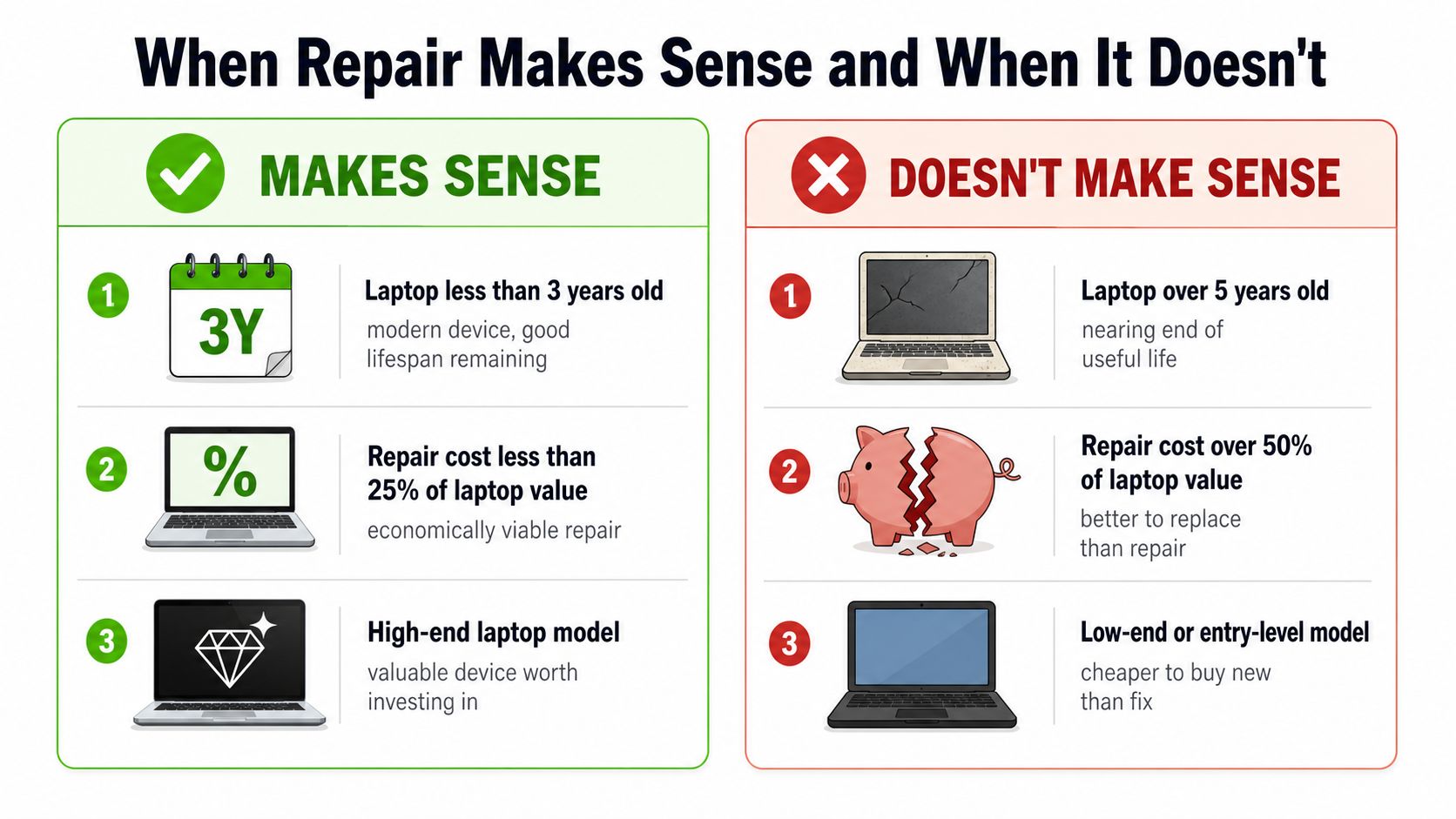
A charger port repair is worth paying for when the laptop still has real life left in it, the charging problem is isolated, and the quote stays in line with what the machine is worth. A laptop that is still current, still fast enough for the job, and failing at one clear point is a good repair candidate. Once the problem spreads to the board, the battery, or other worn parts, the repair stops being a smart buy.
Use value, age, and damage severity
Start with the machine's value, then look at age and damage severity. Repair makes sense when the laptop is still useful, the charger port is the only real fault, and the work is a small part of what the laptop is worth. Replace the laptop instead when it is already old, the charging issue is one problem in a longer list, or the repair quote has climbed because the board needs work too.
Do not let sunk cost talk you into a bad decision. A lot of people keep paying to fix an old laptop because they already spent money on it before. That is the wrong test. The only question that matters is whether this repair buys enough useful time to justify the bill.
Borderline cases deserve hard thinking
Premium laptops usually deserve a closer look because a clean port repair can still be cheaper than replacing the whole machine. A basic entry-level laptop with a worn battery, weak hinges, and a damaged port usually does not deserve the same treatment. The numbers get ugly fast, and the machine often has more than one weak point.
If the repair quote starts looking like money better spent on a replacement, stop and compare the two side by side.
For a straight repair-vs-replace decision, use We Fix PC Laptop's repair or replacement guide. That is the right way to judge it. Fix the laptop only when the math still makes sense.
Choosing the Right Repair Provider
A good repair provider starts with diagnosis, not with a sales pitch. If the shop won't explain how they tested the charger, port, battery, and board, that's a red flag. If they give you a quote without looking at the device, that's another one.
Ask these questions before you approve anything
- Is diagnosis included? Some shops roll it into the repair, others charge separately.
- Do you do the work in-house? In-house depot service keeps the job from getting bounced around and usually improves control over quality.
- What happens if you find board damage? The shop should explain the next step before they touch anything.
- What does the warranty cover? You want to know whether the shop stands behind the connector, the solder work, and the test result.
- Will you replace the charger first if needed? A decent technician won't force a port job when the adapter is the actual problem.
The reason in-house work matters is simple. It shortens the repair cycle, limits outsourcing, and gives the shop better control over component-level work. A provider that can't tell you where the repair happens is usually a provider that can't own the outcome either.
If you need a checklist for choosing a trustworthy shop, use We Fix PC Laptop's guide to finding a reliable local computer repair shop. The bad signs are easy to spot. Vague quotes, pressure to commit immediately, and “we'll see what happens” aren't good enough when your laptop won't charge.
Your Action Plan for Charger Port Problems
Start simple. Test the charger, inspect the cable, and clean the port before you spend money on hardware repair. If the problem remains, get a real diagnosis, not a guess.
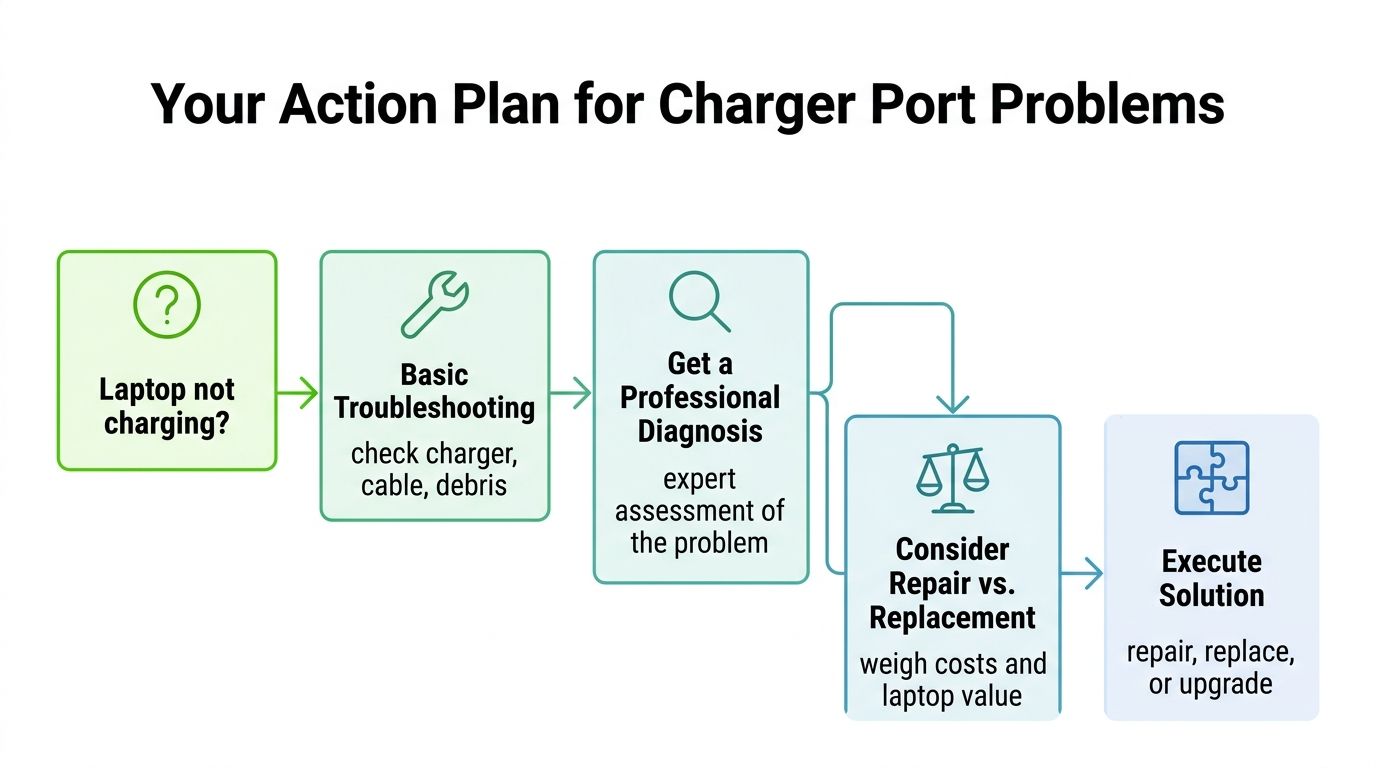
If the quote is under control and the laptop still has strong value, repair it. If the estimate crosses into the $300 to $700+ range and the machine isn't worth much more than that, stop and compare replacement options instead. The smart move is always the one that matches the fault, not the one that sounds cheapest at first glance.
If your laptop still isn't charging, We Fix PC Laptop can diagnose the fault, tell you whether the port, charger, or board is the actual issue, and repair it the right way. Visit We Fix PC Laptop to get a straight answer before you spend money on the wrong fix.