.svg)
.svg)
.svg)




Gaming PC Repair: The 2026 Guide to Restoring Peak Performance
Is your GPU actually dying, or is a failing power supply simply choking your system during a heavy raid? It’s a terrifying moment when your high-end rig starts stuttering or throwing intermittent crashes, especially with component prices jumping up to 130% this year. You’ve spent thousands on your setup, so the anxiety of a potential hardware meltdown or the fear of losing years of data is completely valid. DIY attempts often lead to inconsistent performance or, worse, expensive damage that keeps you offline for weeks. You deserve a professional gaming pc repair strategy that treats your rig with the respect it deserves.
We believe that your PC isn’t just a machine; it’s your gateway to competition and community. This guide provides professional expert guidance to help you identify and resolve complex hardware failures while ensuring your personal data remains secure. We will explore the latest 2026 diagnostic tools, like the Thermaltake Dr. Power III Pro, and specialized depot-level repair strategies that restore your FPS and stability. You’ll learn how to navigate new Right to Repair laws and use advanced testing to get back into the game faster than ever.
Key Takeaways
- Specialized rigs need more than just a quick fix; they require deep technical knowledge of thermal management and custom hardware.
- Spot the difference between a simple driver glitch and a dying GPU to save yourself from unnecessary component replacements.
- See how an in-house depot environment provides the safety and precision tools required for a high-stakes gaming pc repair.
- Protect your data and your peace of mind by vetting your repair team for their commitment to security and technical integrity.
- Restore your machine to its original glory through rigorous stress testing that guarantees stability during your most intense gaming sessions.
Why Gaming PC Repair Requires a Specialized Technical Approach
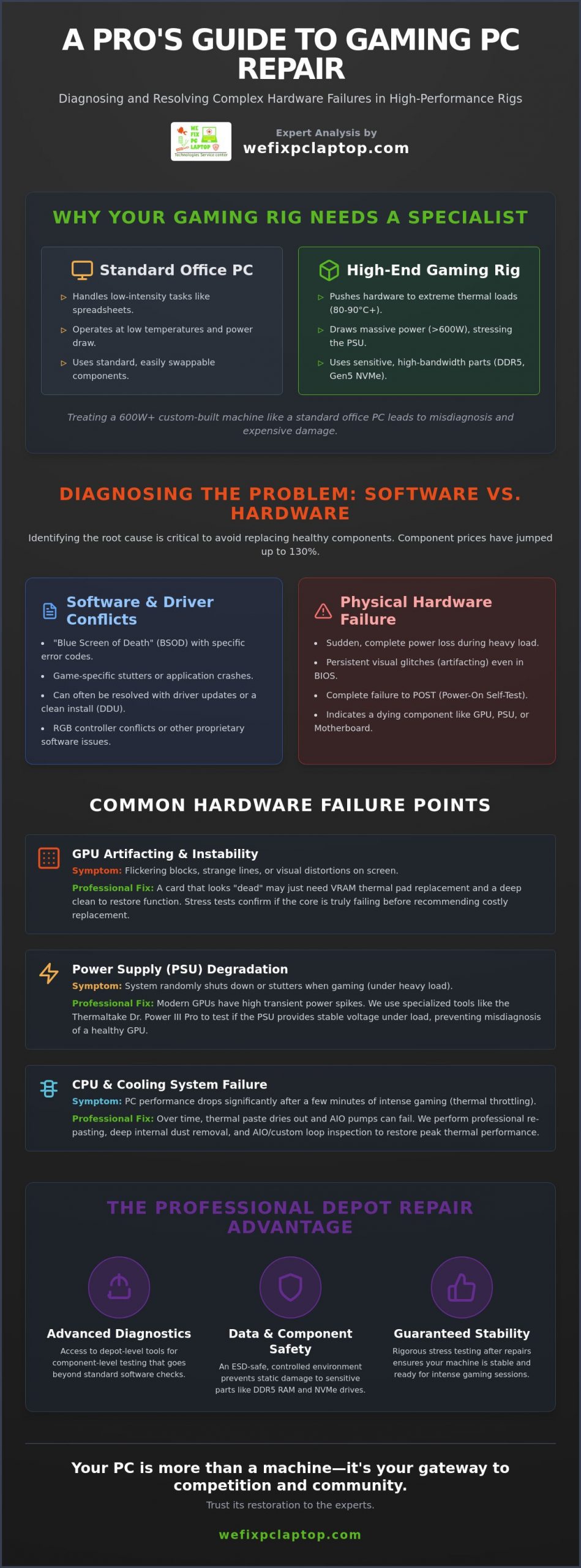
Your gaming rig is a finely tuned instrument, not a standard office workstation. While a typical business PC might handle spreadsheets at low temperatures, a high-end gaming machine operates under extreme thermal loads that can exceed 80 or 90 degrees Celsius during a heavy session. Because of this intense heat, gaming pc repair isn’t just about swapping parts. It’s the restoration of high-performance computing hardware through specialized thermal management and component-level diagnostics. You can’t treat a system pulling 600 watts of power the same way you’d treat a basic laptop.
Every custom build is unique. There’s no “one size fits all” diagnostic manual when you’re dealing with a mix of different manufacturers, proprietary software, and varied BIOS settings. Modern components like DDR5 RAM and Gen5 NVMe drives are incredibly fast but also sensitive to static and voltage fluctuations. Handling these requires specific protocols to ensure you don’t end up with a dead stick of memory or a corrupted boot drive. Maintaining your system in a good state of repair involves more than just dusting the fans; it requires a deep understanding of how these high-bandwidth parts interact under pressure.
Thermal Management and Overclocking Challenges
Heat is the primary enemy of performance. Over time, thermal paste dries out and loses its ability to transfer heat from the CPU to the cooler. If you’re using an All-In-One (AIO) liquid cooler, a pump failure or a clogged radiator leads to immediate thermal throttling, where your PC slows down to protect itself from melting. Overclocking adds another layer of complexity. While it pushes your hardware to the limit, it also impacts voltage stability and component longevity. Professional re-pasting and deep internal cleaning are essential maintenance steps to ensure your voltages remain stable and your hardware doesn’t age prematurely.
Custom Loop and High-End Architecture
Liquid cooling offers peak performance but introduces the risk of leaks. A single drop of coolant can short out an expensive motherboard if it’s not handled with professional care. Beyond the plumbing, modern rigs often struggle with RGB controller conflicts and proprietary software that fights for system resources. We focus on BIOS and UEFI optimization for modern chipsets to ensure your hardware talks to your software without crashing. This specialized approach ensures that every component, from the pump to the lighting strip, works in perfect harmony to deliver the frames you expect.
Diagnosing Common Gaming PC Hardware Failures
When your screen freezes mid-match, your first instinct is likely frustration mixed with a bit of panic. The hardest part of any gaming pc repair is determining if you’re facing a simple software driver conflict or the actual death of a component. Software issues usually manifest as “blue screens” with specific error codes or game-specific stutters. Physical hardware failure, however, is often more dramatic. It presents as sudden power loss, persistent visual glitches that appear even in the BIOS, or a complete failure to POST (Power-On Self-Test). Understanding these symptoms is the first step toward a successful restoration.
Diagnostic transparency is a core value of the modern tech community. Organizations like The Repair Association champion your right to understand what is happening inside your machine. Whether it’s a micro-fracture in the motherboard’s PCB caused by years of intense heat cycles or a VRM (Voltage Regulator Module) that has finally given out under the stress of high-wattage overclocking, a professional diagnosis prevents you from wasting money on parts you don’t actually need.
GPU Artifacting and Driver Stability
GPU artifacting is the appearance of visual distortions, such as flickering blocks or strange lines, caused by memory or core hardware errors. Before you assume your card is e-waste, we use stress tests to check if the VRAM is simply overheating. Sometimes, a card that looks “dead” just needs a fresh set of high-conductivity thermal pads and a deep clean. If artifacts persist after a clean driver install using Display Driver Uninstaller (DDU), the hardware itself is likely failing. If these technical hurdles feel overwhelming, reaching out to gaming pc repair specialists can provide the clarity you need before making an expensive replacement.
The Role of the Power Supply in System Stability
In 2026, high-end rigs with 40-series and 50-series cards demand massive, stable power. A “Bronze” rated PSU might have been fine years ago, but modern cards have transient power spikes that can trip the over-current protection on older units. If your PC reboots instantly when a game gets intense, your PSU rails are likely failing to maintain voltage. We often see damage caused by “daisy-chained” PCIe cables; always use individual cables for each power header on your GPU to prevent melting connectors or random shutdowns. Symptoms like audible coil whine or a persistent “click” when you hit the power button are clear warnings that your power supply is on its way out.
Depot Repair vs. On-Site: Which is Best for Your High-End Rig?
Convenience often clashes with technical necessity. While on-site technicians can resolve minor software glitches or basic networking issues, complex hardware teardowns require a stable, surgical environment. Attempting a gaming pc repair on a dining room table lacks the precision needed for modern high-performance machines. Dust, carpet static, and inadequate lighting turn a simple fan replacement into a high-risk gamble with your motherboard. You need a space designed for technical success.
Opting for in-house depot computer repair provides a level of hardware restoration that on-site visits simply cannot match. A dedicated facility allows for long-term stress testing that is impossible to conduct in a home or office. We often run intensive benchmarks for 24 hours or more to catch those elusive, intermittent crashes that only appear under sustained heat. This methodical approach ensures your rig is truly stable before it returns to your desk, giving you the confidence to jump straight back into competition.
The Controlled Environment Advantage
High-end components worth thousands of dollars demand ESD-safe (Electrostatic Discharge) workspaces. In a depot setting, every surface is grounded to prevent invisible static shocks that can shorten the lifespan of your CPU or RAM. Immediate access to a full library of spare testing parts means we don’t have to guess which component is failing. We can swap in a known-good power supply or GPU instantly to isolate the problem. Additionally, deep hardware cleaning requires more than a can of compressed air. Industrial air compressors and specialized tools remove fine particulates from heatsinks and PCB crevices that standard cleaning methods leave behind.
Cost-Benefit Analysis for Gamers
Many gamers worry about the downtime of a depot visit, but a “quick fix” on-site often leads to recurring failures. If a technician misses a failing VRM because they couldn’t run a full thermal stress test, you’ll be back in the same position next week. A thorough depot diagnostic reduces long-term costs by solving the root cause the first time. For professional streamers who cannot afford a single hour of downtime, these depot services often facilitate managed it support services that keep their entire production stack running smoothly. Investing in a lab-grade repair today prevents a catastrophic system failure during your next live event.
How to Choose a Reliable Gaming PC Repair Partner
Handing over a custom-built rig feels different than dropping off a standard office laptop. You’ve likely spent months researching parts and hours perfecting the cable management. Many big-box retailers treat every machine with a “one size fits all” mentality, which often leads to generic troubleshooting that ignores the nuances of high-performance hardware. Finding a gaming pc repair specialist means looking for a partner who values your investment as much as you do. You need someone who understands that a frame drop isn’t just a glitch; it’s a competitive disadvantage.
Transparency is your best defense against unexpected costs. With DRAM and SSD prices increasing by up to 130% in 2026 due to industry-wide shortages, repair costs can fluctuate rapidly. A reliable shop will provide a clear diagnostic range before they start cracking open your case. They should be able to explain exactly why a specific component needs replacement and how the current market affects those part prices. If a provider is vague about their process or refuses to discuss their warranty terms upfront, it is a significant red flag for your hardware’s safety.
Verifying Technical Expertise and Certifications
An A+ certification is a solid baseline for any technician, but it doesn’t guarantee they know how to troubleshoot a failing custom loop or a complex BIOS conflict on a high-end motherboard. You should ask potential partners if they perform component-level work or if they simply swap parts until the problem goes away. True expertise lies in the ability to diagnose a failing capacitor on a board rather than suggesting a full motherboard replacement. Our lead technician, Ken, focuses on these intricate details to ensure your rig returns to you in peak condition without unnecessary expenses.
Data Protection and Cybersecurity for Gamers
Gamers face unique digital threats that standard repair shops often overlook. Malicious code can hide within game mods or third-party launchers, making comprehensive cybersecurity solutions a vital part of the repair process. We use advanced tools like SentinelOne to ensure your system is clean of threats before we even begin the hardware fix. Protecting your Steam, Epic, and Riot accounts is just as important as fixing a GPU. Your digital identity and personal files deserve a protective environment where data integrity is the highest priority. If you are worried about your system’s health, contact our gaming pc repair team to secure your machine today.
Expert Gaming PC Repair Services by We Fix PC Laptop
When your hardware fails, you don’t just need a technician; you need a specialist who understands the high stakes of competitive play. At We Fix PC Laptop, our lead technician, Ken, heads a team dedicated to the intricate world of high-performance rigs. We don’t just swap parts; we diagnose the root cause of instability to ensure your machine stays in the game. Whether you’re running an ASUS ROG, MSI, Alienware, or a completely custom boutique build, our gaming pc repair services are tailored to the specific architecture of your system.
We understand that for professional gamers and content creators, time is the most valuable resource. That’s why we offer 24/7 emergency support and fast turnaround options to minimize your downtime. Our facility is equipped to handle everything from simple fan replacements to complex component-level board repairs. By focusing on a personal, community-driven approach, we provide a level of care and accountability that large corporate retailers simply cannot match. Your rig is treated as a priority, not just another ticket number in a queue.
Our In-House Diagnostic and Repair Process
We follow a methodical three-step process to ensure every repair is thorough and lasting. This structured approach allows us to maintain the high standards required for modern gaming hardware:
- Step 1: Intake and Physical Inspection. We begin with a deep dive into the chassis, checking for physical obstructions, cable tension, and the health of your cooling systems, including AIO pumps and radiator fins.
- Step 2: Component-Level Testing. Using proprietary diagnostic tools and the latest 2026 testing software, we isolate failures in the GPU, VRAM, and power delivery phases.
- Step 3: Precision Repair. We perform the necessary fixes or replacements using only high-quality, verified parts. This is followed by a rigorous 24-hour stress test to guarantee total system stability under load.
Comprehensive Hardware and Software Support
A true restoration goes beyond just fixing a broken fan or a failing SSD. Our team provides full OS optimization to strip away performance-robbing bloatware and ensure your drivers are perfectly tuned for the latest titles. We also integrate cloud backup solutions into our service flow, ensuring your save files and production assets are protected even during a total hardware overhaul. If your system is stuttering or failing to boot, don’t settle for inconsistent DIY results. Restore your gaming PC to peak performance today!
Restore Your Competitive Edge Today
Your high-end gaming rig represents a significant investment of both time and money. Restoring a machine after a hardware crash requires more than basic troubleshooting. It demands specialized thermal management and the controlled environment of a professional depot. By choosing a partner who prioritizes component-level diagnostics and advanced cybersecurity protection, you ensure that your personal data and your hardware remain safe from the unique technical risks of 2026.
We Fix PC Laptop is your dependable local ally for any technical crisis. Our team provides expert in-house depot gaming pc repair for maximum security, ensuring your custom build receives the precise care it needs to hit peak FPS once again. We offer same-day services for urgent hardware failures and deep diagnostics to solve intermittent crashes using the latest industry tools. This methodical approach takes the guesswork out of maintenance and puts the focus back on your performance.
Don’t let a failing component keep you on the sidelines. Get a Professional Gaming PC Diagnostic Now and experience the relief of a total system resolution. We’re ready to get you back to the games you love with the stability you deserve.
Common Questions About Gaming PC Restoration
How much does gaming PC repair typically cost in 2026?
Industry estimates for most desktop repairs in 2026 range between $79 and $250 depending on the specific component failure. For example, replacing a standard power supply often falls between $119 and $149 while a mid-range motherboard replacement can reach $349. These figures reflect the 4% to 8% price increase seen across the PC market this year due to global storage and memory shortages.
Is it worth repairing an older gaming PC or should I just upgrade?
Repairing an existing machine is often the most financially sound decision in 2026 because new system prices have jumped by up to 20% this year. Since gaming rigs are modular, you can replace a single failing part like an NVMe SSD for much less than the cost of a new build. If your core components like the motherboard and CPU are still relevant, a targeted fix will extend your system’s life significantly.
How long does a professional gaming PC diagnostic take?
A standard diagnostic typically takes 24 to 48 hours to ensure we catch intermittent issues through thermal stress testing. However, we offer same-day service options for urgent hardware fixes when you need to get back online immediately. This process involves a thorough visual inspection followed by software-based stress tests to pinpoint the exact cause of your system’s instability without the guesswork.
Can you fix a gaming laptop that is overheating?
Yes, we specialize in resolving thermal issues for both high-end desktops and gaming laptops. Overheating is usually caused by dried thermal paste or dust accumulation in the cooling fins. We perform deep internal cleanings and re-paste processors to restore proper airflow. This is a critical maintenance step that prevents permanent damage to your expensive internal components and restores your original clock speeds.
What happens to my data and game saves during the repair?
Your personal data and game saves are our highest priority during any gaming pc repair. We utilize secure in-house depot protocols and advanced tools like SentinelOne to protect your digital well-being. Before performing major hardware swaps, we can facilitate cloud backup or data recovery to ensure your progress and personal files remain untouched throughout the entire technical restoration process.
Do you provide a warranty on gaming hardware repairs?
We stand behind our work with a dedicated warranty on all hardware repairs and part replacements. While specific periods can vary based on the manufacturer of the new component, our labor is always backed by our commitment to quality and technical integrity. You should always verify the exact warranty terms during your initial intake to ensure your investment is fully protected against future defects.
Can you repair liquid-cooled PCs if they develop a leak?
We provide comprehensive support for liquid-cooled systems, including leak detection and component cleanup. If a custom loop or AIO cooler fails, we carefully disassemble the affected area and use specialized tools to remove any conductive residue. We then replace the faulty pump or tubing and perform rigorous pressure testing to ensure the system is completely watertight before it returns to your desk.
Do I need to bring my own cables and peripherals for the repair?
You generally only need to bring the PC tower itself for a gaming pc repair unless you suspect a specific cable is the problem. Our depot is fully equipped with high-quality testing monitors, power cables, and peripherals to facilitate a complete diagnostic. If you are experiencing issues with a specific external device or a proprietary power adapter for a laptop, bringing those items can help us replicate the exact failure.
- Depot Repair vs. On-Site Repair: How to Best Repair Any Computer in 2026
- Comprehensive Laptop Screen Repair Guide: 2026 Professional Solutions
- Dell Laptop Screen Replacement Cost: 2026 Pricing and Repair Guide
- The 2026 Dental IT Support Checklist: Is Your Practice Secure and Compliant?
- The Ultimate Notebook Screen Repair Checklist: 2026 Expert Guide
- Cybersecurity Solutions: The 2026 Buying Guide for Professional Firms
- IT Services for Healthcare Providers: A 2026 Guide to Managed Technology Services