.svg)
.svg)
.svg)




How to Choose Between Data Recovery Companies: A Complete 2026 Comparison Guide
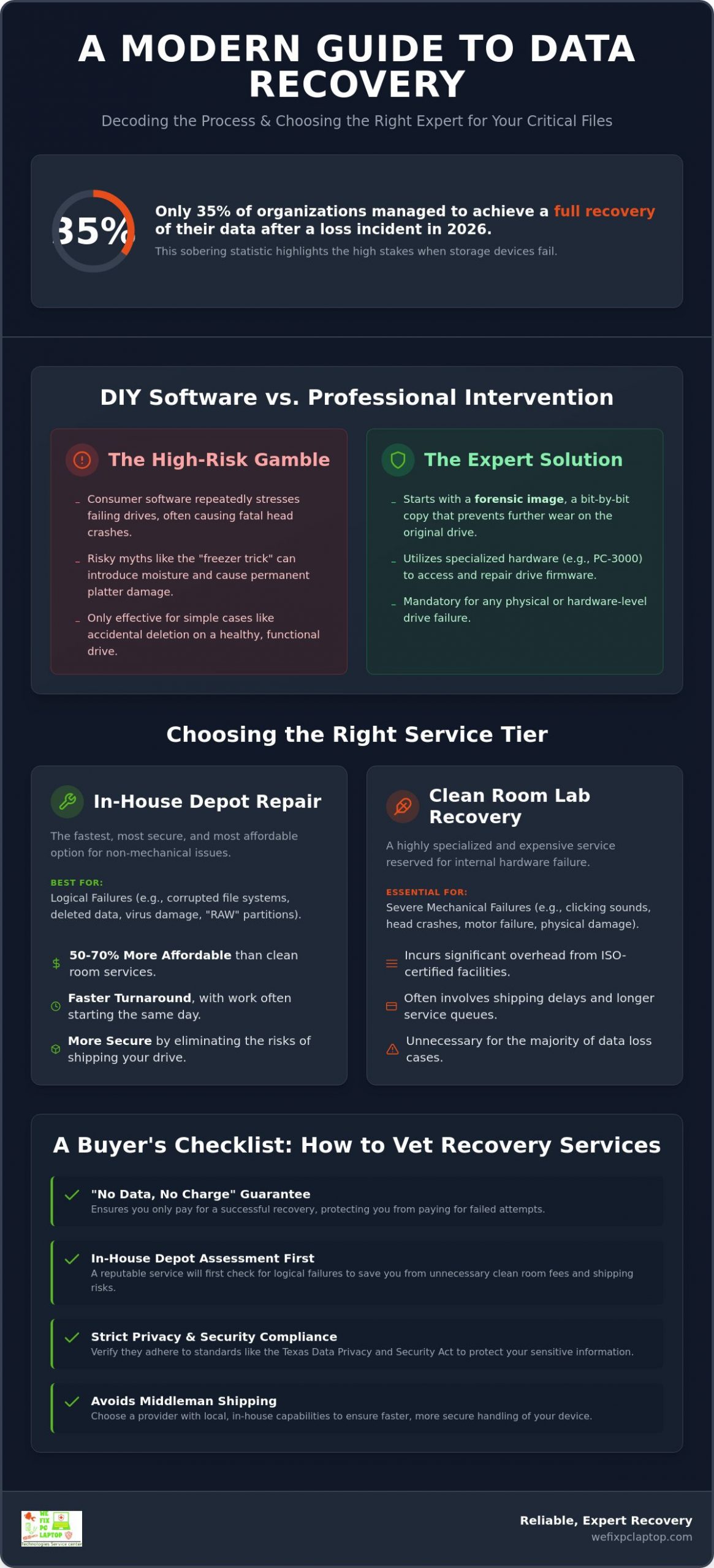
Did you know that only 35% of organizations managed to achieve a full recovery of their data after a loss incident in 2026? It’s a sobering statistic that highlights just how high the stakes are when your hard drive starts clicking or your SSD suddenly goes dark. When you’re searching for data recovery houston, the fear of permanent loss is often compounded by confusion over complex pricing tiers and anxiety about who is actually handling your sensitive information. You want your life’s work or your business’s future back, and you want to know it’s in safe, capable hands.
We understand the stress of a digital crisis and believe you deserve clarity instead of cold, corporate jargon. This guide will teach you how to distinguish between different types of providers so you can choose the right level of service to save your critical files. We’ll walk you through the latest 2026 industry standards, including how the Texas Data Privacy and Security Act protects your information during the restoration process. By the end of this comparison, you’ll have the confidence to move from a state of technical failure to a state of total resolution with a partner you can trust.
Key Takeaways
- Understand how professional recovery goes beyond basic undelete tools to retrieve data from physically damaged or corrupted storage media.
- Learn to distinguish between local depot repairs for logical issues and specialized clean room labs required for severe mechanical drive failures.
- Discover the essential vetting checklist for choosing data recovery houston services, including no-data-no-charge guarantees and strict privacy compliance.
- Avoid common DIY myths like the “freezer trick” that can cause permanent damage and learn why repeated software attempts often lead to fatal head crashes.
- Find out how in-house depot services provide a faster, more secure path to restoring your files without the risks and delays of middleman shipping.
What Are Data Recovery Companies and How Do They Work?
Data recovery companies are specialized engineering firms that retrieve inaccessible, lost, or corrupted data from damaged storage media. They step in when your computer’s operating system gives up. While a standard “undelete” tool looks for files marked as empty space, professional recovery involves working directly with the storage hardware. If you’re searching for data recovery houston, you’ve likely realized that a simple software fix won’t solve a hardware crisis. These firms act as digital first responders, using clean environments and specialized equipment to save files that seem gone forever.
The mission goes far beyond what a typical IT department can handle. Professional intervention is mandatory for hardware-level failures because standard computers aren’t designed to talk to “broken” drives. In 2026, the landscape has changed. We now face hardware-encrypted SSDs that require deep controller-level access and cloud-synced failures where a single error can ripple through an entire company’s infrastructure. Expert recovery teams stay ahead of these trends by developing custom scripts and hardware interfaces that bypass traditional security and communication barriers.
Professional Recovery vs. Consumer Software
DIY software is a great first step if you accidentally emptied your trash on a perfectly healthy laptop. It’s affordable and fast. However, using that same software on a drive that’s clicking or running slowly is often a death sentence for your data. Software “stresses” the drive by forcing it to read the same damaged areas repeatedly. Forensic-grade imaging is the standard for professional recovery where a bit-by-bit bitstream copy of the entire storage device is created to prevent any further wear on the failing hardware. This ensures the original drive is touched as little as possible so the recovery has the highest chance of success.
The Role of Specialized Hardware and Tools
True experts utilize industrial-grade firmware repair tools like the PC-3000. These systems allow technicians to modify the internal “operating system” of a hard drive or SSD. By fixing the firmware, we can bypass bad sectors that would otherwise cause a computer to hang or crash. Once we have access, we use two primary methods to find your files:
- File system reconstruction: This involves repairing the internal map of the drive so your files appear in their original folders with their original names.
- File carving: If the map is destroyed, we search for the specific “signatures” of files, like the start of a PDF or the end of a JPEG, to pull them out individually.
This level of precision is what makes professional data recovery houston services the only reliable choice for critical business or personal files. It moves the process from a state of technical failure to a state of total resolution.
Comparing Data Recovery Tiers: Depot Repair vs. Clean Room Labs
Not all data loss is created equal. Choosing the wrong tier can cost you thousands in unnecessary fees or, worse, lead to permanent loss. Many national providers push every customer toward a clean room, but many cases are actually logical failures that don’t require a sterile environment. If you’re looking for data recovery houston, starting with a local depot can save you a fortune. Depot repairs are often 50-70% more affordable than lab-based services. This is because they don’t involve the massive overhead of ISO-certified facilities or the risk of shipping your fragile drive across the country.
According to evaluations of the Best Data Recovery Services, top-tier labs are essential for mechanical damage, but local expertise is often the fastest route for everything else. Speed is a major factor. A local depot can often start work the same day, while national labs involve shipping delays and longer queues. We believe in providing the most efficient path to recovery, starting with a thorough assessment to see if a cost-effective depot repair is the right fit for your situation.
Logical Failures: The In-House Depot Advantage
Logical failures happen when the hardware is healthy but the data structure is a mess. You might see your drive in the file explorer, but it shows up as “raw” or asks to be formatted. This is where Professional In-House Depot Computer Repair shines. Technicians use specialized benches to stabilize the drive and create a perfect clone before attempting to rebuild the file system. It’s a precise, methodical process that protects your data from further corruption. If you’re unsure of your drive’s status, you can consult with a local specialist to avoid making the problem worse.
Physical Failures: When the “Clean Room” is Non-Negotiable
Physical failures are different. If you hear clicking, grinding, or if the drive doesn’t spin, the internal components are failing. At this point, opening the drive in a normal room is a death sentence. A single speck of dust is like a mountain to a hard drive head flying nanometers above the platter. An ISO 5 Clean Room is mandatory here. These environments filter out almost all airborne particles, allowing elite engineers to swap out heads or motors. It’s often a one-shot opportunity. If the first attempt fails because of poor technique or a dusty environment, the data may be gone forever. Getting a fast diagnosis for data recovery houston ensures you don’t waste time or money on the wrong level of service.
A Buyer’s Checklist: How to Vet Data Recovery Companies
Choosing a partner to handle your most sensitive files requires more than just a quick search for data recovery houston. You need to know exactly who is touching your hardware and how they protect your privacy. Many local shops act as mere brokers; they take your drive and ship it to a third-party lab without your knowledge. This adds unnecessary shipping risks and middleman markups. Always ask if the work is performed in-house. A legitimate provider should be able to show you their diagnostic equipment or explain their local process in detail. You deserve to work with a tech-savvy lifesaver who values personal connection over corporate quotas.
According to Forbes Advisor’s guide to data recovery services, the best companies prioritize security certifications and clear evaluation policies. You should feel like a valued member of the community, not just a ticket number in a corporate database. A transparent provider will offer a firm price range based on the physical or logical condition of the drive after an initial diagnostic, ensuring you aren’t surprised by hidden fees later.
Security and Data Privacy Standards
For businesses in Houston, security isn’t optional. If you handle medical or financial records, SOC 2 Type II or HIPAA compliance is a mandatory requirement to ensure your data stays confidential. The Texas Data Privacy and Security Act (TDPSA) mandates strict limits on data collection and requires clear privacy notices. Ask your provider how they return your data. Receiving files on an unencrypted thumb drive is a massive security risk. Atakama encryption tools protect recovered files by ensuring that data remains unreadable to anyone without the specific decryption keys, even if the storage media is lost during transit. Legal professionals facing the loss of case files or discovery documents should also review our guide on data recovery for law firms to understand how chain of custody and attorney-client privilege factor into the restoration process.
Pricing Transparency and the ‘No Data, No Charge’ Rule
Legitimate firms stand behind their work with a “No Data, No Charge” guarantee. You shouldn’t pay a full recovery fee upfront. While some complex cases might require a small, non-refundable “attempt fee” to cover parts or specialized labor, the bulk of the cost should only be due if the files you need are actually recovered. This aligns the company’s success with your own. Avoid companies that use “per-gigabyte” pricing models. Modern high-capacity drives take the same amount of effort to stabilize whether they hold 10GB or 10TB of data. A professional data recovery houston specialist will price based on the complexity of the repair, not the size of your photo library.
The Risky Truth: Why DIY Data Recovery Often Fails
When you realize your files are missing, the first instinct is often to panic and search for a quick fix online. It’s understandable. You want your photos and documents back right now. However, most DIY methods you’ll find on forums are outdated relics from a time when hard drives were far less complex. Trying to handle data recovery houston on your own without professional tools usually turns a recoverable issue into a permanent disaster. We’ve seen many customers come to us after a DIY attempt has made the platters inside their drive unreadable, leaving us with no path to restoration.
The infamous “freezer trick” is perhaps the most destructive myth still circulating today. The idea that freezing a drive will shrink the metal components to “unstick” a head is false. In reality, modern drives have incredibly tight tolerances. Taking a drive from the freezer to room temperature causes immediate condensation on the platters. When you power that drive on, the heads will hit those water droplets and scrape the magnetic coating right off the disk. This creates a “ring of death” on the platter that no amount of professional equipment can fix.
Consumer software can also be a hidden trap. If your drive has physical damage, recovery software will keep trying to read the same “bad sectors” over and over. This constant stress generates heat and forces the read/write heads to work harder, eventually leading to a catastrophic head crash. Similarly, opening a drive at home is a fatal mistake. Microscopic dust particles, which are invisible to you, act like wrecking balls to a hard drive head flying nanometers above the surface. Even a simple logic board swap rarely works anymore because modern drives store unique “adaptive ROM” data that is specific to that individual unit. If you don’t transfer that chip correctly, the drive will never spin up again.
The ‘Ghost Lab’ Red Flag
Be careful of what we call “ghost labs.” These are companies that appear in your search for data recovery houston but don’t actually have a local presence. If a company asks you to drop your drive off at a UPS Store or a generic “receiving center,” they’re likely a broker. These middlemen ship your fragile drive to a third party, adding shipping risks and middleman markups to your bill. You lose accountability and a personal connection when your data is being mailed across state lines. Working with a local ally ensures your drive stays in a secure, controlled environment from start to finish.
Ransomware: A Different Kind of Recovery
Traditional hardware recovery methods won’t help if your files have been encrypted by a cyberattack. Ransomware recovery requires a specialized cybersecurity approach that focuses on decryption and system hardening rather than mechanical repair. We recommend following a structured Ransomware Recovery Plan to ensure your business can bounce back without paying a ransom. Modern protection involves using AI-driven tools like SentinelOne to detect and roll back malicious changes in real time. If your drive is clicking or your files are missing, don’t risk a DIY disaster; let our Houston technicians provide a safe diagnostic before the damage becomes permanent.
The We Fix PC Laptop Approach: Reliable, Expert Recovery
Discovering that your critical files are inaccessible feels like a total technical failure, but it doesn’t have to be the end of the road. We believe in providing a sense of relief from the moment you contact us. While many competitors push every customer toward expensive, high-end clean room services for every case, we take a more methodical and honest approach. Our commitment to in-house depot repairs means we handle the vast majority of cases right here in our facility. This ensures maximum speed and security because your drive never leaves our sight or enters the hands of a third-party broker.
We bridge the gap between basic IT support and elite forensic recovery. Most standard IT shops lack the specialized hardware needed to bypass bad sectors or repair firmware, while national labs often overcharge for simple logical issues. By focusing on expert data recovery houston services that utilize industrial-grade tools, we offer a balanced solution that is both highly effective and accessible. Our goal is to lead you from a point of frustration to a point of total resolution with integrity and care. Partnering with a dedicated it service provider who handles both proactive monitoring and emergency recovery means you have a single trusted ally for every stage of your technology’s lifecycle.
Our Transparent Diagnostic Process
When you bring your device to us, the first 24 hours are focused on stabilization and assessment. We don’t hide behind corporate jargon or vague promises. Instead, you’ll receive a clear explanation of what happened to your media and a firm path forward. You get to speak directly with the technician handling your data, ensuring a personal touch that national corporations simply can’t match. We treat your digital well-being as our top priority, keeping you informed every step of the way until your files are safely back in your hands.
Building a Disaster-Proof Future
While we take pride in being your tech-savvy lifesaver, we also want to ensure you never face this crisis again. Recovery should always be a last resort. We help our clients implement total data immunity through the 3-2-1 backup rule: keep three copies of your data, on two different media types, with one copy stored offsite. Our managed IT services play a vital role in preventing future crises by monitoring drive health and automating backups before a failure occurs. If you are a business owner dealing with a sudden outage, you might consider Computer Rental for Business to maintain continuity while we finalize your data recovery houston process. Restoration is about more than just files; it’s about restoring your peace of mind and securing your digital future.
Take the First Step Toward Total Data Resolution
Navigating a technical crisis is overwhelming, but you now have the tools to choose a partner who values your files as much as you do. Remember that most cases don’t require the massive expense of a national clean room lab; a local depot repair often provides the fastest and most secure results. By vetting your provider for transparency and avoiding the destructive risks of DIY software, you significantly increase your chances of a successful restoration. Your digital life is far too valuable to leave to chance or middleman brokers who ship your hardware across the country.
At We Fix PC Laptop, our in-house technical leadership under Ken ensures that your drive receives expert attention from the moment it arrives. Whether you need specialized help for a high-end gaming PC or a complex MacBook repair, we have the forensic tools to bridge the gap. We even offer 24/7 Emergency On-Site Support for those critical moments when every second counts for your data recovery houston needs. Don’t let a clicking drive or a missing folder define your day. Get a Fast Diagnostic and Save Your Data with We Fix PC Laptop. We are here to help you get back to normal.
Frequently Asked Questions
How much do data recovery companies typically charge?
Pricing depends on the specific level of failure rather than the total amount of data you have. Simple logical recoveries for accidental deletions are typically the most cost-effective, while advanced depot repairs for physically undetectable drives involve higher costs due to the precision labor and specialized tools required. It’s best to get a clear diagnostic first so you understand whether you’re facing a minor software glitch or a major mechanical crisis.
Is it possible to recover data from a physically broken SSD?
Yes, it is possible to recover data from a physically broken SSD, but it requires advanced micro-soldering and controller-level access. Unlike traditional drives, SSDs store data on flash chips that can often be transplanted to a donor board or accessed by bypassing a failed controller. This is a highly technical process that should only be handled by an expert data recovery houston specialist to avoid damaging the NAND flash chips during the attempt.
How long does the data recovery process usually take?
Most recoveries take between 2 to 10 business days, depending on the drive’s condition and the parts required. Logical issues can often be resolved in just a day or two, while physical repairs might take longer if we need to source a specific donor drive for a head swap. We always prioritize speed and efficiency to help you move from a state of technical failure to a state of total resolution as quickly as possible.
Can data recovery companies see my private files?
Technicians focus on bit-level restoration of the drive’s structure and rarely need to open individual files. We might perform a quick spot check on a few random files to verify the integrity of the recovery, but your privacy is protected by strict standards like the Texas Data Privacy and Security Act. We treat your sensitive information with the high level of care and dedication you’d expect from a trusted local ally who values your digital well-being.
What is a ‘No Data, No Charge’ policy?
This policy ensures you don’t pay the full recovery fee unless we successfully retrieve the specific files you need. It’s a foundation of trust that protects you from paying for failed attempts. While some complex cases might involve a small diagnostic fee to cover initial labor or specialized parts, the success fee is only due once your critical data is confirmed and ready to be returned to you safely.
Can you recover data from a drive that has been formatted?
We can almost always recover data from a formatted drive, provided you haven’t written new files over the old ones. Formatting typically just erases the drive’s “map” rather than the actual data. If you’ve accidentally formatted your device, stop using it immediately. Every new file saved or update performed by the operating system increases the risk of permanently overwriting the information you’re trying to save from the empty sectors.
Do I need to send the whole computer or just the hard drive?
You can bring in the entire device or just the storage drive, but bringing the whole computer is often better for a thorough diagnostic. Many modern laptops have storage chips soldered directly to the motherboard, making it impossible to remove the “drive” separately. A local data recovery houston expert can safely disassemble your device and determine the most efficient way to access the raw data without causing any further hardware damage.
What should I do immediately after my hard drive starts making noise?
Shut down your computer immediately if you hear clicking, grinding, or screeching sounds. These noises are physical warnings that the read/write heads are failing or making contact with the platters. Keeping the drive powered on for even a few more minutes can cause irreversible surface damage. Disconnect the power and seek professional help to ensure your one-shot opportunity for a successful recovery isn’t lost to a catastrophic head crash. Attorneys and legal professionals facing the loss of case-critical evidence should pay particular attention to this advice, as the forensic steps required for data recovery for law firms demand that the original media be preserved in the best possible condition to maintain a valid chain of custody.
- How to Recover Data from a Failed Hard Drive: Step-by-Step
- Business Computers & Info Services: 2026 Guide
- How to Find the Best Notebook Repair Shop: The 2026 Expert Guide
- Professional Hard Drive Recovery Service: Secure Data Restoration for 2026
- The Ultimate Guide to Laptop Repair: Restoring Performance and Data in 2026
- Depot Repair vs. On-Site Repair: How to Best Repair Any Computer in 2026
- Gaming PC Repair: The 2026 Guide to Restoring Peak Performance