.svg)
.svg)
.svg)




Data Recovery Services Cost: What You’ll Actually Pay
Routine logical recoveries usually run $300 to $900, while mechanical and RAID jobs commonly land in the $1,200 to $6,000+ range. If you're staring at a dead drive or a missing network share right now, that's the number to keep in your head before anybody starts talking about lab work, donor parts, or clean-room time.
The bill feels mysterious because only the headline quote is visible. Cost sits in the details, and if you know where those details live, you can tell whether a quote is fair, padded, or incomplete.
Table of Contents
- What Data Recovery Services Cost in Real Numbers
- Understanding Failure Modes and Why They Drive the Bill
- Anatomy of a Recovery Invoice Line by Line
- How Media Type and Capacity Change the Quote
- Questions to Ask Before You Approve Any Quote
- Where Quotes Quietly Inflate and How to Push Back
- What to Do in the First Hour After You Lose Data
- A Practical Checklist Before You Sign Anything
What Data Recovery Services Cost in Real Numbers
The first panic moment is always the same. A drive clicks, an SSD vanishes from the system, or a RAID drops offline, and you want a straight answer before you call anyone. The closest realistic answer is still a range, because data recovery services cost rises with failure severity, lab work, and risk, not with file count.
A 2025 industry cost guide puts HDD recovery at $400 to $2,000+, SSD recovery at $600 to $3,000+, and server or RAID recovery at $1,500 to $6,000+ EaseUS cost guide. It also shows turnaround stretching from 3 to 7 days for HDDs, 1 to 2 weeks for SSDs, and 1 week to 1 month for server or RAID cases, with success rates in the 70% to 90%, 60% to 80%, and 50% to 75% bands respectively EaseUS cost guide. That spread tells you the quote is tied to the difficulty of the job, not just the amount of data you want back.
Practical rule: if the quote sounds simple, ask what failure tier it assumes. A logical repair, a mechanical repair, and a RAID rebuild are not the same job.
The part that drives the widest price swing is the failure mode. A drive with a damaged file system can often be imaged and repaired with software work. A drive with head damage, spindle trouble, or failed flash chips pushes the job into lab time, donor parts, and more risk.
A useful independent benchmark is the Titanium Computing 2026 data recovery resource, which you can use to sanity-check whether a local quote sounds routine or expensive. For a more service-oriented breakdown of the recovery workflow, this professional hard drive recovery service overview is useful because it frames recovery as a technical process, not a retail add-on.
The market itself explains why quotes are so structured. A 2026 market report projects the global data recovery services market to move from $5.2 billion in 2025 to $6.04 billion in 2026, a 16.1% CAGR Research and Markets report. That growth does not make recovery cheaper. It usually means more specialization, more tiered pricing, and more room for diagnostic and labor charges.
Understanding Failure Modes and Why They Drive the Bill
A broken file system is a paperwork problem. A seized motor is a hardware problem. A cracked platter or damaged NAND is a physical damage problem, and those three categories live in completely different price brackets.
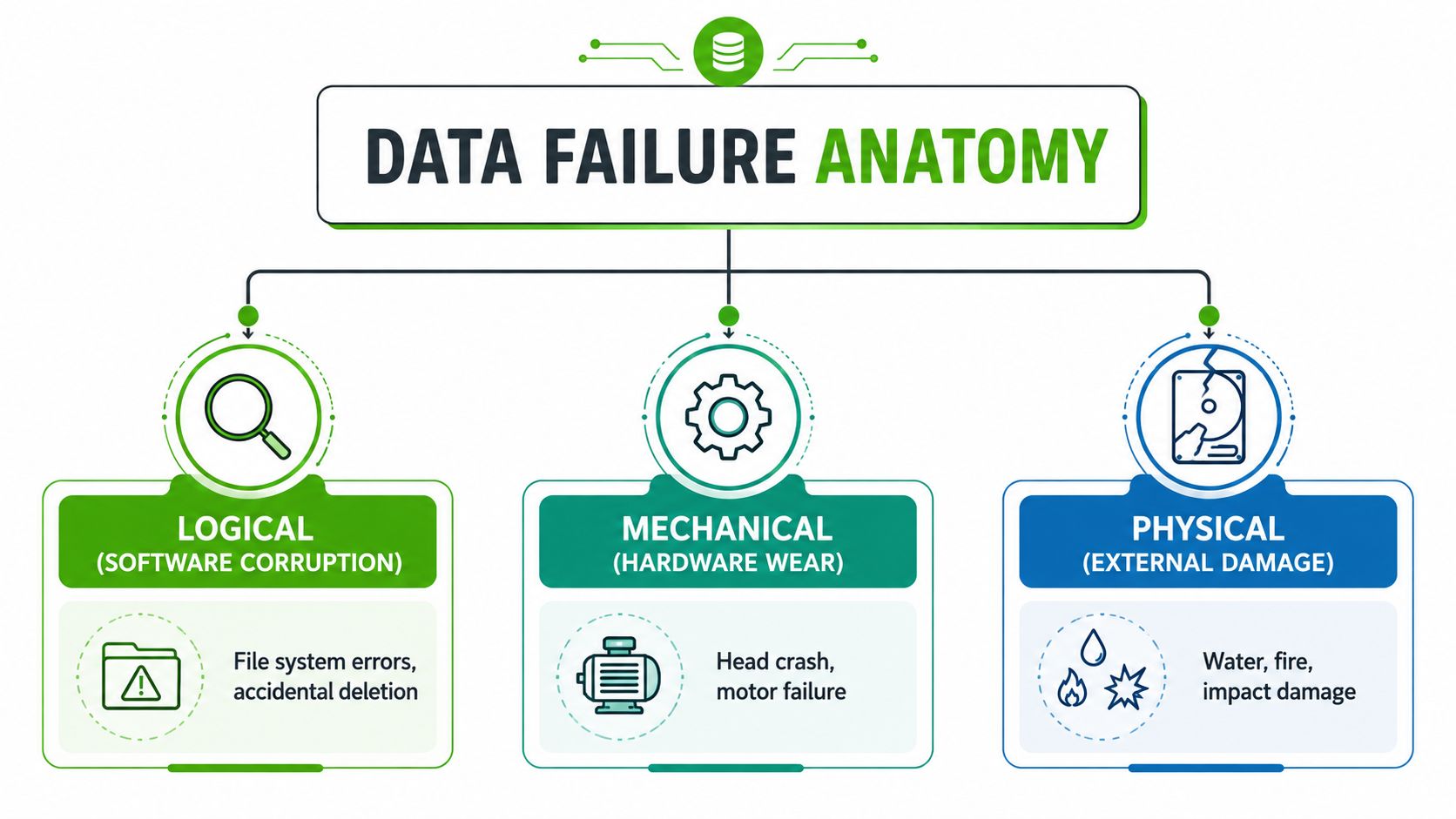
Logical failure costs less because the hardware still behaves
Logical failure means the device still spins, powers on, or at least communicates enough for a technician to image it. Accidental deletion, corrupted metadata, and file-system damage fall into this bucket. The work often looks like controlled cloning, partition analysis, and selective reconstruction, which is why it's usually the cheapest tier.
That doesn't mean it's trivial. It means the technician can usually work with the existing media instead of replacing parts or opening the drive in a controlled environment. If your drive is healthy enough to read consistently, the labor is mostly software and imaging time, not donor matching.
Mechanical and physical failure force the labor up
Mechanical failure is what happens when the moving parts stop moving cleanly. A bad head stack, a seized spindle, or a failing motor means the device needs physical intervention, donor parts, or both. That's where clean-room work enters the quote, because the drive often has to be opened and rebuilt to get a stable image.
Physical damage is the hardest tier. Water intrusion, impact damage, burned components, or fractured boards can push the job into board-level repair or beyond. The technician isn't just recovering files anymore, they're trying to get the media into a readable state at all.
A clean file system can be repaired with software. A damaged head assembly needs parts, tools, and time. That gap is why a quote can jump from a few hundred dollars to several thousand without any change in the amount of data.
Anatomy of a Recovery Invoice Line by Line
Most bad quotes hide in the line items, not the headline. If two providers both say “recovery starts at $499,” one may include diagnostics, imaging, and return media while the other bills those separately. The smarter move is to read the invoice like a technician would.
| Common Line Items in a Professional Recovery Invoice | What It Covers | Typical Range |
|---|---|---|
| Diagnostics or evaluation | Initial inspection, failure assessment, and recovery estimate | Often billed separately or credited if you approve |
| Labor | Imaging, reconstruction, microsoldering, or RAID assembly | Usually tier-based or hourly |
| Clean-room work | Opening a drive and handling sensitive internal components | Included in higher mechanical or physical tiers |
| Donor parts | Head stacks, boards, matched chips, or other replacement hardware | Added when the original parts can't be reused |
| Imaging and cloning | Creating a stable copy before reconstruction | Usually bundled in serious recovery jobs |
| Return media | New drive, SSD, or external media used to hand data back | Sometimes included, sometimes extra |
| Success-based fee | Payment only when data is recovered, or a policy tied to recovery outcome | Varies by provider |
The hidden variable is usually parts. A logical recovery might need little more than technician time and a clone target. A mechanical job can require donor hardware and clean-room handling, which changes both the risk and the labor curve. A higher quote that bundles those pieces can be the safer deal.
The other quiet cost is the transfer step. A recovered dataset doesn't just appear on your desk. Someone has to image it, verify it, and often move it to return media you can use immediately.
Read the invoice this way: if a quote doesn't say what's included, assume something is missing until the provider spells it out.
How Media Type and Capacity Change the Quote
People assume a bigger drive means a bigger bill. That's not the right model. Media type matters more than capacity, because a simple HDD and a complicated SSD can have completely different recovery paths even when they store the same amount of data.
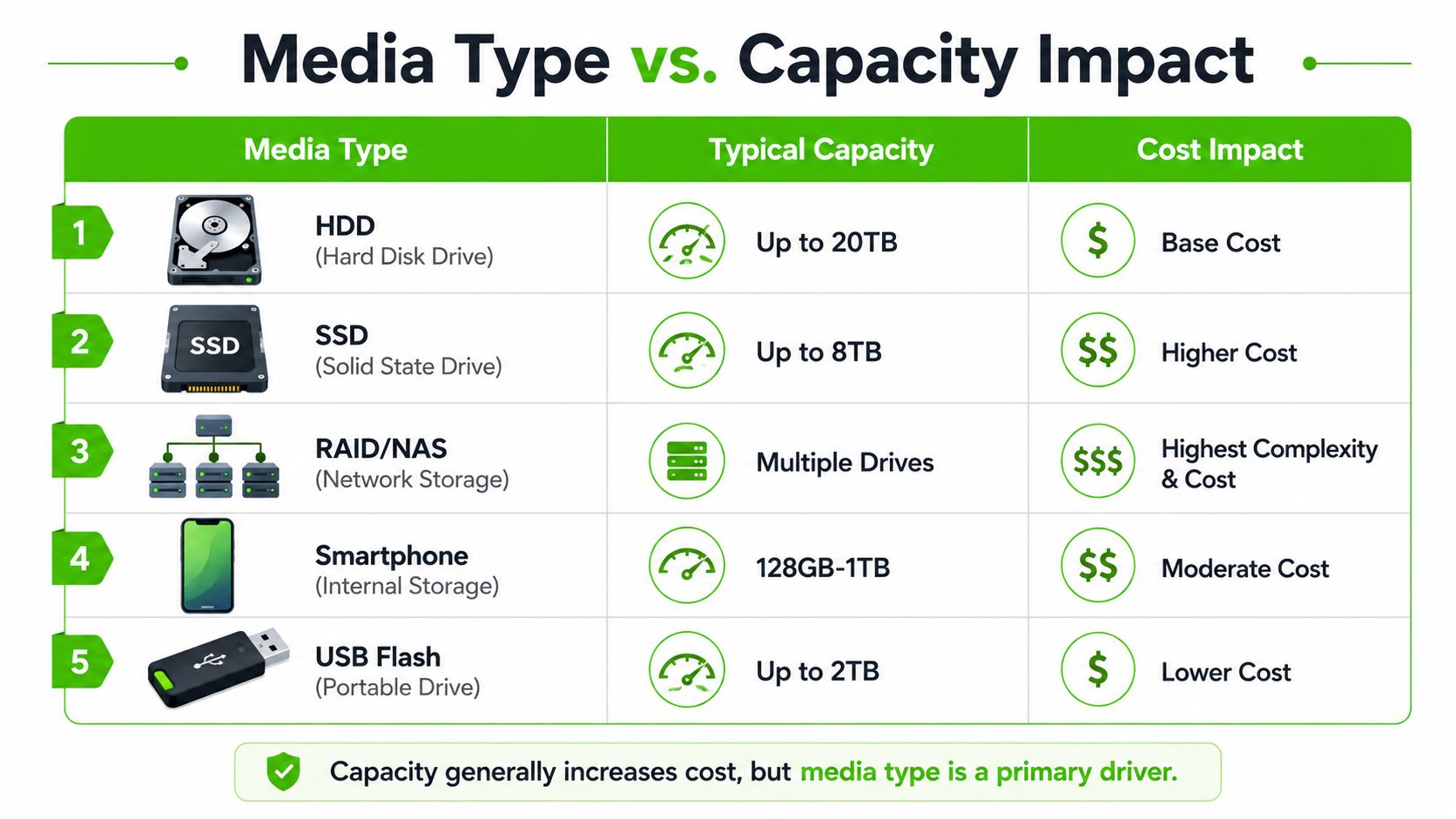
A 2026 pricing chart shows logical HDD, SSD, and USB recoveries around CAD $300 to $900, major physical recoveries at CAD $1,200 to $1,800, and catastrophic cases at CAD $3,000 to $4,500+ Data Recovery Expert pricing. That spread lines up with how technicians price the work, by device and failure tier rather than by raw storage capacity. In other words, a small device with severe damage can cost more than a larger drive with a simple logical issue.
HDDs are usually the most straightforward when the failure is logical. SSDs get more expensive because the controller, NAND behavior, and internal handling can complicate recovery, especially when the device no longer responds cleanly. RAID, NAS, and server cases sit at the top because you're not fixing one disk, you're rebuilding a storage structure.
The same basic principle applies to phones and USB devices. A smartphone may need board-level or chip-level recovery, while a flash drive might be cheap if it's only logically damaged and much pricier if the connector or controller is gone. The device class determines the workflow, and the workflow determines the bill.
Questions to Ask Before You Approve Any Quote
The quote only matters if you know what it includes. Ask the wrong question and you compare apples to broken toolboxes. Ask the right ones and the numbers suddenly make sense.
Start with billing structure
Ask whether diagnostics are free, credited back, or separate. Ask whether the price is flat, hourly, or tier-based. Ask whether the provider bills for the attempt even if the recovery fails.
Those questions matter because the cheapest headline number can still become the most expensive real invoice. A provider that includes diagnostics, parts, and return media in one estimate can be safer than one that looks cheap but bills every extra step.
Then pin down what's included
Ask whether donor parts are included. Ask who supplies the return media. Ask whether shipping, media cloning, or data transfer is extra. If you're dealing with a RAID, NAS, or server, ask whether the work is done in-house or sent out.
A good comparison resource is this data recovery company selection guide, because the difference between providers is usually process, not marketing. The same recovery can turn into two very different quotes depending on where the lab is, how it bills, and whether it owns the parts it needs.
Ask this exact question: “What would I pay if you recovered the data, and what would I pay if you couldn't?”
That one question cuts through vague language fast. If the answer stays unclear, the quote isn't ready.
Where Quotes Quietly Inflate and How to Push Back
The headline number is where providers get your attention. The fine print is where the invoice grows.
The first hidden cost is a diagnostic fee that never gets credited back. The second is billable cloning or imaging time, which can turn a modest recovery into a time-and-materials job. The third is return-media upgrades, where a low quote assumes you'll accept basic media, then charges more for the drive you need to use. The fourth is a failed-attempt surcharge, which shows up when a provider bills per attempt instead of per success.
Thumbtack lists commercial, government, and education work at $250 for the first hour plus $120 per additional hour Thumbtack cost page. That's a reminder that some providers price openly by labor time, while others hide the same cost inside a project estimate or a success policy. Neither model is automatically better, but you need to know which one you're buying.
Ask for a written breakdown before you approve anything. Ask for a not-to-exceed cap. If one provider offers no-data-no-fee and another offers a lower upfront quote with separate diagnostics, compare the total risk, not the starting price.
The cheapest quote often costs more because it leaves too many variables open. A clear, slightly higher quote is usually easier to defend, easier to approve, and less likely to surprise you after the recovery is already underway.
What to Do in the First Hour After You Lose Data
Stop using the device immediately. Every extra boot, retry, or reconnect can push a recoverable problem into a worse tier. If the drive clicked, made scraping noises, or stopped spinning, power it down and leave it alone.
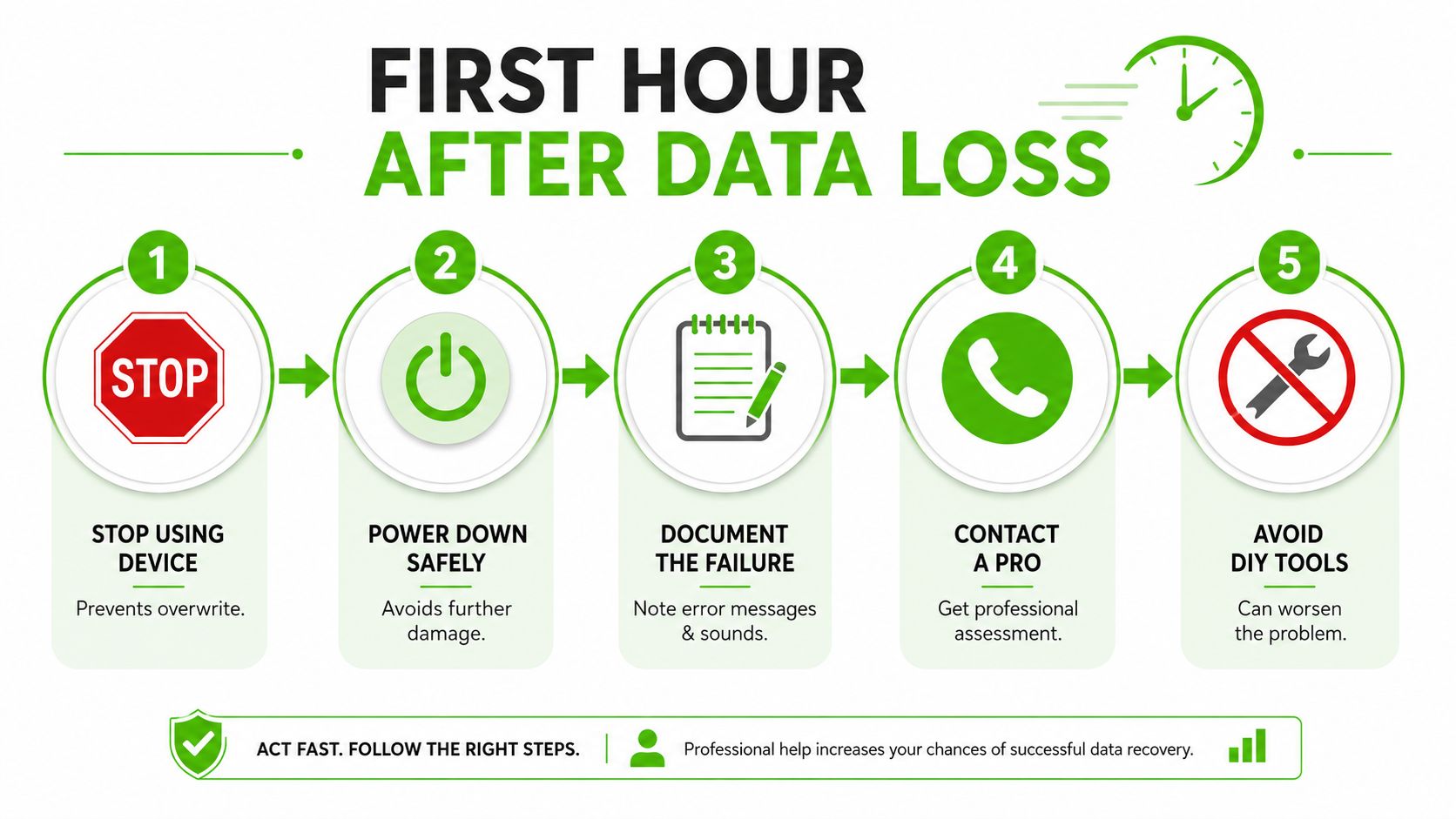
Handle the device like evidence
Write down what happened in plain language. Note whether the drive was dropped, wet, overheated, unplugged suddenly, or making unusual sounds. If the device is removable, bag it carefully and keep it from getting handled by anyone who might “just try it again.”
Do not run consumer recovery software on a drive that's physically failing. Those tools are useful on a healthy-enough disk with deleted files, but they can make a marginal device worse if the drive is already struggling to read.
Know when to escalate
If the failure followed water or impact, read a practical water-damaged laptop recovery guide before touching the device again. For business owners, an ARPHost disaster recovery planning overview is worth a look because it separates backup thinking from actual recovery planning.
The first hour matters because it preserves your options. A drive that gets powered down after a bad sound may still stay in the mechanical recovery tier. A drive that gets forced through repeated boot attempts can move into a more expensive physical repair path.
A Practical Checklist Before You Sign Anything
Use this as your filter before you approve a recovery job. First, identify the failure mode, the media type, and the billing structure. Those three things drive most of the price movement.
Second, ask about the hidden items. You want to know whether diagnostics are billed, whether donor parts are included, whether return media is extra, and whether the provider charges only on success or also on failed attempts. If any of those answers are vague, the quote is incomplete.
Third, think about prevention. A solid Cloudvara backup planning strategy matters because recovery is expensive precisely when backups are weak or missing. If the data is business-critical, routine logical jobs can sometimes be handled locally, while severe mechanical or RAID cases still belong with a specialist lab.
If you're talking to a provider today, keep the device off, document the symptoms, and ask for a quote that spells out the parts, labor, and return media. That's the cleanest way to avoid paying for the same work twice.
We Fix PC Laptop handles data recovery, cloning, and related repair work from an in-house Houston depot, which makes routine cases easier to price and move quickly. If you need a technician to read the symptoms, explain the quote, and tell you whether a local recovery makes sense or a specialist lab is the better move, visit We Fix PC Laptop and start with a straightforward assessment.