.svg)
.svg)
.svg)




Houston Data Recovery: What Locals Need to Know
You're staring at a screen that won't mount, a drive that's clicking, or a MacBook that just swallowed the only copy of a client file, a semester project, or payroll data. Panic is normal. What matters is the next move, because the first few minutes after a failure can decide whether houston data recovery is a clean repair job or a self-inflicted disaster.
Houston has plenty of recovery shops, but they don't all solve the same problem. Some places are fine for quick triage, some handle diagnostics and repair in one building, and some should only be used when the drive needs clean-room work or shipping to a specialty lab. If you're in that first-hour mess right now, read the part that matches what happened, then act.
Table of Contents
- When a Houston Hard Drive Fails, What Comes Next
- What Houston Data Recovery Actually Means
- Houston Service Models Compared
- The First Ten Minutes After Data Loss
- Common Failure Scenarios and Realistic Outcomes
- Turnaround and Pricing Guidance for Houston Customers
- Designing Backups That Prevent the Next Houston Recovery
- Choosing a Houston Data Recovery Provider You Can Trust
When a Houston Hard Drive Fails, What Comes Next
A downtown office manager hears a desktop start clicking during a backup run. A student on the West Side opens a MacBook after a spill and gets a dead machine instead of their thesis. A small business owner in Houston tries one more reboot before tax week ends, and the drive disappears completely.
That's the moment people make the wrong call. They keep trying to “see if it comes back,” they run recovery software on a physically failing drive, or they hand the machine to the nearest shop without asking what kind of failure it is. In a city with a dense market for houston data recovery, those choices matter because the service model has to match the failure, not just the zip code.
Practical rule: if the drive is making new noises, stop using it. Every extra power-on can turn a recoverable case into a parts hunt or a dead platter.
Houston businesses have a real reason to treat this as urgent. A Houston-area scan of 2,420 businesses found 45.5% earned a D or F on external security testing, and the metro average grade was only D+ (1.60 GPA), which means a lot of organizations are walking around with weak prevention and backup hygiene before any failure even starts, according to CinchOps's cybersecurity-by-the-numbers report. On the business side, the cost of getting recovery wrong can be brutal, because the average breach cost for U.S. companies reached $10.22 million in 2025 and SMB cyber incidents have been reported at $254,445 on average, with some incidents much higher, in the same report.
If you need the fast path, skip to the service model comparison. If the device is clicking, wet, encrypted, or just vanished from the system, the first ten minutes matter more than the next ten phone calls.
What Houston Data Recovery Actually Means
Data recovery means getting files back from storage that can't be read normally. That's not the same thing as reinstalling Windows, resetting macOS, or resyncing a cloud account. A good technician is trying to preserve the original data structure, pull the readable contents off the media, and avoid making the failure worse while doing it.
Failure Type Matters More Than Device Type
Think of a drive like a book. A logical problem is a book with pages shuffled or missing chapter numbers. The paper is still there, but the table of contents is broken. An electronic problem is more like a book whose lamp won't turn on, the content may still be intact, but the system that opens it is dead. A mechanical failure is the book jammed shut with torn binding, bent pages, or scratched surfaces.
That's why the first question from a Houston shop is usually not “what model is it?” It's “what happened right before it failed?” A drive that fell, got soaked, or started clicking needs a very different path from one that was accidentally formatted or shows a missing partition.
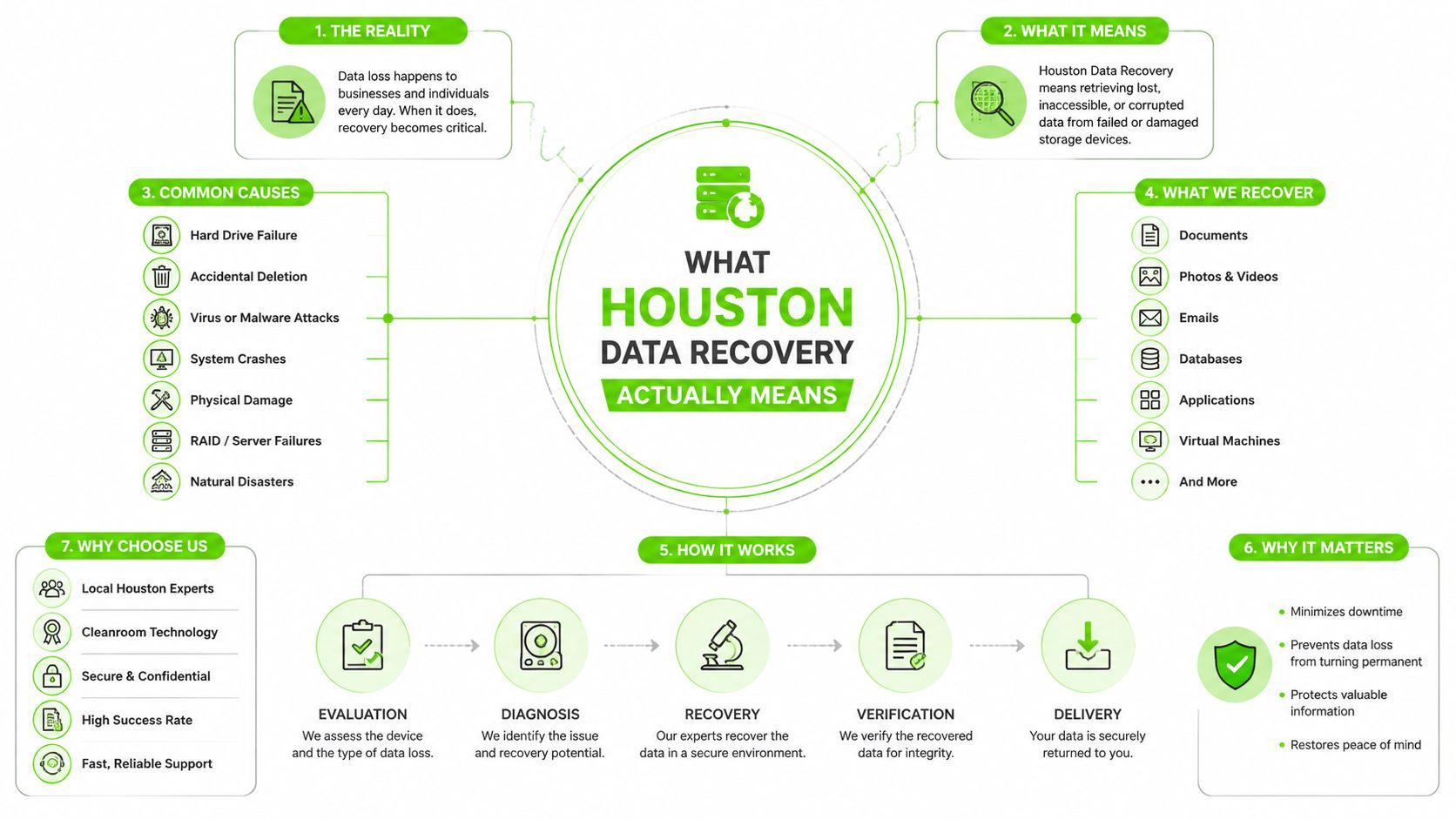
A useful reference point for what a professional recovery workflow looks like is this 2026 hard drive recovery guide. The point isn't the brand name on the door, it's whether the shop can identify the failure class before it starts poking at the media.
How the Recovery Process Starts
Real recovery starts with diagnosis, not software clicks. Technicians check whether the device is visible, whether it spins, whether it mounts, whether the file system is damaged, and whether there are signs of physical distress. If the data is still logically intact, imaging and file extraction may be enough. If the media is mechanically compromised, the plan changes fast.
The customer's job is simple. Don't improvise, don't keep testing, and don't assume “not seen by my laptop” means “probably just a corrupted folder.” That guess burns people every week.
Houston Service Models Compared
Houston customers usually have three paths: local drop-off, same-day depot service, and mail-in specialty lab recovery. The right choice depends on how fast you need the files, how badly the media is damaged, and how much risk you can tolerate while the case is being handled.
| Houston Data Recovery Service Models Compared | Typical Turnaround | Best-Fit Failure | Main Tradeoff |
|---|---|---|---|
| Local drop-off shop | Fast triage, often same day for intake | Accidental deletion, file system corruption, simple logical issues | Convenient, but limited clean-room capability |
| Same-day depot service | Often same day on many cases when parts and tools are on site | Mixed laptop, desktop, SSD, and drive-cloning cases | Better control, but not ideal for severe mechanical damage |
| Mail-in specialty lab | Longer, because shipping and lab work add time | Clicking drives, RAID arrays, physically damaged media, enterprise storage | Highest technical depth, but slower handoff |
Local drop-off works when the problem is obvious and shallow
A walk-in shop is useful when you need someone to look at the machine right away and tell you whether the issue is logical or physical. That matters for accidental deletion, simple partition problems, and cases where the device still behaves normally enough to image safely. It's the wrong bet if the drive is noisy, dropping out under power, or showing obvious signs of damage.
The upside is speed at the front end. The downside is that not every storefront has the tools for component-level work or clean-room handling. If the drive needs donor parts, head work, or careful platter handling, the convenience of a local counter stops mattering.
Same-day depot service is the strong middle option
An in-house depot model, like a facility that handles diagnostics and repair under one roof, is the practical sweet spot for many Houston customers. It cuts handoffs, speeds imaging, and keeps a technician close to the device from intake to result. That matters when a laptop SSD, RAID member, or external drive needs rapid triage but not a full specialty-lab chain.
Best fit: if the device is still detectable and the failure is not aggressively mechanical, keep the chain short. One building beats three transfers.
Mail-in labs are for severe physical or enterprise cases
Mail-in service makes sense when the failure is beyond everyday bench tools. Clicking HDDs, scratched media, RAID rebuilds, and other physically delicate cases belong in a lab with deeper parts access and a controlled workflow. The tradeoff is time. You're exchanging convenience for the right environment.
The simple rule is this. If the device is physically noisy or was dropped, flooded, or power-damaged, convenience is a trap. If the device is logically broken but stable, local or same-day service is usually enough.
The First Ten Minutes After Data Loss
The first ten minutes are not for experimenting. They're for preventing extra damage, preserving the media, and collecting the facts a technician needs to give you a real answer.
If the drive is clicking, beeping, scraping, or repeatedly spinning up and down, power it off and leave it off. If a laptop got hit by liquid, shut it down immediately and don't charge it. If a ransomware note has appeared, disconnect the machine from the network and stop spreading the problem to shared folders or backup targets.
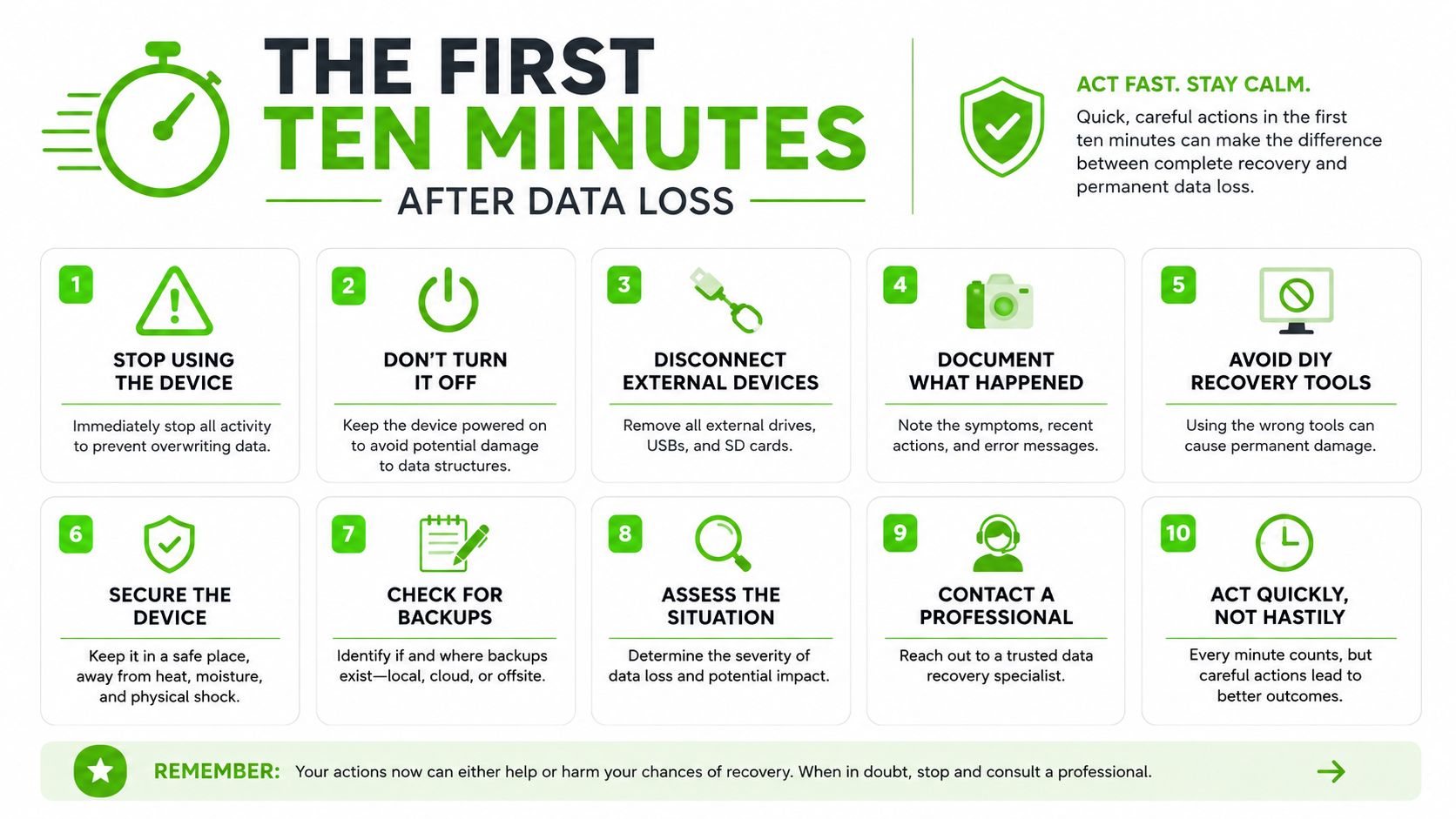
What not to do
- Don't keep restarting a noisy drive. A new mechanical noise is a warning, not a challenge.
- Don't install recovery software on the failing device. If the media is unstable, every write can overwrite useful data.
- Don't open the drive enclosure. Dust and finger pressure can ruin recovery chances.
- Don't keep testing a wet laptop. Power plus moisture turns a repairable spill into board damage.
- Don't assume cloud sync saved everything. Sync errors and credential loss create their own recovery problems.
What to write down before you call
Write down the exact symptom, the last thing that happened before failure, and whether the device is a drive, laptop, desktop, RAID box, phone, or cloud-connected account. Note whether the machine got dropped, exposed to liquid, lost power, or was encrypted. If you can tell a technician whether the data was local, synced, or stored behind FileVault or BitLocker, diagnosis goes faster.
If the device is a phone holding the only copy of photos or work files, stop using it and power it down if possible. The priority is preservation first, recovery second.
Common Failure Scenarios and Realistic Outcomes
A Houston bench tech sees the same pattern over and over. The symptom looks simple, but the failure mode underneath can be very different. That's why honest recovery shops talk in ranges and conditions, not fantasy guarantees.
Clicking HDDs need clean-room discipline
A clicking hard drive usually points to mechanical trouble, often head or platter damage. The safe move is immediate power-off, then lab handling. These cases belong with a service model that can image the drive in a controlled environment and replace parts if the media is still salvageable.
The outcome depends on how far the heads have damaged the surface. If the platters are scratched, the data may be partial. If the heads failed before surface damage started, the odds are much better.
SSDs that disappear may be logic, firmware, or controller issues
SSDs don't make the same noise profile as spinning disks, which tricks people into thinking they're safer to experiment with. They aren't. A missing SSD can be a firmware problem, controller failure, or corruption event. That usually calls for specialized bench work, not DIY software runs on the original device.
RAID rebuild failures are not a raid of simple fixes
A RAID array mid-rebuild with another drive dying is a serious situation. The wrong rebuild attempt can destroy parity relationships or overwrite clean member data. This is one of the clearest cases for lab-level handling, because the logic of the array matters as much as the hardware.
Ransomware and encrypted Macs are access problems, not always hardware problems
When a file server is encrypted by ransomware, the priority is containment, recovery planning, and checking whether clean backups exist. The same goes for an encrypted MacBook where the owner forgot the FileVault password. The device may be physically healthy, but the data is effectively locked.
Cloud sync failures need account-level thinking
If the missing files live in iCloud, OneDrive, Google Drive, or Microsoft 365, the fix may have nothing to do with a dead disk. It could be credential loss, sync conflict, or accidental deletion in the cloud layer. The right technician should ask where the original copy lived before promising anything.
A decent yardstick for why these cases need caution is that 67.7% of businesses experience significant data loss, 85.6% of data-loss incidents happen in cloud storage, and prolonged data loss can drive bankruptcy for 93% of affected companies, according to Houston-focused disaster-recovery guidance at MyShyft. Those numbers are why “try a free utility first” is often bad advice for serious cases.
Turnaround and Pricing Guidance for Houston Customers
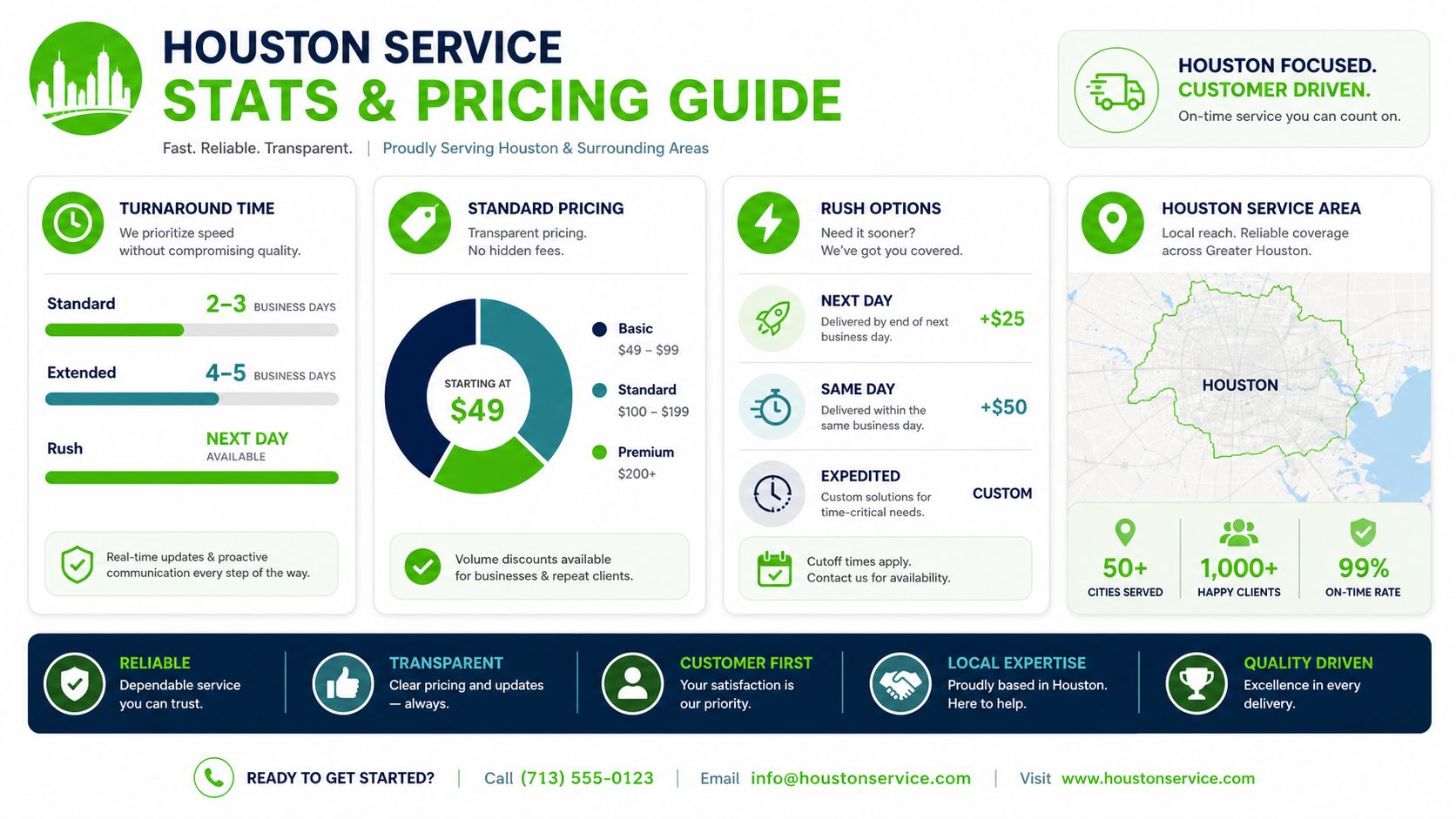
A fair quote should separate logical recovery from electronic repair and from mechanical clean-room work. The cheap work is usually the work that doesn't require opening the media or chasing donor parts. The expensive work is the work that does.
What you should expect from a quote
If a shop gives you one number without telling you what failure type it thinks you have, push back. You want to know whether the quote covers diagnostics, imaging, component repair, clean-room handling, and any outsourced lab work. You also want to know whether the quote is fixed, estimated, or conditional on what the technician finds after opening the device.
Practical rule: a real quote names the failure, the service path, and the point where the price can change.
Reading the logic of the price
Deleted files, formatted partitions, and straightforward logical corruption should sit at the low end because the job is mostly imaging and reconstruction. Controller failures, board-level issues, and swap work move into the middle because parts and bench time enter the picture. Mechanical clean-room work on a hard drive belongs at the high end because the risk, labor, and tooling are different.
A local depot model can make the early part of that process faster by keeping diagnostics and repair in one place. When a provider also says it can do same-day on many cases when parts are in stock, that usually means the workflow is optimized for quick triage, not magic recovery.
Red flags in the quote
- “Guaranteed recovery” language without a failure review. No honest technician can promise that before diagnosis.
- A low teaser price with vague add-ons. That usually means the final bill shows up later.
- No explanation of no-data, no-charge. Ask whether that covers all cases or only specific classes of work.
- No mention of parts sourcing or lab handling. Mechanical cases need that detail.
If you want a local example of an in-house depot model, We Fix PC Laptop handles diagnostics and component-level repair in Houston and offers data recovery, drive cloning, and related services from its Waugh Drive facility. That kind of setup is useful because it keeps the intake, triage, and repair path under one roof instead of bouncing the case around.
Designing Backups That Prevent the Next Houston Recovery
The cleanest recovery is the one you never need. For Houston businesses, that means treating backup design as part of continuity planning, not a checkbox. A single on-site backup is not enough if the same flood, surge, or building outage can hit both copies.
The basic model is still the right one, 3-2-1. Keep three copies of the data, on two different types of storage, with one copy offsite. For Houston, that offsite copy should be outside the Gulf Coast region, because a local weather event can affect both the primary machine and the nearby backup at the same time, according to TechRooster's Houston backup guidance.
Set recovery targets before you buy gear
Define RTO, which is how fast you need to be back online, and RPO, which is how much data loss you can tolerate. Then map backup frequency to the RPO target. If your RPO is four hours, your backups need to run at least every four hours. If restore testing is skipped, you don't really have a backup plan, you have hope.
Make the offsite copy physically and geographically different
Dallas, Austin, the Midwest, or a geographically distributed cloud provider all make more sense than another box sitting in the same building. That's especially true in hurricane season, because the failure domain needs to be separate from the office that's trying to recover.
A cloud-backup design can help, but it still needs a recovery test and a ransomware-resistant setting. Immutable backups matter because if a ransomware event hits the active environment, the attacker should not be able to rewrite the only safety copy. This cloud disaster recovery guide is a useful companion if your team needs a practical backup policy instead of a vague storage subscription.
Choosing a Houston Data Recovery Provider You Can Trust
Ask the provider direct questions and listen for direct answers. Can they do clean-room work? Do they diagnose in-house or send the drive somewhere else? Do they have parts access for mechanical cases, or are they just a storefront forwarding shipments?
If the answer to those questions is fuzzy, move on. A shop that won't explain its workflow probably won't explain the risks either. You want a provider that tells you whether the device should be powered off, dropped off, or shipped out, and why.
Questions to ask on the first call
- Clean-room capability: Can they handle clicking or physically damaged drives in a controlled environment?
- In-house diagnostics: Are the diagnostics done where you drop off the device, or does it go elsewhere first?
- Parts availability: Do they source donor parts for board or head work?
- Data handling: Who sees the files, and how is privacy handled during recovery?
- Backup advice: Will they tell you how to prevent a repeat failure, not just hand you a bill?
For a comparison-minded shopper, this 2026 guide to choosing between data recovery companies is worth reading before you hand over the only copy of anything important.
What not to trust
Don't trust a shop that pushes software on a drive making new noises. Don't trust “instant recovery” claims for obviously damaged media. And don't trust a provider that can't tell the difference between logical corruption and a failing mechanism.
If the machine still has a chance, the goal is to preserve that chance. If it doesn't, the goal is to stop making it worse.
If you've got a dead drive, a locked MacBook, or a business file server that can't stay down, bring it to We Fix PC Laptop in Houston for diagnostics and recovery planning. They handle data recovery, drive cloning, and related repair work from an in-house depot setting, which makes them a practical fit for cases that need fast triage and careful handling. Visit We Fix PC Laptop and get the device looked at before another power-on turns a recoverable problem into a bigger one.