.svg)
.svg)
.svg)




How to Navigate PC Repair in 2026: A Step-by-Step Guide to Saving Your Computer
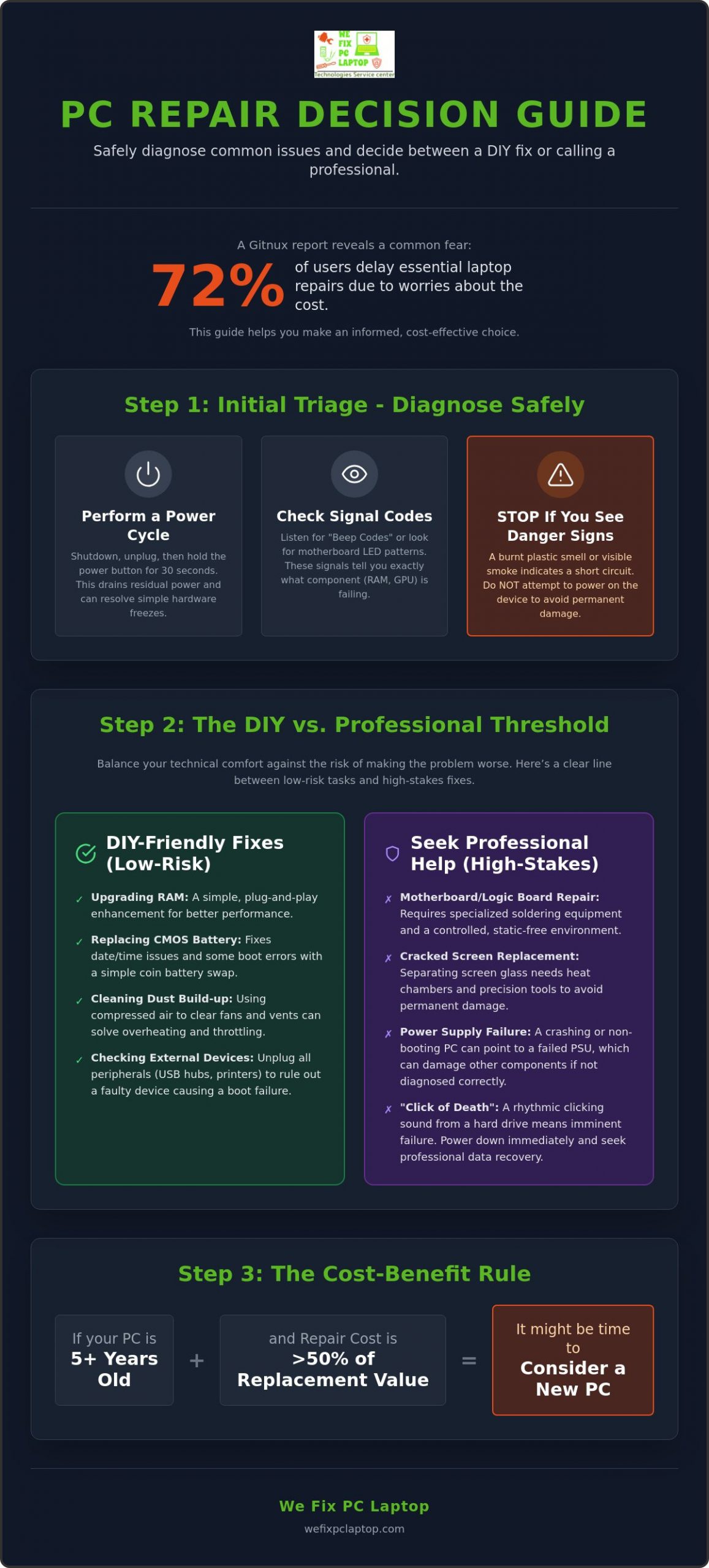
Did you know that 72% of users delay essential laptop repairs because they’re worried about the cost? It’s a staggering number from a May 2026 Gitnux report, and it highlights a common fear: the choice between an expensive fix and an even more expensive replacement. When your computer starts acting up, it’s natural to feel a wave of anxiety over your budget and the safety of your personal documents. You shouldn’t have to choose between your bank account and your digital memories.
We understand how frustrating technical jargon can be, and we’re here to help you regain control. In this guide, you’ll learn how to accurately handle pc repair by diagnosing your specific issues and deciding whether a DIY approach or professional service is the right move for your situation. We’ll also show you how to keep your data secure during the process. We’ll walk you through a clear path to get your system running again, from identifying the latest Windows 11 updates to protecting your files from unexpected loss. You deserve a solution that’s fast, reliable, and easy to understand.
Key Takeaways
- Master safe triage techniques like draining residual power and reading LED patterns to accurately assess your computer’s health before taking action.
- Draw a clear line between low-risk DIY tasks and high-stakes fixes that require a controlled depot environment for precision and safety.
- Access specialized solutions for gaming rigs and MacBooks that go beyond standard fixes to resolve complex hardware throttling or logic board issues.
- Protect your personal information with a comprehensive approach to pc repair that includes advanced cybersecurity and cloud-based disaster recovery.
- Transition from reactive fixing to proactive prevention by using managed IT strategies to monitor your hardware’s performance in real-time.
Initial Triage: How to Diagnose Your PC Failure Safely
Don’t panic when your computer refuses to wake up or suddenly freezes during a deadline. The first step in any successful pc repair is a safe, methodical diagnosis. Think of this as a digital first-aid kit. Before you consider opening the case or calling for help, you should perform a “Power Cycle” to reset the motherboard. Simply shut down the machine, unplug the power cord, and hold the power button down for a full 30 seconds. This process drains residual electricity from the capacitors, which can often resolve “ghost” issues where the hardware is simply stuck in an unresponsive state.
If the machine still won’t boot, listen closely to the hardware. Your computer uses “Beep Codes” or specific LED patterns on the motherboard to tell you exactly what is wrong. A single beep might mean everything is fine, while a repeating series of long and short beeps indicates a specific failure like a RAM error or a GPU issue. Understanding these signals is a core part of what a computer repair technician does to pinpoint faults quickly. While you can look up these codes in your motherboard’s manual, remember that a software “hang” (where the screen just freezes) is usually a driver or OS issue, whereas a sudden hardware “crash” (where the power cuts out completely) often points to a failing power supply or overheating component.
Stop immediately if you smell a burnt plastic odor or see smoke. These are signs of a short circuit. Attempting to force a boot in these conditions can cause permanent, irreversible damage to the logic board. Your priority is protecting your data and the integrity of your components, not just getting the machine to turn on.
Decoding Symptoms: Screen, Power, and Sound
Understanding the difference between a “Black Screen of Death” and a “Blue Screen” is vital. A blue screen is actually a helpful error message from Windows indicating a software or driver conflict. A black screen, however, often means the hardware isn’t even reaching the point where it can talk to the monitor. To test this, plug your PC into a different monitor or a TV. If the image appears there, your monitor is the culprit. If it stays black, your GPU or internal display cable has likely failed. Also, keep an ear out for the “Click of Death.” If you hear a rhythmic clicking from a traditional hard drive, shut the system down immediately to prevent total data loss.
External Checks You Can Do in 5 Minutes
Check your power sources before assuming the worst. For laptops, try booting with the battery removed while plugged into the wall to see if a dead battery is preventing the startup. If your fans are spinning loudly or the case feels hot to the touch, dust build-up is likely causing thermal throttling. Unplug all peripheral devices like printers, USB hubs, and external drives. Sometimes a faulty USB device can short a port and prevent the entire system from passing its initial power-on self-test.
The DIY Threshold: When to Fix it Yourself vs. Seeking Professional Help
You’ve finished your initial triage and identified the symptoms. Now comes the pivotal moment: deciding whether to attempt a pc repair at home or take it to a specialist. It’s a choice that balances your technical comfort level against the potential for making the problem worse. Simple maintenance tasks like upgrading RAM, replacing a dead CMOS battery, or blowing out dust with compressed air are excellent entry-level projects. These fixes are relatively low-risk and can significantly extend the life of your machine without requiring a deep technical background.
However, you need to recognize the “No-Go” zone. Modern computers are masterpieces of miniaturization. Attempting to solder components on a logic board or trying to separate screen glass from a laptop display without a specialized heat chamber usually ends in disaster. These tasks aren’t just difficult; they’re nearly impossible to perform safely on a kitchen table. If your diagnosis points to a failed motherboard or a cracked display, a professional In-House Depot Repair Service is the most cost-effective path. A professional evaluation often identifies the root cause in minutes, saving you from spending hours watching conflicting YouTube tutorials that might not even apply to your specific model.
Before you commit to any fix, perform a quick cost-benefit analysis. If your PC is more than five years old and the repair cost approaches 50% of its replacement value, it might be time to consider new hardware. But for high-end gaming rigs or newer MacBooks, professional restoration is almost always the smarter financial move.
The Risks of Home Repair
The biggest threat to your computer isn’t a screwdriver; it’s static electricity. An invisible spark from your fingertip can fry a microprocessor instantly. Beyond static, many DIYers struggle with stripped screws or fragile ribbon cables that snap under the slightest pressure. These common mistakes can easily double your eventual repair bill. You also have to consider securing your data before you start dismantling your primary storage device. Finally, remember that opening your laptop’s casing can void your manufacturer’s warranty, leaving you without a safety net if something goes wrong later.
Tools You Need for Basic Maintenance
If you decide to handle basic maintenance, you’ll need the right gear. A precision screwdriver set and an anti-static wrist strap are non-negotiable. When cleaning, always use compressed air rather than a vacuum cleaner. Vacuums create significant static buildup that can jump to your motherboard. For software-related issues, keep a bootable USB drive ready with a fresh OS recovery image. These simple tools allow you to handle the basics safely while you leave the complex hardware surgery to the experts.
The Depot Advantage: Why Major Hardware Repairs Need a Controlled Environment
While at-home service sounds convenient, your kitchen table isn’t the place for a complex pc repair. Serious hardware restoration requires a level of precision that only a dedicated lab can provide. When you’re deciding whether to repair or replace your device, consider the environment. A depot offers a static-free, climate-controlled space that guards against the dust and humidity found in a typical home or office. Attempting to replace a laptop screen or repair a motherboard in a living room exposes sensitive internal components to contaminants that can lead to premature failure or short circuits.
Data security is another critical factor that sets depot service apart. Before any major hardware surgery begins, a depot environment allows for strict data recovery protocols. Technicians use isolated workstations to back up your files, ensuring your documents remain safe even if a component fails during the process. After the physical work is done, the machine enters a quality control phase. We perform extensive testing that simply isn’t possible during a quick on-site visit. This includes thermal monitoring to check for overheating and multiple RAM cycles to ensure long-term stability.
Depot vs. On-Site: A Comparison
It’s clear that in-house depot computer repair is the gold standard for hardware restoration. On-site support is great for software bugs, but it fails when hardware gets complicated. A repair depot is packed with specialized tools like digital microscopes for micro-soldering, industrial heat guns, and ultrasonic cleaners for liquid damage. These tools are far too bulky and sensitive for a technician to carry from house to house. You might think leaving your PC at a shop slows things down. Actually, it’s often faster. Having parts and tools in one place means we can start immediately rather than waiting for a second visit with the right equipment.
What to Expect During the Process
The journey starts with a detailed intake phase. We document the physical state and every symptom your device shows, creating a clear roadmap for the fix. You’ll never feel out of the loop. We prioritize transparent communication and send status updates so you know exactly where your repair stands. Before you pick it up, the PC faces a final stress test. We push the hardware to its limits to ensure it’s reliable under heavy loads. This final check gives you the peace of mind that your system is truly restored and ready for years of service.
High-Performance Fixes: Specialized Care for Gaming PCs and MacBooks
High-end systems require a different level of expertise than your standard office workstation. A liquid-cooled gaming rig or a sleek MacBook Pro is built with precision-engineered components that demand a specialized approach to pc repair. When these machines fail, generic advice can lead to costly mistakes. You need a solution that respects the unique architecture of your hardware while prioritizing the restoration of its peak performance. Whether you’re dealing with thermal throttling on a high-end GPU or a logic board failure in a Mac, the goal remains the same: getting your premium device back to its original glory without the premium price tag of a total replacement.
Gaming Rig Maintenance and Repair
Gaming PC Repair often centers on thermal management. If you notice sudden FPS drops or hear your fans screaming under a light load, your GPU is likely thermal throttling. We recommend re-pasting both your CPU and GPU every 2 to 3 years. Over time, factory thermal paste dries out and loses its ability to transfer heat effectively. For those using liquid cooling, a leak is a high-stakes emergency. It requires immediate, professional attention to prevent coolant from shorting out your motherboard or power supply. Sometimes, a simple component swap is better than a fix. We help you decide when to repair a failing part and when to upgrade to future-proof your rig for the next generation of games.
The MacBook Repair Challenge
MacBook owners often face a frustrating reality at “authorized” service providers. Many big-box shops will tell you a logic board issue is unfixable or requires a full-board replacement that costs nearly as much as a new laptop. This simply isn’t true. We specialize in component-level logic board repair. By using digital microscopes and precision soldering, we can often replace a single failed chip or capacitor for a fraction of the cost. We also handle common “flexgate” screen issues and trackpad glitches that plague older models. Don’t ignore a bulging chassis, either. A swelling battery is a serious safety hazard that can permanently warp your MacBook’s frame if it isn’t replaced promptly.
Precision is also vital for laptop screen replacements. It’s not enough to find a panel that fits the frame. You must match the exact refresh rate and color gamut specs to maintain the professional display quality you expect. Furthermore, because modern MacBooks use soldered SSDs, data recovery becomes a specialized task that can only be performed in a controlled depot environment. If your high-performance machine is acting up, our specialized gaming and MacBook repair services offer the technical expertise needed to save your investment and your data.
Beyond the Fix: Securing Your Data and Preventing Future Crashes
A successful pc repair is a fresh start, but it’s also the perfect time to audit your digital defenses. In 2026, hackers aren’t just looking for passwords; they’re looking for persistent access to your hardware. A standard clean install of Windows 11 version 26H2 is a great foundation, but it isn’t a complete shield against modern ransomware or kernel-level exploits. We believe your data deserves better than basic, off-the-shelf antivirus programs that only react after an infection has already started. You need a system that anticipates threats before they arrive.
To provide true digital well-being, we utilize advanced endpoint protection tools like SentinelOne. This technology uses artificial intelligence to monitor behavior in real-time, stopping suspicious activity before it can encrypt your photos or documents. It’s the same level of security used by major corporations, now scaled for your home or small office. Pairing this with a robust cloud backup solution ensures that even if your hardware fails again, your digital life remains intact and ready for a quick disaster recovery. We want you to feel confident that your system is not just fixed, but fortified.
Proactive Maintenance for Longevity
Prevention is always cheaper than a fix. We recommend following the 3-2-1 backup rule: keep three copies of your data, on two different types of media, with one copy stored offsite in a secure cloud backup solution. Don’t ignore those ‘Optional Updates’ in your Windows settings. These often contain critical firmware patches for your specific hardware components that help prevent the crashes we’ve discussed. Finally, check your PC’s physical placement. Ensure there’s at least three inches of clearance around all vents to maintain the airflow needed to prevent thermal damage and extend the life of your components.
Managed Security for Peace of Mind
The most successful users are moving away from the old ‘break-fix’ model. Instead of waiting for a crash to happen, managed IT support services offer a proactive partnership. This means we monitor your system’s health in the background, identifying failing hard drives or security vulnerabilities before they turn into emergencies. It’s about providing a sense of total resolution and reliability. Whether you’re running a local law office or a busy household, having a dedicated tech ally ensures you’re never left stranded by a technical crisis again. We’re here to be your dependable local ally for all your technical needs.
Take the Next Step Toward a Reliable PC
Restoring your computer doesn’t have to be a source of constant stress. By following a methodical triage process and understanding the limits of DIY fixes, you’ve already taken the first steps toward a successful resolution. Whether you’re managing a high-performance gaming rig or a specialized MacBook, the right environment makes all the difference. Our in-house depot repair facility provides the precision tools and controlled conditions necessary for complex hardware restoration that simply can’t be matched at home.
Your digital life is too valuable to leave to chance. Beyond the physical fix, we prioritize your long-term security by using advanced tools like SentinelOne to protect against modern threats. Our expert MacBook and gaming PC specialists are ready to bring your system back to peak performance while ensuring your data remains untouchable. Don’t let technical jargon or repair anxiety hold you back any longer. Get your free diagnostic and professional pc repair quote today and experience the relief of a total technical resolution. We’re here to help you get back to what matters most.
Frequently Asked Questions
Is it worth repairing a 5-year-old laptop or should I buy a new one?
It depends on the original quality of the device and the specific failure. High-end workstations or gaming PCs often retain enough value to make pc repair a smart investment even after five years. If the fix costs less than half the price of a comparable new machine, restoration is usually the better financial move. We’ll help you evaluate the hardware’s health before you commit to any work.
Will my data be safe during a professional PC repair?
Your data is our top priority during every pc repair we perform. We use isolated workstations and advanced cybersecurity tools to ensure your files are backed up and protected from external threats. Before we perform any major hardware surgery, we establish a secure recovery point. You can rest easy knowing your photos and documents are handled with the highest level of professional care and total integrity.
How much does a typical laptop screen repair cost?
The cost of a screen replacement depends heavily on the specific panel technology and refresh rate required for your model. High-resolution OLED displays or fast gaming panels naturally require a different investment than standard office screens. We focus on matching the exact manufacturer specifications to ensure your color accuracy and brightness remains perfect. We provide clear, transparent quotes after a quick physical inspection of the damage.
Can you fix a computer that had liquid spilled on it?
Yes, liquid damage is often reversible if you act quickly and keep the power off. We use specialized depot equipment like ultrasonic cleaners to remove corrosion from the logic board that a simple cloth can’t reach. Don’t try the rice trick as it can actually trap moisture inside. Bringing it to a professional shop immediately is the best way to save your motherboard and your data from permanent failure.
What is the difference between a software fix and a hardware repair?
A software fix involves resolving issues within your operating system or applications, such as driver conflicts or virus removal. Hardware repair requires physical intervention, like replacing a failing hard drive or a cracked laptop hinge. While software bugs can often be handled via remote support, hardware issues need a controlled environment with specialized tools to ensure a safe and lasting fix that won’t compromise other internal components.
How long does a professional depot repair usually take?
Most professional depot repairs are completed much faster than you might expect because we keep common parts in stock. While a complex logic board fix takes time for precision testing, many hardware replacements are finished within a few business days. We prioritize efficiency to get you back to your routine as quickly as possible. We’ll always give you a realistic timeline during the intake phase so you can plan ahead.
Do you offer same-day service for urgent computer repairs?
We offer fast and reliable same-day services for many common technical issues. If your situation is an emergency, we can often prioritize your machine to get it back in your hands before the day is over. For businesses or critical home office needs, our 24/7 emergency on-site support is also available to tackle urgent problems that can’t wait for a shop visit. We’re here to be your dependable local ally.
Can a gaming PC be repaired if the graphics card is integrated?
Yes, a gaming PC with integrated graphics can still be repaired through component-level logic board work. While you can’t simply swap a modular card, our technicians can identify and replace the specific failed chips on the motherboard. This type of precision work is a specialty of our depot lab and requires a high level of skill. It’s a viable alternative to the high cost of replacing the entire main board.
- IT Services for Healthcare Providers: A 2026 Guide to Managed Technology Services
- How to Choose Between Data Recovery Companies: A Complete 2026 Comparison Guide
- How to Protect Personal Data Before Sending a PC for Repair
- Professional In-House Depot Computer Repair: The Gold Standard for Hardware Restoration
- Laptop Battery Draining Fast? Causes and Repair Options
- Computer Services in Houston: Complete Guide to Computer Repair and IT Support
- Emergency Laptop Screen Repair in Houston: What to Do When Your Screen Breaks