.svg)
.svg)
.svg)




Ransomware Recovery Plan: A Comprehensive Guide for Business Continuity
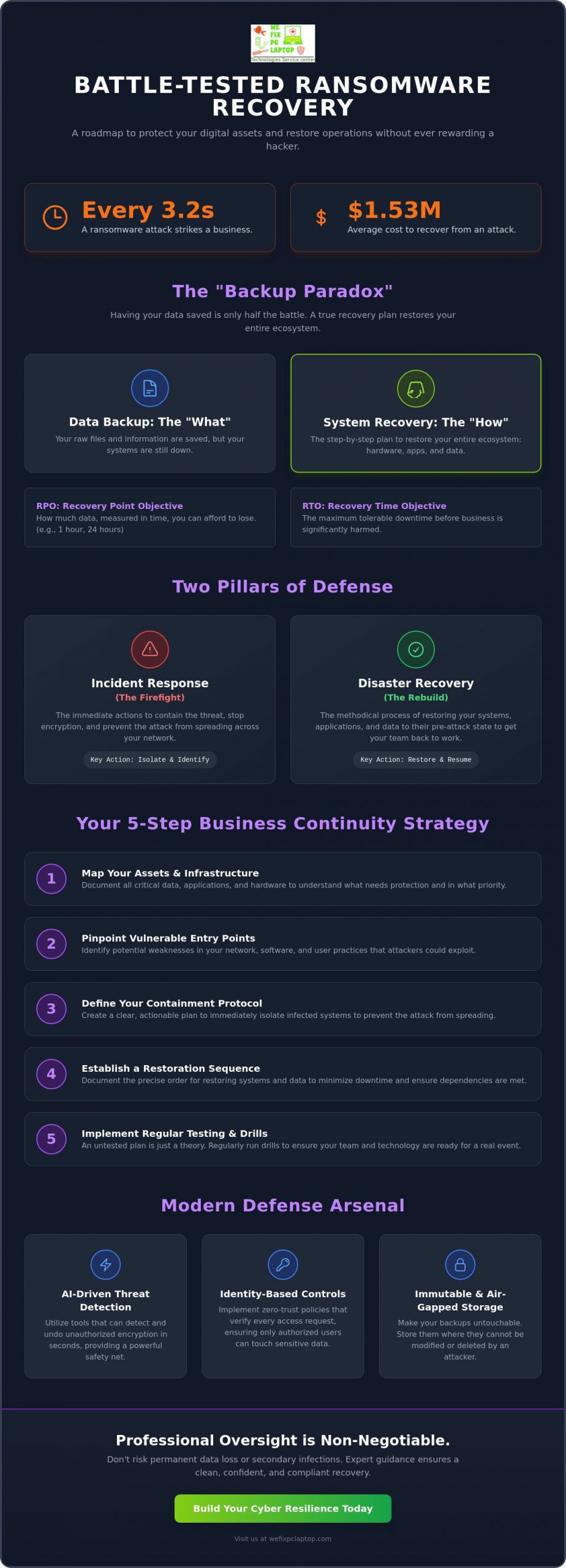
Did you know that a ransomware attack strikes every 3.2 seconds? It’s a terrifying thought for any business owner, especially when the average cost to recover, even without paying the ransom, has climbed to $1.53 million. You’ve likely spent nights worrying about total data loss or wondering if your current ransomware recovery plan is enough to keep you afloat. It’s completely normal to feel anxious about the gap between saving your data and actually getting your team back to work.
We’re here to help you turn that anxiety into action. In this guide, you’ll learn how to build a battle-tested roadmap that protects your digital assets and restores operations without ever rewarding a hacker. We’ll walk through the critical phases of restoration, explore tools that actually work, and look at the latest 2026 NIST guidelines to give you total confidence in your business continuity. From understanding the 72-hour CIRCIA reporting window to implementing identity-based controls, you’ll gain the clarity you need to stay in control and keep your business moving forward.
Key Takeaways
- Understand the “Backup Paradox” and why simply saving your data isn’t enough to get your business back on its feet quickly.
- Learn how to design a battle-tested ransomware recovery plan that covers both immediate threat containment and full system restoration.
- Identify the five critical steps for business continuity, including how to map your assets and pinpoint your most vulnerable entry points.
- Discover how modern AI-driven tools can undo unauthorized encryption in seconds, providing a powerful safety net for your operations.
- See why professional oversight and regular testing are non-negotiable for avoiding secondary infections and permanent data loss.
What is a Ransomware Recovery Plan (and Why Backups Aren’t Enough)?
A ransomware recovery plan is your business’s definitive survival guide. It’s a documented strategy that outlines exactly how to restore your data, applications, and hardware after a cyberattack has locked you out. While Ransomware has evolved from simple locker programs into sophisticated extortion schemes, your response must be equally advanced. Simply hoping for the best isn’t a strategy; you need a step by step manual that your team can follow even under extreme pressure.
Many business owners fall into what we call the Backup Paradox. They believe that because they have a daily backup running, they’re safe. However, having your data saved is only half the battle. If your files are tucked away in the cloud but your entire server infrastructure is encrypted, you still can’t process an invoice, see a patient, or manage a production line. A true ransomware recovery plan focuses on the restoration of the entire ecosystem, not just the raw files.
Paying a ransom is never the answer. Not only does it fund criminal enterprises, but it also paints a target on your back for future attacks. The real financial burden isn’t the ransom fee itself; it’s the crushing cost of downtime. Every hour your team sits idle costs you revenue, productivity, and customer trust. We focus on building cyber resilience. This is the ability to maintain core operations and keep your business moving forward even while an active threat is being neutralized by your Cyber Security Solution.
The Difference Between Data Backup and System Recovery
Think of your backups as the ingredients and your recovery plan as the recipe. Backups are the “what” (the raw files), while recovery is the “how” (the sequence of steps to get systems online). To understand this, we look at two metrics. Recovery Point Objective (RPO) determines how much data you can afford to lose in terms of time. Recovery Time Objective (RTO) is the maximum tolerable duration of downtime before significant damage occurs. Without a clear Disaster Recovery strategy, your RTO could stretch from hours into weeks.
Why Ransomware Actors Target Your Backups First
Modern attackers aren’t just looking for your live data; they’re hunting for your exit strategy. They know that if they destroy your safety net, you’re more likely to pay. Sophisticated malware now specifically seeks out shadow copies and network backups to delete them before the main encryption begins. This makes “air-gapped” or immutable storage a necessity. By using a high quality cloud backup solution that prevents data from being modified or deleted for a set period, you ensure your lifeline remains intact even if the rest of the network is compromised. Professional firms, such as law offices and healthcare providers, are frequently targeted because their data is highly sensitive and their downtime costs are exceptionally high.
Incident Response vs. Disaster Recovery: Knowing the Difference
While they are often used interchangeably, Incident Response (IR) and Disaster Recovery (DR) are two distinct pillars of your ransomware recovery plan. Incident Response is the immediate firefighting phase. It’s about containing the threat, stopping the encryption in its tracks, and ensuring the “fire” doesn’t spread to other parts of your network. On the other hand, Disaster Recovery is the rebuilding phase. This is when you begin the methodical process of restoring your systems to their pre-attack state so your team can get back to work.
For professional entities like a law office or a healthcare provider, the distinction is even more critical. You aren’t just fighting for your data; you’re fighting for compliance. Regulatory bodies require proof that you took every step to protect sensitive client or patient information. This is where digital forensics plays a vital role in the IR phase. You must verify that the environment is completely clean before you start the restoration process. If you restore data into a compromised network, the hackers will simply lock you out again. If you’re feeling overwhelmed by the technical requirements, our Cyber Security Solution can provide the expert oversight needed to navigate these high-stakes moments.
Incident Response: The First 24 Hours
Disaster Recovery: Restoring the Business
Once the threat is neutralized, the focus shifts to restoration. You can’t bring everything back at once. You must prioritize critical systems like billing software or active patient records over old archives. A major part of this phase is validation. You need to ensure that the data you’re pulling from your Cloud backup solution hasn’t been infected with a “sleeper” virus that could re-trigger the attack later. For many modern businesses, Disaster recovery via the cloud offers a much faster alternative to rebuilding physical servers from scratch, allowing for near-instant failover that keeps your doors open.
5 Critical Steps to Building Your Business Continuity Strategy
Building a ransomware recovery plan is more than a technical hurdle; it is about ensuring your business can survive a worst-case scenario. To move from a state of vulnerability to total confidence, you need a structured approach that leaves nothing to chance. These five steps provide the foundation for a resilient business continuity strategy that protects your livelihood and your reputation.
- Step 1: Asset Inventory. You cannot defend what you haven’t documented. Create a comprehensive list of every piece of hardware, every software application, and every data set your business owns.
- Step 2: Risk Assessment. Pinpoint the most likely entry points for attackers. Whether it is a phishing email or an unsecured Remote Desktop Protocol (RDP) port, knowing your weaknesses allows you to close them effectively. Citing the NIST Ransomware Risk Management framework provides a gold standard for identifying these vulnerabilities and aligning with modern security requirements.
- Step 3: Strategy Design. Choose the recovery model that fits your specific operations. You might opt for a hybrid model that uses both local servers and Cloud Storage to ensure you have multiple layers of redundancy.
- Step 4: Documentation. Write your plan in plain English. In a crisis, your lead technician might be unreachable, so a non-technical staff member should be able to follow the initial containment steps without confusion.
- Step 5: Testing. Treat your recovery like a fire drill. Regularly simulating an attack ensures your Disaster recovery protocols are effective and your team stays sharp.
Identifying Your ‘Crown Jewels’
Not all data is created equal. A healthcare provider needs patient charts immediately, whereas old marketing brochures can usually wait. Categorizing your information helps you focus your resources where they matter most. Think about the financial and legal impact of losing access to specific databases for 48 hours. The ‘Crown Jewels’ are the critical data without which your business ceases to function. By identifying these early, you can prioritize their restoration in your ransomware recovery plan and minimize the total cost of downtime.
Creating a ‘Clean Room’ for Recovery
One of the biggest mistakes businesses make is restoring data directly back onto their primary network. If the malware is still hiding in a corner of your system, it will immediately re-infect your “clean” files. Instead, we recommend using a “clean room.” This is a secondary, isolated environment where data is restored and scanned for threats before it ever touches your main infrastructure. As an IT consultant for manufacturing and dental offices, we often facilitate these isolated environments to ensure the restoration is 100% safe. This layer of protection is what separates a successful recovery from a recurring nightmare. For businesses that need to rapidly deploy replacement hardware during a recovery scenario, exploring computer rental for business as a scalable continuity solution can significantly reduce the time it takes to get your team back to work.
Modern Defense Tools: SentinelOne, Atakama, and Immutable Storage
A truly effective ransomware recovery plan doesn’t just wait for a disaster to happen; it utilizes modern tools to stop an attack before it can paralyze your business. While traditional antivirus relies on a library of known threats, today’s hackers are constantly creating new malware that can slip past old defenses. You need a proactive shield that recognizes suspicious behavior in real time. By integrating advanced technology into your business continuity strategy, you can transform your security from a simple lock on the door into a comprehensive, high tech surveillance system.
One of the most powerful allies in this fight is SentinelOne. This AI-driven endpoint detection and response (EDR) tool doesn’t just watch for viruses; it monitors every process on your network. If it detects unauthorized encryption starting, it can trigger a “Rollback” feature. This incredible technology can undo the encryption in seconds, returning your files to their original state as if the attack never happened. When combined with Atakama for multifactor encryption, your data becomes useless to hackers. Even if they manage to steal your files, they can’t open them without multiple fragmented keys, effectively neutralizing the threat of “double extortion” where criminals threaten to leak your private information.
Endpoint Protection: Stopping the Ransomware Execution
SentinelOne represents a massive leap forward because it uses behavioral AI instead of old fashioned virus signatures. This means it can identify a threat based on what the software is doing, not just what it is named. This level of sophistication is vital because many attacks happen when you’re least expecting them. Hackers love to strike on weekends or holidays when they think no one is watching. Our Managed IT and Cybersecurity Solutions provide the 24/7 monitoring necessary to catch these “sleeper” attacks. We act as your knowledgeable guide, ensuring that your endpoints are protected every second of the day, allowing you to focus on running your business with total peace of mind.
The Power of Immutable Cloud Backups
If an attacker manages to get past your firewall, your final line of defense is your backup. However, as we discussed earlier, hackers now target backups specifically. This is why “Immutability” is the most important word in modern data protection. Immutable data is a version of your files that cannot be changed, deleted, or encrypted for a set period, no matter who tries to access it. It serves as the ultimate “Get Out of Jail Free” card against ransomware. When choosing a Cloud backup solution, we look for providers that offer built-in immutability. This ensures that even if a hacker gains administrative access to your network, they cannot touch your survival lifeline. Secure your business with a custom Cyber Security Solution that includes these advanced protections today.
Implementation & Testing: Why Professional Oversight is Non-Negotiable
Many businesses treat their cybersecurity strategy like a smoke detector; they install it once and assume it will work when a fire breaks out. This “Set it and Forget it” mentality is a dangerous trap. A ransomware recovery plan is not a static document you tuck away in a drawer. It’s a living, breathing strategy that requires constant attention to stay ahead of the latest threats. Without active management, your defenses will quickly become outdated as hackers find new ways to bypass old protocols.
One of the most effective ways to ensure your team is ready is through regular Tabletop Exercises. Think of these as a rehearsal for a digital disaster. We gather your key staff members and walk through a simulated attack scenario. Who makes the first call? How do we isolate the infected hardware? These exercises reveal gaps in your communication and technical response before they can cause real world damage. It’s about building muscle memory so that if an attack happens, your team reacts with calm precision instead of panicked confusion.
The stakes are particularly high for specialized sectors. If you’re looking for an IT consultant for a law office, dentistry, or healthcare facility, you need someone who understands the specific regulatory requirements of your industry. A generic approach won’t work when you’re dealing with strict privacy laws and high stakes patient data. Professional oversight ensures that your recovery steps don’t just restore your files, but also maintain the legal and ethical standards your clients expect. Many businesses also benefit from partnering with a dedicated IT service provider who can deliver proactive support and help prevent disasters before they strike.
The Risks of DIY Ransomware Recovery
When an attack strikes, the psychological pressure is immense. In the heat of the moment, an amateur “cleanup” attempt can do more harm than good. We’ve seen well meaning staff accidentally delete critical decryption keys or wipe logs that were essential for digital forensics. DIY recovery often leads to secondary infections because the original entry point was never properly closed. If you don’t have the tools to verify the cleanliness of your environment, you’re likely just restoring your data into a trap. Relying on professional Disaster recovery services is a much safer bet for handling critical system crashes and complex restoration tasks. Before engaging any vendor, it’s worth understanding how to choose between data recovery companies to ensure your sensitive data is handled by qualified professionals.
Partnering for Resilience
You don’t have to face these threats alone. At We Fix PC Laptop, we position ourselves as your dependable local ally. We provide 24/7 Emergency On-Site Support to handle the physical containment of hardware and the technical heavy lifting of restoration. There’s a massive benefit to having a dedicated technician, like Ken, who knows your network personally and takes pride in protecting your digital well being. We don’t just see you as a ticket number; you’re a valued member of our community. Don’t wait for the encryption screen. Secure your business with a professional disaster recovery plan today.
Take Control of Your Digital Future Today
Building a resilient business isn’t about avoiding every single threat; it’s about being prepared to bounce back when the unexpected happens. You now have the blueprint to move from the fear of data loss to the confidence of total business continuity. By distinguishing between incident response and disaster recovery, identifying your most critical assets, and utilizing high security tools like SentinelOne and Atakama, you’ve already taken the first steps toward true cyber resilience.
Secure Your Business with a Professional Recovery Plan and gain the peace of mind that comes with knowing your data is in expert hands. You’ve worked hard to build your business; let’s work together to protect its future.
Frequently Asked Questions
Should we ever pay the ransom to get our data back?
You should never pay the ransom because it doesn’t guarantee you’ll get your data back and it marks your business as a profitable target for future attacks. In 2025, a record low of only 28% of victims chose to pay, as many realized that hackers often leave behind “sleeper” malware even after payment. Your resources are much better spent on a robust ransomware recovery plan that focuses on restoring from secure, uncorrupted backups.
How long does it typically take to recover from a ransomware attack?
Recovery time depends entirely on your level of preparation and the volume of data you need to restore. Without a tested plan, businesses often face weeks of downtime as they struggle to rebuild servers and verify data cleanliness. However, if you have a modern Disaster recovery strategy with cloud failover, you can often get your most critical systems back online within a few hours.
Can ransomware infect my cloud backups like OneDrive or Dropbox?
Yes, ransomware can infect standard cloud storage services like OneDrive or Dropbox through automatic synchronization. When the malware encrypts your local files, the cloud service views this as a standard file update and syncs the encrypted versions immediately. To stay safe, you need a dedicated Cloud backup solution that offers immutability, which prevents files from being changed or deleted for a set period.
What is the very first thing I should do if I see a ransom note on my screen?
You must immediately isolate the infected device by disconnecting it from your network. Unplug the ethernet cable or turn off the Wi-Fi right away to prevent the malware from spreading laterally to your servers or other workstations. Once the device is disconnected, leave it powered on for forensic analysis and call for 24/7 Emergency On-Site Support to begin professional containment.
How often should we test our ransomware recovery plan?
You should test your ransomware recovery plan at least once every quarter to ensure your team remains sharp and your restoration paths are functional. Regular “fire drills” help you identify gaps in your documentation or technical process before a real crisis occurs. It’s also vital to perform a full test after any major network upgrade or software change to confirm your backups are still compatible.
Is a standard antivirus enough to protect my business from ransomware in 2026?
Standard antivirus is no longer sufficient because it relies on a library of known threats that hackers can easily bypass. In 2026, you need a proactive Cyber Security Solution that uses behavioral AI to detect suspicious activity in real time. Tools like SentinelOne are essential because they monitor how programs act, allowing them to stop and even rollback unauthorized encryption before it can paralyze your business.
Does insurance cover the costs of ransomware recovery?
Most cyber insurance policies cover the costs of data restoration and forensic investigations, but coverage often depends on your compliance with specific security standards. Insurers frequently require proof that you have a documented recovery strategy and multi-factor authentication active across your network. You should review your policy with your provider to ensure your current protections meet their requirements for a full claim payout.
What is an ‘air-gapped’ backup and do I need one?
An air-gapped backup is a copy of your data that is completely disconnected from any network, creating a physical or logical “gap” that hackers cannot cross. You definitely need one as your final line of defense against total data loss. Whether it’s an offline physical drive or a specialized immutable cloud tier, an air-gap ensures that even if your entire network is compromised, your survival data remains untouched and ready for restoration. If you ever need to engage outside help, learning how to compare data recovery companies in Houston and beyond will help you select a trusted provider who can safely retrieve your most critical files.
- How to Recover Data from a Failed Hard Drive: Step-by-Step
- Best Cloud Backup for Businesses: 2026 Strategy Guide
- Houston Small Business Computer Repair: 2026 Guide
- SentinelOne Managed Security: 2026 Guide for Firms
- Business Computers & Info Services: 2026 Guide
- Cloud Disaster Recovery: 2026 Small Business Guide
- Professional Hard Drive Recovery Service: Secure Data Restoration for 2026